


 Web Front-end
JS Tutorial
MUi framework ajax request WebService interface instance_AJAX related
Web Front-end
JS Tutorial
MUi framework ajax request WebService interface instance_AJAX related
MUi framework ajax request WebService interface instance_AJAX related

Below I will share with you an example of the MUi framework ajax request WebService interface, which has a good reference value and I hope it will be helpful to everyone.
The example is as follows:
mui.init();
      mui.plusReady(function()
      {
        document.getElementById('login').addEventListener('tap',function()
        {
          var UserName=document.getElementById("account").value;
          var Userpassword= hex_md5(document .getElementById("password").value);
          mui.ajax('http://XXXXX/Login.asmx/MgLogin',
          {
              data:"{'loginname':'"+UserName+"','password':'"+Userpassword+"','identifies':'123456','code':''}",
              type:'POST',//HTTP请求类型
              dataType:'json',//服务器返回json格式数据
              timeout:10000,//超时时间设置为10秒;
              headers:{'Content-Type':'application/json'},
              success:function(data)
              {
                //服务器返回响应,根据响应结果,分析是否登录成功;
                var jsons=data.d;
                var str=JSON.parse(jsons);
                if(str["StatusCode"]=="200")
                {
                  mui.alert("登陆成功");
                }else
                {
                  mui.alert("登陆失败");
                }
              },
              error:function(xhr,type,errorThrown)
              {
                //异常处理;
                mui.alert(type);
                console.log(type);
              }
          });
        });
});Note: If there is a problem with the returned format It will prompt: abort
The above is what I compiled for everyone. I hope it will be helpful to everyone in the future.
Related articles:
Pull-up loading example written in native ajax (graphic tutorial)
ajax implementation of WeChat web page Authorized login method (graphic tutorial)
##Detailed explanation of using ajax to submit a form to the database (no refresh)
The above is the detailed content of MUi framework ajax request WebService interface instance_AJAX related. For more information, please follow other related articles on the PHP Chinese website!

Hot AI Tools

Undresser.AI Undress
AI-powered app for creating realistic nude photos

AI Clothes Remover
Online AI tool for removing clothes from photos.

Undress AI Tool
Undress images for free

Clothoff.io
AI clothes remover

AI Hentai Generator
Generate AI Hentai for free.

Hot Article
Hot Tools

Notepad++7.3.1
Easy-to-use and free code editor

SublimeText3 Chinese version
Chinese version, very easy to use

Zend Studio 13.0.1
Powerful PHP integrated development environment

Dreamweaver CS6
Visual web development tools

SublimeText3 Mac version
God-level code editing software (SublimeText3)
Hot Topics
 1378
1378
 52
52

 How to solve the 403 error encountered by jQuery AJAX request
Feb 20, 2024 am 10:07 AM
How to solve the 403 error encountered by jQuery AJAX request
Feb 20, 2024 am 10:07 AM
Title: Methods and code examples to resolve 403 errors in jQuery AJAX requests. The 403 error refers to a request that the server prohibits access to a resource. This error usually occurs because the request lacks permissions or is rejected by the server. When making jQueryAJAX requests, you sometimes encounter this situation. This article will introduce how to solve this problem and provide code examples. Solution: Check permissions: First ensure that the requested URL address is correct and verify that you have sufficient permissions to access the resource.
 How to solve jQuery AJAX request 403 error
Feb 19, 2024 pm 05:55 PM
How to solve jQuery AJAX request 403 error
Feb 19, 2024 pm 05:55 PM
jQuery is a popular JavaScript library used to simplify client-side development. AJAX is a technology that sends asynchronous requests and interacts with the server without reloading the entire web page. However, when using jQuery to make AJAX requests, you sometimes encounter 403 errors. 403 errors are usually server-denied access errors, possibly due to security policy or permission issues. In this article, we will discuss how to resolve jQueryAJAX request encountering 403 error
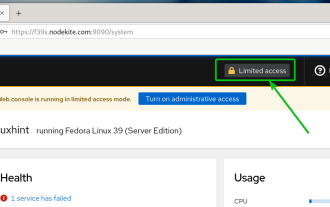 How to enable administrative access from the cockpit web UI
Mar 20, 2024 pm 06:56 PM
How to enable administrative access from the cockpit web UI
Mar 20, 2024 pm 06:56 PM
Cockpit is a web-based graphical interface for Linux servers. It is mainly intended to make managing Linux servers easier for new/expert users. In this article, we will discuss Cockpit access modes and how to switch administrative access to Cockpit from CockpitWebUI. Content Topics: Cockpit Entry Modes Finding the Current Cockpit Access Mode Enable Administrative Access for Cockpit from CockpitWebUI Disabling Administrative Access for Cockpit from CockpitWebUI Conclusion Cockpit Entry Modes The cockpit has two access modes: Restricted Access: This is the default for the cockpit access mode. In this access mode you cannot access the web user from the cockpit
 How to solve the problem of jQuery AJAX error 403?
Feb 23, 2024 pm 04:27 PM
How to solve the problem of jQuery AJAX error 403?
Feb 23, 2024 pm 04:27 PM
How to solve the problem of jQueryAJAX error 403? When developing web applications, jQuery is often used to send asynchronous requests. However, sometimes you may encounter error code 403 when using jQueryAJAX, indicating that access is forbidden by the server. This is usually caused by server-side security settings, but there are ways to work around it. This article will introduce how to solve the problem of jQueryAJAX error 403 and provide specific code examples. 1. to make
 How to get variables from PHP method using Ajax?
Mar 09, 2024 pm 05:36 PM
How to get variables from PHP method using Ajax?
Mar 09, 2024 pm 05:36 PM
Using Ajax to obtain variables from PHP methods is a common scenario in web development. Through Ajax, the page can be dynamically obtained without refreshing the data. In this article, we will introduce how to use Ajax to get variables from PHP methods, and provide specific code examples. First, we need to write a PHP file to handle the Ajax request and return the required variables. Here is sample code for a simple PHP file getData.php:
 PHP and Ajax: Building an autocomplete suggestion engine
Jun 02, 2024 pm 08:39 PM
PHP and Ajax: Building an autocomplete suggestion engine
Jun 02, 2024 pm 08:39 PM
Build an autocomplete suggestion engine using PHP and Ajax: Server-side script: handles Ajax requests and returns suggestions (autocomplete.php). Client script: Send Ajax request and display suggestions (autocomplete.js). Practical case: Include script in HTML page and specify search-input element identifier.
 Is PHP front-end or back-end in web development?
Mar 24, 2024 pm 02:18 PM
Is PHP front-end or back-end in web development?
Mar 24, 2024 pm 02:18 PM
PHP belongs to the backend in web development. PHP is a server-side scripting language, mainly used to process server-side logic and generate dynamic web content. Compared with front-end technology, PHP is more used for back-end operations such as interacting with databases, processing user requests, and generating page content. Next, specific code examples will be used to illustrate the application of PHP in back-end development. First, let's look at a simple PHP code example for connecting to a database and querying data:
 PHP vs. Ajax: Solutions for creating dynamically loaded content
Jun 06, 2024 pm 01:12 PM
PHP vs. Ajax: Solutions for creating dynamically loaded content
Jun 06, 2024 pm 01:12 PM
Ajax (Asynchronous JavaScript and XML) allows adding dynamic content without reloading the page. Using PHP and Ajax, you can dynamically load a product list: HTML creates a page with a container element, and the Ajax request adds the data to that element after loading it. JavaScript uses Ajax to send a request to the server through XMLHttpRequest to obtain product data in JSON format from the server. PHP uses MySQL to query product data from the database and encode it into JSON format. JavaScript parses the JSON data and displays it in the page container. Clicking the button triggers an Ajax request to load the product list.
