


 Web Front-end
CSS Tutorial
Detailed explanation of whether css loading will cause blocking_CSS tutorial_CSS_Web page production
Web Front-end
CSS Tutorial
Detailed explanation of whether css loading will cause blocking_CSS tutorial_CSS_Web page production
Detailed explanation of whether css loading will cause blocking_CSS tutorial_CSS_Web page production

This time I will give you a detailed explanation of whether css loading will cause blocking. What are the precautions ? The following is a practical case, let's take a look.
The exam is finally over. Today, I suddenly remembered that when I was looking for an internship a while ago, the interviewer from Toutiao asked me that js execution will block the parsing and rendering of the DOM tree, so css loading will block the DOM tree. Parse and render? So, next I will do a test on the parsing and rendering of the DOM tree by css loading.
In order to complete this test, let’s do some popular science first, how to use chrome to set the download speed
1. Open the chrome console (press F12), you can see the picture below, the focus is on The place where I drew the red circle

2. Click on the place where I drew the red circle (No throttling), you will see the picture below, we choose the GPRS option
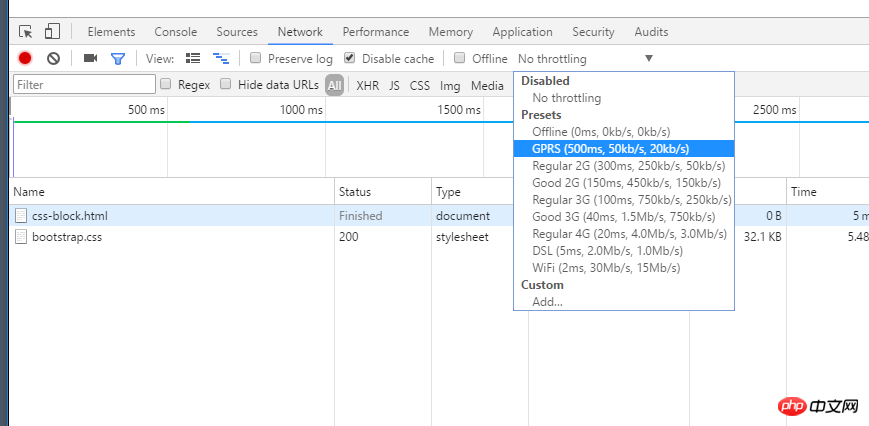
3. In this way, the upper limit of the download speed of our resources will be limited to 20kb/s. Okay, let’s get to our main topic
Will css loading block the parsing and rendering of the DOM tree?
Speak in code:
<!DOCTYPE html>
<html lang="en">
<head>
<title>css阻塞</title>
<meta charset="UTF-8">
<meta name="viewport" content="width=device-width, initial-scale=1">
<style>
h1 {
color: red !important
}
</style>
<script>
function h () {
console.log(document.querySelectorAll('h1'))
}
setTimeout(h, 0)
</script>
<link href="https://cdn.bootcss.com/bootstrap/4.0.0-alpha.6/css/bootstrap.css" rel="stylesheet">
</head>
<body>
<h1>这是红色的</h1>
</body>
</html>
Hypothesis: css loading will block DOM tree parsing and rendering
Assumption result: Before bootstrap.css is loaded, the following content will not be parsed and rendered, so what we see at the beginning should be a white screen, and h1 will not be displayed. And the result of console.log should be an empty array at this time.
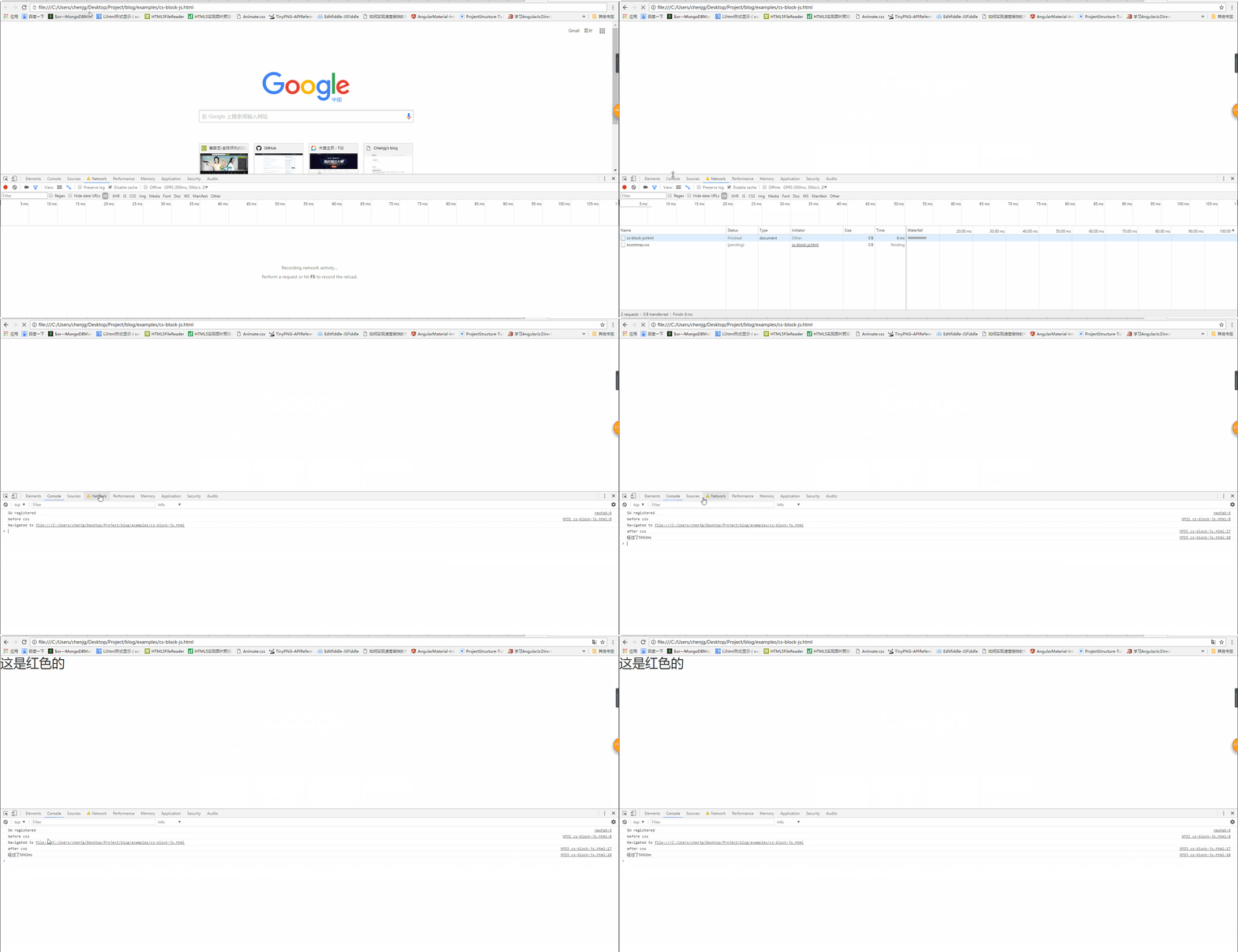
Actual result: As shown below

Will css block DOM tree parsing?
We can see from the above picture that when the css has not been loaded, h1 is not displayed, but at this time the console output is as follows

It can be known that the DOM tree has at least been parsed to h1 at this time, but the css has not been loaded yet, which means that the css will not block the parsing of the DOM tree.
Will css loading block DOM tree rendering?
From the above picture, we can also see that when the css has not been loaded, the page displays a white screen. It is not until the css is loaded that the red font is displayed, that is Said that although the following content was parsed, it was not rendered. Therefore, css loading will block DOM tree rendering.
Personal evaluation of this mechanism
In fact, I think this may also be an optimization mechanism of the browser. Because when you load css, you may modify the style of the DOM node below. If the css loading does not block the DOM tree rendering, then after the css is loaded, the DOM tree may have to be redrawn or reflowed. , which caused some unnecessary losses. So I simply parse the structure of the DOM tree first, complete the work that can be done, and then wait for your css to be loaded, then render the DOM tree according to the final style. This approach will indeed be better in terms of performance. .
Will css loading block js running?
From the above inference, we can conclude that css loading will not block DOM tree parsing, but it will block DOM tree rendering. So, will css loading block js execution?
Similarly, verify through code.
<!DOCTYPE html>
<html lang="en">
<head>
<title>css阻塞</title>
<meta charset="UTF-8">
<meta name="viewport" content="width=device-width, initial-scale=1">
<script>
console.log('before css')
var startDate = new Date()
</script>
<link href="https://cdn.bootcss.com/bootstrap/4.0.0-alpha.6/css/bootstrap.css" rel="stylesheet">
</head>
<body>
<h1>这是红色的</h1>
<script>
var endDate = new Date()
console.log('after css')
console.log('经过了' + (endDate -startDate) + 'ms')
</script>
</body>
</html>
Assumption: css Loading will block the subsequent js execution
Expected result: The js code behind the link should not be run until the css loading is completed
Actual result:
We can see from the above picture that the js code located before the css loading statement is executed first, but the code located after the css loading statement is not executed until the css loading is completed. This also shows that css loading will block the execution of subsequent js statements. See the picture below for detailed results (css loading took 5600+ms):

##Conclusion
From the above, we can The following conclusions are drawn: 1.css loading will not block the parsing of the DOM tree2.css loading will block the rendering of the DOM tree
3.css loading will block the execution of subsequent js statements
Therefore, in order to avoid letting users see a long white screen time, we should improve the css loading speed as much as possible. For example, you can use the following methods:
1. Use CDN (because CDN will According to your network conditions, select the nearest node with cached content to provide you with resources, thus reducing loading time)
2. Compress the css (you can use many packaging tools, such as webpack, gulp, etc., You can also turn on gzip compression)
3. Use cache reasonably (setting cache-control, expires, and E-tag are all good, but you should pay attention to one problem, that is, after the file is updated, you must avoid caching and bringing One of the solutions is to add a version number after the file name)
4. Reduce the number of http requests, merge multiple css files, or simply write it in an inline style (a shortcoming of the inline style) It just can’t be cached)
I believe you have mastered the method after reading the case in this article. For more exciting information, please pay attention to other related articles on the php Chinese website!
Recommended reading:
How to make a 0.5 pixel line in css
css3 Transition smooth transition menu bar implementation
The above is the detailed content of Detailed explanation of whether css loading will cause blocking_CSS tutorial_CSS_Web page production. For more information, please follow other related articles on the PHP Chinese website!

Hot AI Tools

Undress AI Tool
Undress images for free

Undresser.AI Undress
AI-powered app for creating realistic nude photos

AI Clothes Remover
Online AI tool for removing clothes from photos.

Clothoff.io
AI clothes remover

Video Face Swap
Swap faces in any video effortlessly with our completely free AI face swap tool!

Hot Article
Hot Tools

Notepad++7.3.1
Easy-to-use and free code editor

SublimeText3 Chinese version
Chinese version, very easy to use

Zend Studio 13.0.1
Powerful PHP integrated development environment

Dreamweaver CS6
Visual web development tools

SublimeText3 Mac version
God-level code editing software (SublimeText3)


 How to use CSS gradients for backgrounds
Aug 17, 2025 am 08:39 AM
How to use CSS gradients for backgrounds
Aug 17, 2025 am 08:39 AM
CSSgradientsprovidesmoothcolortransitionswithoutimages.1.Lineargradientstransitioncolorsalongastraightlineusingdirectionsliketobottomorangleslike45deg,andsupportmultiplecolorstopsforcomplexeffects.2.Radialgradientsradiatefromacentralpointusingcircleo
 How to create a glassmorphism effect with CSS
Aug 22, 2025 am 07:54 AM
How to create a glassmorphism effect with CSS
Aug 22, 2025 am 07:54 AM
To create a glass mimicry effect of CSS, you need to use backdrop-filter to achieve background blur, set a translucent background such as rgba(255,255,255,0.1), add subtle borders and shadows to enhance the sense of hierarchy, and ensure that there is enough visual content behind the elements; 1. Use backdrop-filter:blur(10px) to blur the background content; 2. Use rgba or hsla to define the transparent background to control the degree of transparency; 3. Add 1pxsolidrgba(255,255,255,0.3) borders and box-shadow to enhance the three-dimensionality; 4. Ensure that the container has rich backgrounds such as pictures or textures to present a blurred penetration effect; 5. It is compatible with old browsers
 How to create a dotted border in CSS
Aug 15, 2025 am 04:56 AM
How to create a dotted border in CSS
Aug 15, 2025 am 04:56 AM
Use CSS to create dotted borders, just set the border attribute to dotted. For example, "border:3pxdotted#000" can add a 3-pixel-wide black dot border to the element. By adjusting the border-width, the size of the point can be changed. The wider borders produce larger points. You can set dotted borders for a certain side, such as "border-top:2pxdottedred". Dotted borders are suitable for block-level elements such as div and input. They are often used in focus states or editable areas to improve accessibility. Pay attention to color contrast. At the same time, different from dashed's short-line style, dotted presents a circular dot shape. This feature is widely used in all mainstream browsers.
 How to change the list style in CSS
Aug 17, 2025 am 10:04 AM
How to change the list style in CSS
Aug 17, 2025 am 10:04 AM
To change the CSS list style, first use list-style-type to change the bullet or numbering style. 1. Use list-style-type to set the bullet of ul to disc, circle or square, and the number of ol is decimal, lower-alpha, upper-alpha, lower-roman or upper-roman. 2. Remove the tag completely with list-style:none. 3. Use list-style-image:url('bullet.png') to replace it with a custom image. 4. Use list-style-position:in
 How to change the cursor in CSS
Aug 16, 2025 am 05:00 AM
How to change the cursor in CSS
Aug 16, 2025 am 05:00 AM
Usebuilt-incursortypeslikepointer,help,ornot-allowedtoprovideimmediatevisualfeedbackfordifferentinteractiveelements.2.ApplycustomcursorimageswiththecursorpropertyusingaURL,optionallyspecifyingahotspotandalwaysincludingafallbacklikeautoorpointer.3.Fol
 How to implement a dark mode theme with CSS
Aug 22, 2025 am 09:55 AM
How to implement a dark mode theme with CSS
Aug 22, 2025 am 09:55 AM
There are two main ways to implement dark mode: one is to use prefers-color-scheme media to query automatically to adapt system preferences, and the other is to add manual switching function through JavaScript. 1. Use prefers-color-scheme to automatically apply dark themes according to the user system. There is no need for JavaScript, just define the styles in the media query; 2. To achieve manual switching, you need to define light-theme and dark-themeCSS classes, add toggle buttons, and use JavaScript to manage the theme status and localStorage to save user preferences; 3. You can combine both to read localSt first when the page is loaded.
 How to use grid-template-areas in CSS
Aug 22, 2025 am 07:56 AM
How to use grid-template-areas in CSS
Aug 22, 2025 am 07:56 AM
Thegrid-template-areaspropertyallowsdeveloperstocreateintuitive,readablelayoutsbydefiningnamedgridareas;eachstringrepresentsarowandeachwordacolumncell,withgrid-areanamesonchildelementsmatchingthoseinthetemplate,suchas"headerheaderheader"for
 How to add a box shadow in CSS
Aug 18, 2025 am 11:39 AM
How to add a box shadow in CSS
Aug 18, 2025 am 11:39 AM
To add box shadows, use box-shadow attribute; 1. The basic syntax is box-shadow: horizontal offset vertical offset blur radius expansion radius shadows in color; 2. The first three values are required, the rest are optional; 3. Use rgba() or hsla() to achieve transparent effect; 4. The positive expansion radius expands shadows and the negative value is reduced; 5. Multiple shadows can be added by commas separation; 6. Overuse should be avoided to ensure that visibility is tested on different backgrounds; this attribute is well supported by the browser, and reasonable use can improve the design texture.
