


Detailed explanation of touch event examples in web development

This article mainly shares with you a detailed explanation of touch event examples in mobile web development. It has a good reference value and I hope it will be helpful to everyone. Let’s follow the editor to take a look, I hope it can help everyone.
Previous words
In order to convey some special information to developers, Safari for iOS has added some new exclusive events. Because iOS devices have neither a mouse nor a keyboard, regular mouse and keyboard events are simply not enough when developing interactive web pages for mobile Safari. With the addition of WebKit in Android, many of these proprietary events became de facto standards, leading the W3C to begin developing the Touch Events specification. This article will introduce the mobile touch event in detail
Overview
When the iPhone 3G containing iOS 2.0 software was released, it also included a new version of the Safari browser. This new mobile Safari provides some new events related to touch operations. Later, browsers on Android also implemented the same event. Touch events are triggered when the user places their finger on the screen, slides it across the screen, or moves it away from the screen. Specifically, there are the following touch events
touchstart:当手指触摸屏幕时触发;即使已经有一个手指放在了屏幕上也会触发
touchmove:当手指在屏幕上滑动时连续地触发。在这个事件发生期间,调用preventDefault()可以阻止滚动
touchend:当手指从屏幕上移开时触发
touchcancel:当系统停止跟踪触摸时触发(不常用)。关于此事件的确切触发时间,文档中没有明确说明
[touchenter and touchleave]
The touch event specification once included touchenter and touchleave events. This event is triggered when the user moves the finger into or out of an element. But these two events were never realized. Microsoft has alternative events for these two events, but only IE supports them. In some cases, it is very useful to know whether the user's finger slides in and out of an element, so we hope that these two events can return to the specification
In touch events, the commonly used ones are touchstart, touchumove and The three events of touchend correspond to the mouse events as follows
鼠标   触摸
mousedown touchstart
mousemove touchmove
mouseup  touchend
[Note] The touch event is added using the DOM0 level event handler in some versions of the chrome simulator. Event Invalid
<!DOCTYPE html>
<html lang="en">
<head>
<meta charset="UTF-8">
<meta name="viewport" content="width=device-width, initial-scale=1.0">
<meta http-equiv="X-UA-Compatible" content="ie=edge">
<title>Document</title>
<style>
#test{height:200px;width:200px;background:lightblue;}
</style>
</head>
<body>
<p id="test"></p>
<script>
(function(){
var
stateMap = {
touchstart_index : 0,
touchmove_index : 0,
touchend_index : 0
},
elesMap = {
touch_obj: document.getElementById('test')
},
showIndex, handleTouch;
showIndex = function ( type ) {
elesMap.touch_obj.innerHTML = type + ':' + (++stateMap[type + '_index']);
};
handleTouch = function ( event ) {
showIndex( event.type );
};
elesMap.touch_obj.addEventListener('touchstart', function(event){handleTouch(event);});
elesMap.touch_obj.addEventListener('touchmove', function(event){handleTouch(event);});
elesMap.touch_obj.addEventListener('touchend', function(event){handleTouch(event);});
})();
</script>
</body>
</html>300ms
300ms problem is when an element performs its function and There is a 300 millisecond interval between executing touch events. Compared with touch events, mouse events, focus events, browser default behaviors, etc. all have a delay of 300ms
[Click through]
Because of the existence of 300ms, it will cause common click through question. Let’s look at the example first
<!DOCTYPE html>
<html lang="en">
<head>
<meta charset="UTF-8">
<meta name="viewport" content="width=device-width, initial-scale=1.0, maximum-scale=1.0, user-scalable=no">
<meta http-equiv="X-UA-Compatible" content="ie=edge">
<title>Document</title>
<style>
#test {position: absolute;top: 0;left: 0;opacity: 0.5;height: 200px;width: 200px;background: lightblue;}
</style>
</head>
<body>
<a href="https://baidu.com">百度</a>
<p id="test"></p>
<script>
(function () {
var
elesMap = {
touchObj: document.getElementById('test')
},
fnHide, onTouch;
fnHide = function (type) {
elesMap.touchObj.style.display = 'none';
};
onTouch = function (event) {
fnHide();
};
elesMap.touchObj.addEventListener('touchstart', function(event){onTouch(event);});
})();
</script>
</body>
</html>After the light blue translucent p is clicked (triggering the touch event), if the click position is just above the link, the link jump will be triggered. The default behavior of transfer. The detailed explanation is that after clicking on the page, the browser will record the coordinates of the clicked page, and 300ms later, the element will be found at these coordinates. Trigger click behavior on this element. Therefore, if the upper element of the same page coordinate disappears within 300ms, a click behavior will be triggered on the lower element 300ms later. This causes a point-through problem
This problem is caused because the behavior of touching the screen is overloaded. At the moment when the finger touches the screen, the browser cannot predict whether the user is tapping, double-tap, sliding, holding or any other operation. The only safe thing to do is to wait a while and see what happens next
The problem is Double-Tap. Even if the browser detects that the finger has been lifted off the screen, it still has no way of knowing what to do next. Because the browser has no way of knowing whether the finger will return to the screen again, or whether it will end triggering the tap event and event cascade. To determine this, the browser has to wait for a short period of time. Browser developers found an optimal time interval, which is 300 milliseconds
[Solution]
1. Add a 300ms delay in the event handler of the touch event
(function () {
   var
    elesMap = {
     touchObj: document.getElementById('test')
    },
    fnHide, onTouch;
   fnHide = function (type) {
    elesMap.touchObj.style.display = 'none';
   };
   onTouch = function (event) {
    setTimeout(function(){
     fnHide();
    },300);
   };
   elesMap.touchObj.addEventListener('touchstart', function (event) { onTouch(event); });
})();2. Use easing animation and add a 300ms transition effect. Note that the display attribute cannot use transition
3. Add the dom element in the middle layer to let the middle layer accept this transition. Transparent events and hide them later
4. Tap events are used at both the upper and lower levels, but the default behavior is inevitable
5. The touchstart event on the document prevents the default behavior.
document.addEventListener('touchstart',function(e){
  e.preventDefault();
})Next, add the jump behavior of the a tag
##
a.addEventListener('touchstart',function(){
 window.location.href = 'https://cnblogs.com';
})el.addEventListener('touchstart',function(e){
e.stopPropagation();
})Event object
[Basic information]The event object of each touch event provides common attributes in mouse events, including event type, event target object, event bubbling, and event flow. , default behavior, etc.Take touchstart as an example, the sample code is as follows<script>
(function () {
var
elesMap = {
touchObj: document.getElementById('test')
},
onTouch;
onTouch = function (e) {
console.log(e)
};
elesMap.touchObj.addEventListener('touchstart', function (event) { onTouch(event); });
})();
</script>//当前目标 currentTarget:[object HTMLpElement] //实际目标 target:[object HTMLpElement] //实际目标 srcElement:[object HTMLpElement]
4、eventPhase属性返回一个整数值,表示事件目前所处的事件流阶段。0表示事件没有发生,1表示捕获阶段,2表示目标阶段,3表示冒泡阶段
5、bubbles属性返回一个布尔值,表示当前事件是否会冒泡。该属性为只读属性
6、cancelable属性返回一个布尔值,表示事件是否可以取消。该属性为只读属性
//事件流
eventPhase: 2
//可冒泡
bubbles: true
//默认事件可取消
cancelable: true
【touchList】
除了常见的DOM属性外,触摸事件对象有一个touchList数组属性,其中包含了每个触摸点的信息。如果用户使用四个手指触摸屏幕,这个数组就会有四个元素。一共有三个这样的数组
1、touches:当前触摸屏幕的触摸点数组(至少有一个触摸在事件目标元素上)
2、changedTouches :导致触摸事件被触发的触摸点数组
3、targetTouches:事件目标元素上的触摸点数组
如果用户最后一个手指离开屏幕触发touchend事件,这最后一个触摸点信息不会出现在targetTouches和touches数组中,但是会出现在changedTouched数组中。因为是它的离开触发了touchend事件,所以changedTouches数组中仍然包含它。上面三个数组中,最常用的是changedTouches数组
(function () {
var
elesMap = {
touchObj: document.getElementById('test')
},
onTouch;
onTouch = function (e) {
elesMap.touchObj.innerHTML = 'touches:' + e.touches.length
+ '<br>changedTouches:' + e.changedTouches.length
+ '<br>targetTouches:' + e.targetTouches.length;
};
elesMap.touchObj.addEventListener('touchstart', function (event) { onTouch(event); });
})();【事件坐标】
上面这些触摸点数组中的元素可以像普通数组那样用数字索引。数组中的元素包含了触摸点的有用信息,尤其是坐标信息。每个Touch对象包含下列属性
clientx:触摸目标在视口中的x坐标
clientY:触摸目标在视口中的y坐标
identifier:标识触摸的唯一ID
pageX:触摸目标在页面中的x坐标(包含滚动)
pageY:触摸目标在页面中的y坐标(包含滚动)
screenX:触摸目标在屏幕中的x坐标
screenY:触摸目标在屏幕中的y坐标
target:触摸的DOM节点目标
changedTouches数组中的第一个元素就是导致事件触发的那个触摸点对象(通常这个触摸点数组不包含其他对象)。这个触摸点对象含有clientX/Y和pageX/Y坐标信息。除此之外还有screenX/Y和x/y,这些坐标在浏览器间不太一致,不建议使用
clientX/Y和pageX/Y的区别在于前者相对于视觉视口的左上角,后者相对于布局视口的左上角。布局视口是可以滚动的
(function () {
var
elesMap = {
touchObj: document.getElementById('test')
},
onTouch;
onTouch = function (e) {
var touch = e.changedTouches[0];
elesMap.touchObj.innerHTML = 'clientX:' + touch.clientX + '<br>clientY:' + touch.clientY
+ '<br>pageX:' + touch.pageX + '<br>pageY:' + touch.pageY
+ '<br>screenX:' + touch.screenX + '<br>screenY:' + touch.screenY
};
elesMap.touchObj.addEventListener('touchstart', function (event) { onTouch(event); });
})();相关推荐:
javascript移动设备Web开发中对touch事件的封装实例_javascript技巧
The above is the detailed content of Detailed explanation of touch event examples in web development. For more information, please follow other related articles on the PHP Chinese website!

Hot AI Tools

Undresser.AI Undress
AI-powered app for creating realistic nude photos

AI Clothes Remover
Online AI tool for removing clothes from photos.

Undress AI Tool
Undress images for free

Clothoff.io
AI clothes remover

AI Hentai Generator
Generate AI Hentai for free.

Hot Article
Hot Tools

Notepad++7.3.1
Easy-to-use and free code editor

SublimeText3 Chinese version
Chinese version, very easy to use

Zend Studio 13.0.1
Powerful PHP integrated development environment

Dreamweaver CS6
Visual web development tools

SublimeText3 Mac version
God-level code editing software (SublimeText3)
Hot Topics
 1381
1381
 52
52

 Detailed explanation of obtaining administrator rights in Win11
Mar 08, 2024 pm 03:06 PM
Detailed explanation of obtaining administrator rights in Win11
Mar 08, 2024 pm 03:06 PM
Windows operating system is one of the most popular operating systems in the world, and its new version Win11 has attracted much attention. In the Win11 system, obtaining administrator rights is an important operation. Administrator rights allow users to perform more operations and settings on the system. This article will introduce in detail how to obtain administrator permissions in Win11 system and how to effectively manage permissions. In the Win11 system, administrator rights are divided into two types: local administrator and domain administrator. A local administrator has full administrative rights to the local computer
 Detailed explanation of division operation in Oracle SQL
Mar 10, 2024 am 09:51 AM
Detailed explanation of division operation in Oracle SQL
Mar 10, 2024 am 09:51 AM
Detailed explanation of division operation in OracleSQL In OracleSQL, division operation is a common and important mathematical operation, used to calculate the result of dividing two numbers. Division is often used in database queries, so understanding the division operation and its usage in OracleSQL is one of the essential skills for database developers. This article will discuss the relevant knowledge of division operations in OracleSQL in detail and provide specific code examples for readers' reference. 1. Division operation in OracleSQL
 Detailed explanation of the role and usage of PHP modulo operator
Mar 19, 2024 pm 04:33 PM
Detailed explanation of the role and usage of PHP modulo operator
Mar 19, 2024 pm 04:33 PM
The modulo operator (%) in PHP is used to obtain the remainder of the division of two numbers. In this article, we will discuss the role and usage of the modulo operator in detail, and provide specific code examples to help readers better understand. 1. The role of the modulo operator In mathematics, when we divide an integer by another integer, we get a quotient and a remainder. For example, when we divide 10 by 3, the quotient is 3 and the remainder is 1. The modulo operator is used to obtain this remainder. 2. Usage of the modulo operator In PHP, use the % symbol to represent the modulus
 Detailed explanation of the linux system call system() function
Feb 22, 2024 pm 08:21 PM
Detailed explanation of the linux system call system() function
Feb 22, 2024 pm 08:21 PM
Detailed explanation of Linux system call system() function System call is a very important part of the Linux operating system. It provides a way to interact with the system kernel. Among them, the system() function is one of the commonly used system call functions. This article will introduce the use of the system() function in detail and provide corresponding code examples. Basic Concepts of System Calls System calls are a way for user programs to interact with the operating system kernel. User programs request the operating system by calling system call functions
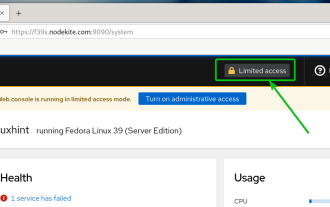 How to enable administrative access from the cockpit web UI
Mar 20, 2024 pm 06:56 PM
How to enable administrative access from the cockpit web UI
Mar 20, 2024 pm 06:56 PM
Cockpit is a web-based graphical interface for Linux servers. It is mainly intended to make managing Linux servers easier for new/expert users. In this article, we will discuss Cockpit access modes and how to switch administrative access to Cockpit from CockpitWebUI. Content Topics: Cockpit Entry Modes Finding the Current Cockpit Access Mode Enable Administrative Access for Cockpit from CockpitWebUI Disabling Administrative Access for Cockpit from CockpitWebUI Conclusion Cockpit Entry Modes The cockpit has two access modes: Restricted Access: This is the default for the cockpit access mode. In this access mode you cannot access the web user from the cockpit
 Detailed explanation of Linux curl command
Feb 21, 2024 pm 10:33 PM
Detailed explanation of Linux curl command
Feb 21, 2024 pm 10:33 PM
Detailed explanation of Linux's curl command Summary: curl is a powerful command line tool used for data communication with the server. This article will introduce the basic usage of the curl command and provide actual code examples to help readers better understand and apply the command. 1. What is curl? curl is a command line tool used to send and receive various network requests. It supports multiple protocols, such as HTTP, FTP, TELNET, etc., and provides rich functions, such as file upload, file download, data transmission, proxy
 Detailed analysis of C language learning route
Feb 18, 2024 am 10:38 AM
Detailed analysis of C language learning route
Feb 18, 2024 am 10:38 AM
As a programming language widely used in the field of software development, C language is the first choice for many beginner programmers. Learning C language can not only help us establish the basic knowledge of programming, but also improve our problem-solving and thinking abilities. This article will introduce in detail a C language learning roadmap to help beginners better plan their learning process. 1. Learn basic grammar Before starting to learn C language, we first need to understand the basic grammar rules of C language. This includes variables and data types, operators, control statements (such as if statements,
 Learn more about Promise.resolve()
Feb 18, 2024 pm 07:13 PM
Learn more about Promise.resolve()
Feb 18, 2024 pm 07:13 PM
Detailed explanation of Promise.resolve() requires specific code examples. Promise is a mechanism in JavaScript for handling asynchronous operations. In actual development, it is often necessary to handle some asynchronous tasks that need to be executed in sequence, and the Promise.resolve() method is used to return a Promise object that has been fulfilled. Promise.resolve() is a static method of the Promise class, which accepts a
