


1.The main basic tags in HTML are as follows:
Comment tag;
Paragraph tag
Title tag
, the parameters of this tag are from h1~h6;Line break tag
or
;
(font) bold label;
(font) italic label;
subscript;
Superscript;
Preformat tag
Address tag
;Delete tag;
Insert tag
Lower horizontal line label
2. The syntax of the connection label: Name
For example, to connect to Baidu homepage:
[html] view plain copy
Connect the picture as a button to the specified path, where alt is the name displayed by moving the mouse, and src is the path of the picture:
[html] view plain copy

Open the connection in a new browser:
[html] view plain copy
Jump to the specified paragraph of the current page:
[ html] view plain copy
;a name="a1">Paragraph a1
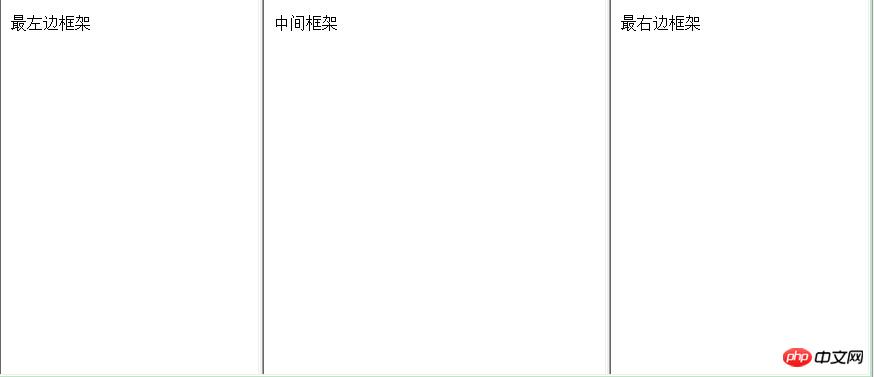
3. Frame structure in HTMLExample 1. Vertical frame structure, the page Divided vertically into three parts. The directory structure is as shown below:
##f1.html code
<!DOCTYPE html PUBLIC "-//W3C//DTD HTML 4.01 Transitional//EN" "http://www.w3.org/TR/html4/loose.dtd">
<html>
<head>
<meta http-equiv="Content-Type" content="text/html; charset=UTF-8">
<title>Insert title here</title>
</head>
<body>
    最左边框架
</body>
</html>f2.html code
<!DOCTYPE html PUBLIC "-//W3C//DTD HTML 4.01 Transitional//EN" "http://www.w3.org/TR/html4/loose.dtd">
<html>
<head>
<meta http-equiv="Content-Type" content="text/html; charset=UTF-8">
<title>Insert title here</title>
</head>
<body>
    中间框架
</body>
</html>f3. html code
<!DOCTYPE html PUBLIC "-//W3C//DTD HTML 4.01 Transitional//EN" "http://www.w3.org/TR/html4/loose.dtd">
<html>
<head>
<meta http-equiv="Content-Type" content="text/html; charset=UTF-8">
<title>Insert title here</title>
</head>
<body>
    最右边框架
</body>
</html><!DOCTYPE html PUBLIC "-//W3C//DTD HTML 4.01 Transitional//EN" "http://www.w3.org/TR/html4/loose.dtd">
<html>
<head>
<meta http-equiv="Content-Type" content="text/html; charset=UTF-8">
<title>框架结构</title>
<!-- 框架结构,frameset不需要写在body里面 -->
</head>
<!-- 垂直结构框架用cols,水平框架用rows -->
<frameset cols="30%,40%,30%">
<frame src="f1.html">
<frame src="f2.html">
<frame src="f3.html">
</frameset>
</html>Example 2. Hybrid structure frame.
The directory structure is as shown below:
<!DOCTYPE html PUBLIC "-//W3C//DTD HTML 4.01 Transitional//EN" "http://www.w3.org/TR/html4/loose.dtd">
<html>
<head>
<meta http-equiv="Content-Type" content="text/html; charset=UTF-8">
<title>Insert title here</title>
</head>
<body>
    <h1>这是一个导航框架</h1>
</body>
</html><!DOCTYPE html PUBLIC "-//W3C//DTD HTML 4.01 Transitional//EN" "http://www.w3.org/TR/html4/loose.dtd">
<html>
<head>
<meta http-equiv="Content-Type" content="text/html; charset=UTF-8">
<title>Insert title here</title>
</head>
<body>
<p>菜单</p>
<!-- 单击菜单一跳转到menu1.html页面,并将该页面在menu框架里面打开 -->
<p>
<a href="menu1.html" target="menu">菜单一</a>
</p>
<p>
<a href="menu2.html" target="menu">菜单二</a>
</p>
</body>
</html><!DOCTYPE html PUBLIC "-//W3C//DTD HTML 4.01 Transitional//EN" "http://www.w3.org/TR/html4/loose.dtd">
<html>
<head>
<meta http-equiv="Content-Type" content="text/html; charset=UTF-8">
<title>Insert title here</title>
</head>
<body>
菜单内容
</body>
</html>
menu1.html代码
[html] view plain copy
<!DOCTYPE html PUBLIC "-//W3C//DTD HTML 4.01 Transitional//EN" "http://www.w3.org/TR/html4/loose.dtd">
<html>
<head>
<meta http-equiv="Content-Type" content="text/html; charset=UTF-8">
<title>Insert title here</title>
</head>
<body>
我是菜单一的内容
</body>
</html>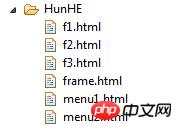 menu2.html code
<!DOCTYPE html PUBLIC "-//W3C//DTD HTML 4.01 Transitional//EN" "http://www.w3.org/TR/html4/loose.dtd">
<html>
<head>
<meta http-equiv="Content-Type" content="text/html; charset=UTF-8">
<title>Insert title here</title>
</head>
<body>
我是菜单二的内容
</body>
</html>frame.html code
<!DOCTYPE html PUBLIC "-//W3C//DTD HTML 4.01 Transitional//EN" "http://www.w3.org/TR/html4/loose.dtd">
<html>
<head>
<meta http-equiv="Content-Type" content="text/html; charset=UTF-8">
<title>混合框架结构</title>
</head>
<!-- 最开始为水平框架 -->
<frameset rows="20%,*">
    <!-- 水平框架里面最开始是一个frame和另一个垂直框架 -->
    <!-- noresize="noresize"属性限制框架大小,设置为固定值 -->
    <frame src="f1.html" noresize="noresize">
    <frameset cols="20%,*">
        <!-- 垂直框架里面有两个frame -->
        <!-- 该框架为菜单,单击内容可以跳转页面 -->
        <frame src="f2.html" noresize="noresize">
        <!-- 将该框架命名为menu -->
        <frame src="f3.html" noresize="noresize" name="menu">
    </frameset>
</frameset>

</body>
</html>Running result graph
The above is the detailed content of Example application of HTML frame tags. For more information, please follow other related articles on the PHP Chinese website!



























![[Web front-end] Node.js quick start](https://img.php.cn/upload/course/000/000/067/662b5d34ba7c0227.png)



