css溢出圖片隱藏的實作方法:1、建立一個div為「
...」;2、使用img標籤引入圖片;3、透過為img新增屬性為「.img-box{width: 400px; overflow: hidden;background-color:teal;}」即可。

本教學操作環境:Windows10系統、CSS3版、DELL G3電腦
css溢位圖片隱藏怎麼實現?
CSS實作圖片或文字溢出隱藏效果
效果圖:單行溢出隱藏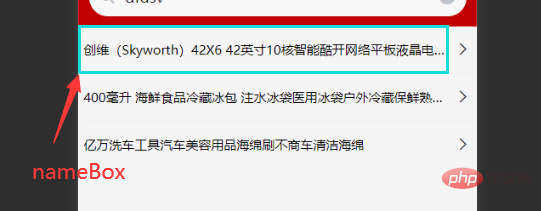
.nameBox {
        // 文字不允许换行(单行文本)
        white-space: nowrap;
        // 溢出部分隐藏
        overflow: hidden;
        // 文本溢出后,使用 ... 代替
        text-overflow: ellipsis;
        margin-right: 3px;
}圖片內容放大框架不變(溢出隱藏overflow:hidden)

 <div>
    <img  alt="css溢出圖片隱藏怎麼實現" >
  </div>

<style>
    .img-box{
      width: 400px;
      overflow: hidden;/*最主要的是这个 hidden是溢出隐藏,将溢出部分显示出来:overflow:visible*/
      background-color:teal;
    }
    img{
     display: block;
      width:100%;
      animation: a1 4s linear infinite alternate;
    }
    @keyframes a1{
      100%{
        transform: scale(1.5);
      }
    }
</style>推薦學習:《css影片教學》
以上是css溢出圖片隱藏怎麼實現的詳細內容。更多資訊請關注PHP中文網其他相關文章!