


windows系統上如何修改docker映像來源

如果我們已經建立了docker machine實例,那麼可以按照以下方式更換映像來源:
1、Docker Toolbox
在Windows命令列執行docker-machine ssh [machine-name]進入VM bash
sudo vi /var/lib/boot2docker/profile
#在--label provider=virtualbox的下一行新增--registry-mirror https://xxxxxxxx.mirror.aliyuncs.com1
- ##重啟docker服務:sudo /etc/ init.d/docker restart或重新啟動VM:exit退出VM bash,在Windows命令列中執行docker-machine restart
- Toolbox的介紹與協助:http://mirrors.aliyun.com/help/docker-toolbox
- Windows系統的安裝檔案目錄:http://mirrors.aliyun.com/docker-toolbox/windows/docker-toolbox/
- Windows系統的安裝檔案目錄:http://mirrors.aliyun.com/docker-toolbox/windows/docker-for-windows/
php影片教學)
2、如何使用Docker加速器- #針對安裝了Docker Toolbox的用戶,您可以參考以下設定步驟:
- #建立一台安裝有Docker環境的Linux虛擬機,指定機器名稱為default,同時設定Docker加速器位址。
docker-machine create --engine-registry-mirror=https://xxxxxxxx.mirror.aliyuncs.com -d virtualbox default
- 查看機器的環境配置,並配置到本機,並透過Docker客戶端存取Docker服務。
docker-machine env default
eval "$(docker-machine env default)"
docker info
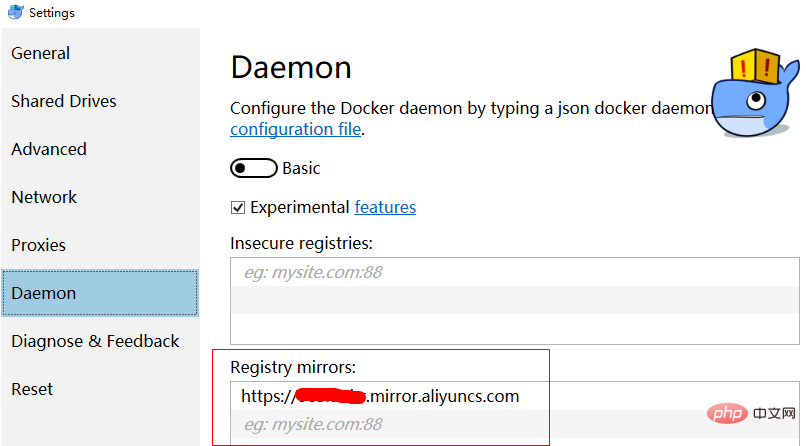
- 針對安裝了Docker for Windows的用戶,您可以參考以下設定步驟:
{
"registry-mirrors": ["https://xxxxxxxx.mirror.aliyuncs.com"]
}
相關文件
docker入門教學
以上是windows系統上如何修改docker映像來源的詳細內容。更多資訊請關注PHP中文網其他相關文章!

熱AI工具

Undress AI Tool
免費脫衣圖片

Undresser.AI Undress
人工智慧驅動的應用程序,用於創建逼真的裸體照片

AI Clothes Remover
用於從照片中去除衣服的線上人工智慧工具。

Clothoff.io
AI脫衣器

Video Face Swap
使用我們完全免費的人工智慧換臉工具,輕鬆在任何影片中換臉!

熱門文章
熱工具

記事本++7.3.1
好用且免費的程式碼編輯器

SublimeText3漢化版
中文版,非常好用

禪工作室 13.0.1
強大的PHP整合開發環境

Dreamweaver CS6
視覺化網頁開發工具

SublimeText3 Mac版
神級程式碼編輯軟體(SublimeText3)


 電腦的系統托盤圖標雜亂,如何整理?
Aug 21, 2025 pm 08:12 PM
電腦的系統托盤圖標雜亂,如何整理?
Aug 21, 2025 pm 08:12 PM
隱藏系統托盤圖標不影響程序運行,僅移除視覺顯示;2.徹底清理需通過任務管理器禁用非必要啟動項;3.根治雜亂須卸載不用軟件並養成安裝時取消捆綁勾選的習慣,這樣才能實現視覺清爽與資源優化的雙重目標。
 如何對更新Windows的問題進行故障排除:Microsoft指南
Aug 22, 2025 am 11:54 AM
如何對更新Windows的問題進行故障排除:Microsoft指南
Aug 22, 2025 am 11:54 AM
runthewIndowsUpDateTrubloubLeShootErtoAtoromationalfixCommonissuesBynAvigatingToSettings> System>故障排除>其他trubloubShooterSandRunningThewIndowSupDateTool.2.ensureatLeast20GBoffReast20GboffReeastOntySysonthesystemDriveanDrivEandMeetUpdateRepDateTaTateTaTatatAtatAtatatAtatatAtaTateUsementsBydususiondusydiskcl
 如何在Windows設置期間修復'我們無法創建新分區”?
Aug 19, 2025 am 10:27 AM
如何在Windows設置期間修復'我們無法創建新分區”?
Aug 19, 2025 am 10:27 AM
UseDiskParttocleanthedriveduringWindowsinstallationbyopeningCommandPromptfromthesetup,typingdiskpart,thenlistdisktoidentifythedrive,selectdiskX(replaceXwiththetargetdisknumber),andfinallycleantoeraseallpartitionsanddata,whichresolvesthepartitioncreat
 如何在Windows任務管理器中修復100%磁盤使用情況。
Aug 21, 2025 am 05:45 AM
如何在Windows任務管理器中修復100%磁盤使用情況。
Aug 21, 2025 am 05:45 AM
Ifyou'reexperiencing100%diskusageinWindows,trythesesteps:1.DisableWindowsSearchandSysMainservices.2.UpdatediskdriversviaDeviceManager.3.RunDiskCleanuptoremovetemporaryfiles.4.Adjustvirtualmemorysettingsmanually.5.TurnofftipsandsuggestionsinSettings.
!['激活Windows”水印不會消失[4個去除技巧]](https://img.php.cn/upload/article/001/431/639/175574412212996.jpg?x-oss-process=image/resize,m_fill,h_207,w_330) '激活Windows”水印不會消失[4個去除技巧]
Aug 21, 2025 am 10:42 AM
'激活Windows”水印不會消失[4個去除技巧]
Aug 21, 2025 am 10:42 AM
如果“激活感”的水印劑,TrytheSesteps:1。 activateWithavalIdProductKeyInsettings.2.usecommand-promptompttompttomantallyalialactivate.3.hidethethewatermarkmarksmarkviaregistoritor.4.useathirt-ehtehtird-partyt-partytoolcairatie。
 修復:Windows顯示'發生磁盤讀取錯誤”
Aug 21, 2025 am 02:10 AM
修復:Windows顯示'發生磁盤讀取錯誤”
Aug 21, 2025 am 02:10 AM
The“Adiskreaderroroccurred”messageistypicallycausedbyacorruptedMBR,faultycables,incorrectbootorder,orsoftwareissuesratherthanimmediatehardwarefailure.2.RestartthecomputerandcheckthatSATAandpowercablesaresecurelyconnected,andverifythecorrectbootorderi
 win7系統任務欄圖標顯示異常_win7托盤圖標亂碼的修復步驟
Aug 21, 2025 pm 08:18 PM
win7系統任務欄圖標顯示異常_win7托盤圖標亂碼的修復步驟
Aug 21, 2025 pm 08:18 PM
Win7任務欄圖標顯示異常的修復方法包括重建圖標緩存、調整顯示設置、檢查系統文件、清理註冊表和殺毒。 1.刪除IconCache.db文件並重啟以重建圖標緩存;2.通過“個性化”調整圖標大小和字體設置;3.運行sfc/scannow命令檢查修復系統文件;4.在註冊表中添加IsShortcut鍵值;5.全面殺毒確保系統安全。原因包括緩存損壞、病毒感染、系統文件或註冊表問題及硬件故障。防止方法有定期清理垃圾文件、更新殺毒軟件、謹慎安裝軟件、備份系統和更新驅動。其他不常見技巧包括使用系統還原、卸載美化軟
 如何在Docker容器中運行命令
Aug 20, 2025 am 05:09 AM
如何在Docker容器中運行命令
Aug 20, 2025 am 05:09 AM
使用dockerrun在新容器中運行命令,使用dockerexec在運行中的容器內執行命令,具體方法為:1.用dockerrun啟動新容器並執行命令,如dockerrun--rmubuntuls/tmp;2.用dockerexec在已運行容器中執行命令,如dockerexecmy-nginx-servicepsaux,交互式操作需加-it,如dockerexec-itmy-container/bin/bash;3.啟動容器時覆蓋默認命令,如dockerrunnginx:latestnginx-T
