

1. The savedPosition printed in scrollBehavior of vue-router is always Object {x: 0, y: 0}
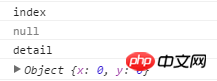
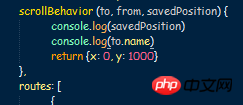
2. Even if keep-alive is used, the scroll bar position cannot be recorded. Switching the route will still automatically go to the top
3.Even window.scrollTo cannot jump










![[Web front-end] Node.js quick start](https://img.php.cn/upload/course/000/000/067/662b5d34ba7c0227.png)




I don’t quite understand the questioner’s needs. Do you want the drop-down bar not to return to the top after switching pages, or not to return to the top when going back?
I remember that by default, the drop-down bar is still in the original position when going back
If not, you can check whether the location where your drop-down bar appears is in the parent container
It really doesn’t work, the extreme approach can even be like thisSet at Data
scrolltop: ""
Observe the path at watchGet and save the scroll height of the container where the scroll bar appears in the callback function, and then set it as needed
It can be done. Please read my article: Vue.js can easily restore the scroll position when the page goes back