
CourseElementary38582
Course Introduction:Detailed explanation of the use of layUI front-end framework

CourseElementary61294
Course Introduction:Xiaopi Panel (phpstudy-linux panel) is a server environment construction and management tool launched for Linux servers. This course video includes a series of tutorials on the installation of small leather panels, site construction, website backup, security protection, etc.
CourseElementary21549
Course Introduction:Git is a free and open source distributed version control system for agile and efficient work on projects of any size. More and more projects are migrating to Git for management, including many open source projects hosted on GitHub, making Git the most popular version control system today, and therefore Git has become an indispensable skill. "Geek Academy Git Usage Video Tutorial" will introduce you to the local and remote operations of Git, hoping to lead you to easily master Git operations.

CourseElementary2476
Course Introduction:If you want to build a website, you can only access the Pagoda panel by opening port 8888. When opening port 8888, you must also remember to open port 80 (which is the default port of the WEB server). It is recommended to open another port 443 (this is based on HTTPS). The default port of the website), open these ports and your website can be accessed normally; this course is reproduced from Bilibili: https://www.bilibili.com/video/BV1fJ41147vV

CourseElementary54131
Course Introduction:"HTML5 From Beginner to Mastery Tutorial" introduces in detail that HTML5 has added a lot of new content based on HTML, with more functions and more dazzling effects.
apache cannot parse php7apache2_4.dll
2017-05-16 13:13:58 0 4 1078
rsa - openssl_private_decrypt does not take effect in typecho Login.php
2017-05-16 13:14:27 0 1 4932
2017-05-16 13:14:29 0 3 777
PHP7.1 cannot obtain session data
2017-05-16 13:14:02 0 2 689

Course Introduction:Avalanche Wallet is a non-custodial wallet for Android phones that stores, sends and receives AVAX tokens and other Avalanche compatible tokens. How to use it includes: Download and install the Avalanche wallet application. Create a new wallet and keep your mnemonic phrase safe. Use the "Send" button to send tokens. Use the "Receive" button to receive tokens. View your transaction history through History.
2024-08-29 comment 0713
Course Introduction:The method of using O3Labs wallet is divided into seven steps: 1. Install the wallet; 2. Create a wallet; 3. Add tokens; 4. Receive tokens; 5. Send tokens; 6. Manage assets; 7. Use other functions (such as Cross-chain trading, decentralized trading and dApp integration).
2024-08-28 comment 0552
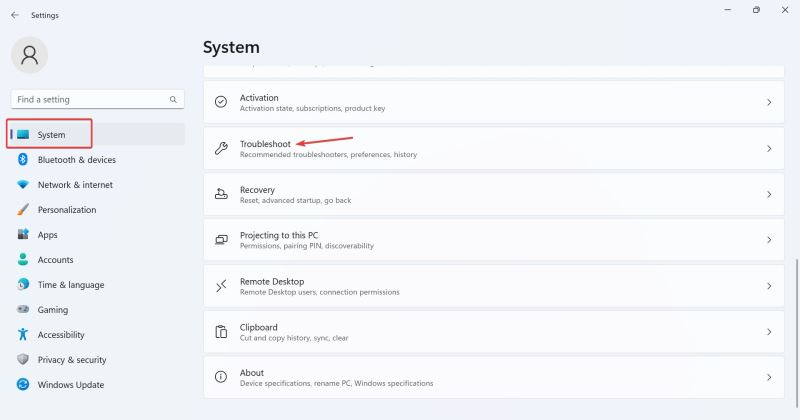
Course Introduction:The camera is a tool that can help us conduct video chats when using computers, but many users find that their cameras cannot be used when using the win11 system. So what is going on? Users can go into the troubleshooter to set up or check the camera permissions to operate. Let this site carefully introduce to users four solutions to the problem that the Win11 camera cannot be used. Four solutions to Win11 camera not working Solution 1. Use the built-in troubleshooter 1. Press + to open "Settings", and then click "Troubleshoot" in the "System" tab. WindowsI2, click Other Troubleshooting. 3. Now, click next to the camera entry
2024-09-03 comment 0579