

Course2857
Course Introduction:Course introduction: 1. Cross-domain processing, token management, route interception; 2. Real interface debugging, API layer encapsulation; 3. Secondary encapsulation of Echarts and paging components; 4. Vue packaging optimization and answers to common problems.
Course1795
Course Introduction:Apipost is an API R&D collaboration platform that integrates API design, API debugging, API documentation, and automated testing. It supports grpc, http, websocket, socketio, and socketjs type interface debugging, and supports privatized deployment. Before formally learning ApiPost, you must understand some related concepts, development models, and professional terminology. Apipost official website: https://www.apipost.cn
Course5521
Course Introduction:(Consult WeChat: phpcn01) The comprehensive practical course aims to consolidate the learning results of the first two stages, achieve flexible application of front-end and PHP core knowledge points, complete your own projects through practical training, and provide guidance on online implementation. Comprehensive practical key practical courses include: social e-commerce system backend development, product management, payment/order management, customer management, distribution/coupon system design, the entire WeChat/Alipay payment process, Alibaba Cloud/Pagoda operation and maintenance, and project online operation. .....

Course5172
Course Introduction:(Consult WeChat: phpcn01) Starting from scratch, you can solve conventional business logic, operate MySQL with PHP to add, delete, modify, and query, display dynamic website data, master the MVC framework, master the basics of the ThinkPHP6 framework, and learn and flexibly master all knowledge involved in PHP development. point.
Course8713
Course Introduction:(Consult WeChat: phpcn01) The learning objectives of the front-end development part of the 22nd issue of PHP Chinese website: 1. HTML5/CSS3; 2. JavaScript/ES6; 3. Node basics; 4. Vue3 basics and advanced; 5. Mobile mall/ Website background homepage layout; 6. Automatic calculation of tabs/carousels/shopping carts...
Best way to preload route data before accessing the route.
2023-11-17 14:54:42 0 2 379
2023-11-16 14:36:03 0 12 290
Website traffic statistics are inaccurate.
2023-11-12 21:49:13 0 0 137
What is the alternative to pages/_app.js in Application Router in NextJS?
2023-11-11 09:38:14 0 1 395
Send email using Symfony Mailer
2023-11-09 21:03:31 0 1 262
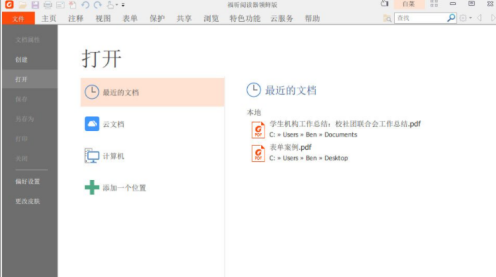
Course Introduction:Many people are using Foxit PDF Reader software in the office. Recently, some new users have asked how to merge files in Foxit PDF Reader. The following article brings you detailed methods of merging files in Foxit PDF Reader. Let us Let’s take a look below. Use the latest version of Foxit Reader to open the PDF documents that need to be merged. To use the advanced features in the early version of Foxit Reader, such as PDF merging and PDF splitting, you need to log in or register a Foxit membership account first. Just click "Not logged in" in the upper right corner to complete login or registration. After logging in, click on the thumbnail on the left, select any page, right-click, select "Insert Page", then rotate where to insert the merged page, here select insert merged page from file.
2024-03-05 comment 0881
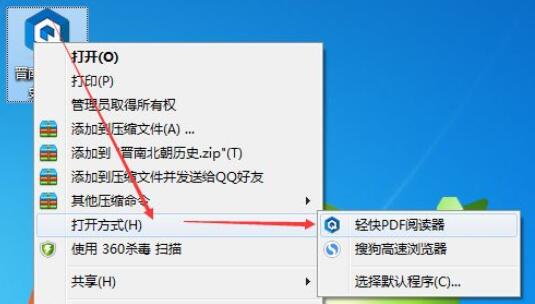
Course Introduction:如何使用轻快PDF阅读器打开文件呢?可能对于刚接触轻快PDF阅读器的朋友来说还不太清楚,那么今天小编就为大家带来了轻快PDF阅读器打开文件的方法,有需要的朋友可以来看看哦。方法一:直接打开pdf文件,就可以把它设置为默认的阅读器,这样以后就可以直接双击pdf文件就会自动打开。右击文件——打开方式——轻快pdf阅读器;这样就设置好了。方法二:打开默认应用设置,将轻快pdf阅读器设置为默认的pdf阅读器。右击pdf文件——属性——打开方式——更改——轻快pdf阅读器;这样就设置好了。方法三:打开控制
2024-06-04 comment
Course Introduction:使用福昕阅读器合并 PDF 文件:打开福昕阅读器,选择要合并的第一个 PDF 文件。单击“页面”菜单,选择“插入页面”,再从文件中选择要插入的第二个 PDF 文件。调整页面顺序,使用页面缩略图工具栏拖放缩略图重新排列顺序。单击“页面”菜单,选择“合并页面”。保存合并后的 PDF 文件。
2024-06-26 comment 0986

Course Introduction:日文电子书阅读器是一种专为阅读日文电子书设计的设备,支持日文 Unicode 编码、先进显示技术和翻页操作。它们便于携带、节省空间、经济实惠、环保,还允许用户调整字体和大小。推荐的日文电子书阅读器包括 Kindle Paperwhite Signature Edition、Kobo Libra 2 和索尼 Xperia 1 III。
2024-08-17 comment 0970

Course Introduction:是的,学生用阅读器支持EPUB格式,可供学生访问大量书籍和教材。具体步骤如下:1. 获取EPUB文件;2. 将文件传输到阅读器;3. 打开文件开始阅读。阅读器还提供可定制字体、书签、同步和离线阅读等优势,增强学生阅读体验。
2024-08-17 comment 0398