


CourseIntermediate3796
Course Introduction:This course is suitable for students with a certain front-end foundation. Course content includes: use of mui framework, front-end verification plug-in, echarts data visualization, Ajax progress bar component, template engine rendering, and image upload plug-in.

CourseIntermediate9593
Course Introduction:"Mobile WEB Layout Video Tutorial" introduces the basics of mobile web development, efficient typesetting and layout, common mobile web problems, terminal touch interaction, how to solve various bug pits, etc.

CourseIntermediate5726
Course Introduction:This course adopts the 2+5 model. In the first two days, HTML+CSS will be implemented, using font icons, plane transitions, animations, etc. to enrich web page effects and presentation methods; in the last five days, mobile and multi-terminal adaptation effects will be completed. The course is designed in a closed-loop manner, and each chapter is equipped with comprehensive cases. After learning, enterprise-level projects will be practiced, allowing students to not only master the knowledge points, but also learn the application scenarios of the knowledge points in actual development, allowing students to apply what they have learned.

CourseIntermediate7544
Course Introduction:Realize the packaging of the project, talk about several ways to develop mobile apps, use HBuliderX to package mobile websites into mobile apps, talk about the role of defineProperty, talk about the difference between server-side rendering and client-side rendering, understand the role of Nuxt, understand The role of asyncData.
apache cannot parse php7apache2_4.dll
2017-05-16 13:13:58 0 4 1074
rsa - openssl_private_decrypt does not take effect in typecho Login.php
2017-05-16 13:14:27 0 1 4927
2017-05-16 13:14:29 0 3 772
PHP7.1 cannot obtain session data
2017-05-16 13:14:02 0 2 685

Course Introduction:Some friends will ask the editor how to move the perspective in Blender. The editor will introduce it to you in detail below. If you want to know, come and take a look. I believe it will definitely help you. How to move the perspective in Blender? Blender mobile perspective tutorial 1. First we enter the application. 2. Then press and hold the middle button of the mouse. 3. Finally, move the perspective to the required position to complete the task.
2024-08-08 comment 0767

Course Introduction:Laravel - Guest User Gates - The Guest User Gates feature is an add-on to the latest 5.7 version released in September 2018. This feature is used to initiate the authorization process for specific users.
2024-08-27 comment 0332

Course Introduction:Excel tables are often used to edit and process data. They are concise and clear and the effect is very high. However, you user found that the excel table cannot be scrolled and the data below cannot be viewed. What is going on? This happens because the scrlk key is pressed. Let’s take a look at the solution. The specific solution is as follows: 1. Open the Excel software, then open or create a new table document, press the up, down, left, and right arrow keys on the keyboard, move the cursor, and see if you can select cells. 2. When pressing the arrow keys to move, if the cell cannot be selected and the table and window move accordingly, check whether the word scroll appears in the status bar at the bottom left of the Excel software. 3. If scrolling occurs, it means that exc has been manually turned on.
2024-08-26 comment 0181
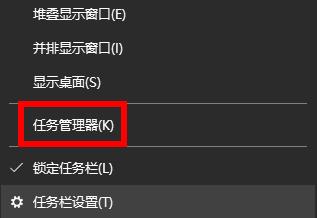
Course Introduction:In the win10 system, there is a problem that the mobile hard disk cannot be safely ejected. It always prompts that it is occupied by a program. Through the event viewer, it is found that the system process occupies the mobile hard disk. However, because the system.exe file is a system process, it cannot be ended, so the mobile hard disk cannot be What to do if security pops up? Let’s talk about the correct solution below. Method 1: 1. You must first check whether all the files you opened from the mobile hard disk have been closed. 2. You can right-click the taskbar and then open the Task Manager. 3. Then take a look at the processes inside. If there is one opened from the mobile hard disk, right-click and select End Task. Method two: 1. First find your hard drive in the taskbar of your computer. 2. Then right-click and select Eject. 3.
2024-08-28 comment 0539