Found a total of 8385 related content
Tips for obtaining Linux user information: simply obtain the current user information
Article Introduction:Practical Linux Tips: Easily Obtain Current User Information In the Linux operating system, it is often necessary to obtain the current user's information, such as user name, user ID, group membership, etc. This information is very important for system administration and debugging. This article will introduce several methods to obtain the current user's information and provide specific code examples. Using the whoami command: The whoami command can be used to obtain the username of the current user. This is a simple and commonly used method, suitable for quickly obtaining basic information about the current user. $who
2024-02-24comment 0658

How to view user information in Linux
Article Introduction:How to view user information in Linux: 1. Use the "cat /etc/passwd" command to output the detailed information of each user; 2. Use the "getent passwd" command to display the detailed information of each user as a single line containing seven fields; 3. Use the "compgen -u" command.
2021-04-22comment 038652

How to set user information in WPS_WPS setting user information tutorial
Article Introduction:1. First create a new WPS text. As shown below: 2. Then click [File] in the upper left corner of the WPS text. As shown below: 3. Then click [Options] in [File] of WPS text. As shown below: 4. Click [User Information] in the options. As shown below: 5. Finally, modify the name in [User Information] and click [About WPS Text] in the help to view the effect. As shown below:
2024-04-09comment743

How to modify user information in Linux
Article Introduction:How to modify user information in Linux: 1. Use the Vim text editor to manually modify related files involving user information ("/etc/passwd", "/etc/shadow", "/etc/group", "/etc/gshadow" ). 2. Use the usermod command to modify the user account or modify the account settings. The syntax is "usermod [option] username".
2023-02-10comment 03784
喜马拉雅用户基本信息在哪里 喜马拉雅用户基本信息查看方法
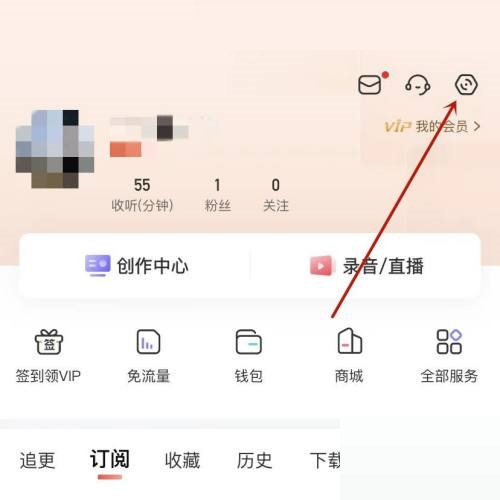
Article Introduction:今天小编为大家带来了喜马拉雅用户基本信息查看方法,想知道怎么做的小伙伴来看看接下来的这篇文章吧,相信一定会帮到你们的。喜马拉雅用户基本信息在哪里?喜马拉雅用户基本信息查看方法1、首先在喜马拉雅中,点击右上角设置。2、然后在设置中,点击个人信息收集清单。3、最后在已收集个人信息清单中,点击用户基本信息即可。
2024-08-15comment849

Teach you how to modify Linux user information
Article Introduction:Linux user information modification tutorial The Linux system is a powerful operating system with a wealth of command line tools that can help users easily perform various operations. In Linux, user information includes user name, user ID, user group ID, home directory, default Shell, etc. This information can be modified through the command line. This article will introduce how to modify user information in a Linux system, and provide specific code examples to help readers get started quickly. First, we need to understand several common commands to operate
2024-02-24comment 0477

漫客栈怎么修改用户名信息 漫客栈修改用户名信息教程
Article Introduction:有的小伙伴会问小编漫客栈怎么修改用户名信息,下面小编就为大家详细的介绍一下,想知道的话就来看看吧,相信一定会帮到你们的。漫客栈怎么修改用户名信息?漫客栈修改用户名信息教程1、首先在手机中找到这个软件直接点击进入。2、然后在APP个人资料详情页面点击左上方头像。3、接着在弹出的页面点击右上方编辑。4、最后在切换的页面点击用户名根据需求填写就可以修改了。
2024-07-26comment333

How to use cookies to save user information in PHP
Article Introduction:Using cookies to save user information in PHP is a common way. It can help developers achieve persistent login status after users log in, and ensure user security to a certain extent. The following will introduce how to use cookies to save user information in PHP. 1. Basic knowledge of cookies Cookies are small text files stored by the browser on the user's computer. When a user visits a website, the server will send a set of cookie information to the user's browser, which will be stored in the user's browser.
2023-06-27comment 0889
Learn more about how to modify Linux user information
Article Introduction:Title: Detailed explanation of how to modify Linux user information. In the Linux operating system, the management of user information is a very important operation. User information includes user name, user ID, user group, user home directory, user shell, etc. Understanding how to modify user information is crucial for system management. This article will introduce in detail how to modify user information in Linux systems, and attach specific code examples. 1. View user information Before you start modifying user information, you first need to know how to view user information. Can
2024-02-24comment439

Which directory in Linux stores user information?
Article Introduction:User information is stored in the "etc" directory of Linux. The etc directory is used to store the main configuration files of the system, such as user account and password files; the passwd file in this directory is the system user configuration file, which stores the basic information of all users in the system, while the shadow file stores the user profiles of the system. Password information.
2022-05-12comment 014451

WPS怎么修改用户信息 WPS修改用户信息的方法
Article Introduction:1.首先,打开界面后,点击左上角的文件菜单2.随后,打开选项设置面板,找到用户信息板块3.最后,在姓名栏目中根据个人需求自定义编辑修改即可
2024-05-11comment 0314

How to change user information in Linux system
Article Introduction:Title: Steps and code examples for modifying user information in Linux systems. In Linux systems, user management is a very important task, including creating, modifying, and deleting users. This article will introduce the specific steps on how to modify user information in a Linux system, and give corresponding code examples to help readers better understand and master related operations. 1. Steps to modify user information: Log in to the system: First, log in to the Linux system using an administrator account to modify user information. View user information: in the terminal
2024-02-25comment 0449

Quickly master how to modify user information in Linux
Article Introduction:Learning to modify user information in Linux is a very important skill, especially for system administrators. In Linux systems, the management of users and user groups is one of the most common operations. This article will introduce how to quickly learn to modify user information in Linux and provide specific code examples. 1. Check the current user information. Before starting to modify the user information, we first need to know the user information that already exists in the current system. You can check it through the following command: cat/etc/passwd This command will
2024-02-25comment347

How to store user information in PHP
Article Introduction:With the development of the Internet, centralized management of user information has become a problem that enterprises must face. At this time, data storage and use are particularly important. Website development languages like PHP have actually provided developers with good solutions to help organizations better store user data. This article will focus on how to store user information in PHP. 1. Database design First we need a suitable database table to store user data. This table should have enough fields to store the user's basic information, such as username, password,
2023-04-21comment 0560

How to view all user and group information in Linux
Article Introduction:The method to view all user and group information in Linux is: 1. Execute the command [cat /etc/passwd] to view all user information in the system; 2. Execute the command [cat /etc/group] to view all group information in the system .
2020-02-15comment 03682

How to implement user modification of information code in PHP
Article Introduction:PHP is one of the most popular server-side scripting languages and has a wide range of applications. Websites usually require users to register and log in, but sometimes users need to modify their information, such as passwords, email addresses, etc. In this article, we will introduce the implementation method for PHP users to modify information code. 1. Front-end page Users need to have a front-end page to modify information, so we first write a simple HTML form. ```
Modify user information</titl</p>
<p class="course-classify article"><span>2023-04-05</span><span>comment 0</span><span class="right"><i class="layui-icon"></i>427</span></p>
</div>
</div>
<div class="course-item">
<a href="//m.sbmmt.com/faq/489328.html" target="_blank" class="course-img"><img src="https://img.php.cn/upload/article/202202/28/2022022811041971448.jpg"></a>
<div class="course-detail">
<a href="//m.sbmmt.com/faq/489328.html" target="_blank" class="title">How to query user's table information in Oracle</a>
<p class="course-" style="height: 50px;line-height: 25px;overflow: hidden;text-overflow: ellipsis;">Article Introduction:How to query user table information in Oracle: 1. Use "SELECT count(*) FROM user_tables" to query the number of tables under the current user; 2. Use "SELECT * FROM user_tables;" to query the tables under the current user.</p>
<p class="course-classify article"><span>2022-02-28</span><span>comment 0</span><span class="right"><i class="layui-icon"></i>8991</span></p>
</div>
</div>
<div class="course-item">
<a href="//m.sbmmt.com/faq/909410.html" target="_blank" class="course-img"><img src="https://img.php.cn/upload/article/202407/30/2024073020531071942.jpg"></a>
<div class="course-detail">
<a href="//m.sbmmt.com/faq/909410.html" target="_blank" class="title">php用户信息框架有哪些</a>
<p class="course-" style="height: 50px;line-height: 25px;overflow: hidden;text-overflow: ellipsis;">Article Introduction:流行的 PHP 用户信息框架包括 Laravel、CodeIgniter、Symfony、Zend Framework 和 CakePHP。在选择框架时,应考虑功能、易用性、文档和支持。</p>
<p class="course-classify article"><span>2024-07-30</span><span>comment 0</span><span class="right"><i class="layui-icon"></i>262</span></p>
</div>
</div>
<div class="course-item">
<a href="//m.sbmmt.com/faq/852732.html" target="_blank" class="course-img"><img src="https://img.php.cn/upload/article/000/000/164/171990243411504.png"></a>
<div class="course-detail">
<a href="//m.sbmmt.com/faq/852732.html" target="_blank" class="title">支付宝户籍信息怎么查询 支付宝户籍信息查询流程分享</a>
<p class="course-" style="height: 50px;line-height: 25px;overflow: hidden;text-overflow: ellipsis;">Article Introduction:支付宝可以给用户提供优质的支付功能,同时你还可以通过软件来查询户籍的信息,具体该如何操作呢?下面小编就来分享下户籍信息的查询流程,帮助你解决问题吧。支付宝户籍信息如何查询步骤一,打开支付宝APP,点击首页的市民中心。步骤二,选择公安点击进入。步骤三,点击治安户政。步骤四,点击户籍基本信息查询即可查询。</p>
<p class="course-classify article"><span>2024-07-02</span><span>comment</span><span class="right"><i class="layui-icon"></i>795</span></p>
</div>
</div>
<div class="layui-row diy-page" id="pagination"></div>
</div>
</div>
<div class="phpFoot">
<div class="phpFootIn">
<div class="phpFootCont">
<div class="phpFootLeft">
<dl>
<dt>
<a href="//m.sbmmt.com/about/us.html" rel="nofollow" target="_blank" title="About us" class="cBlack">About us</a>
<a href="//m.sbmmt.com/about/disclaimer.html" rel="nofollow" target="_blank" title="Disclaimer" class="cBlack">Disclaimer</a>
<a href="//m.sbmmt.com/update/article_0_1.html" target="_blank" title="Sitemap" class="cBlack">Sitemap</a>
<div class="clear"></div>
</dt>
<dd class="cont1">
php.cn:Public welfare online PHP training,Help PHP learners grow quickly!
</dd>
</dl>
</div>
</div>
</div>
</div>
<input type="hidden" id="verifycode" value="/captcha.html">
</body>
</html> 