


Question: Don’t know how to check the basic information of your Ximalaya account? Introduction: PHP editor Youzi will provide you with detailed ways to view basic information of Himalayan users and easily solve your problems. Guide: Continue reading this article to learn how to easily view your Himalayan username, avatar, profile and other basic information.
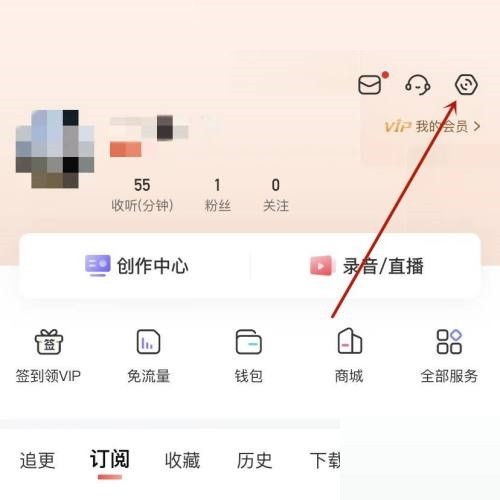
1. First, in Himalaya, click Settings in the upper right corner.
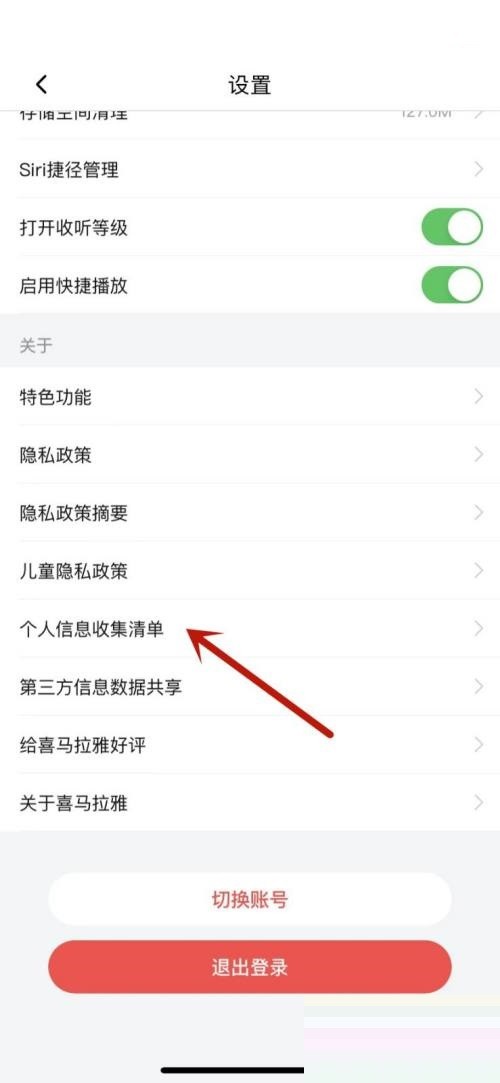
2. Then in settings, click Personal Information Collection List.
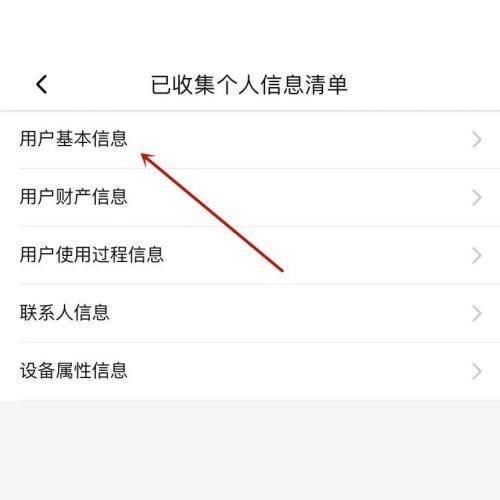
3. Finally, in the list of collected personal information, click on the user’s basic information.
The above is the detailed content of Where is the basic information of Ximalaya users_How to check the basic information of Ximalaya users. For more information, please follow other related articles on the PHP Chinese website!
 The difference between linux and windows
 web server hardware configuration requirements
 The difference between get and post
 Comparative analysis of iqooneo8 and iqooneo9
 python timestamp
 How to recover permanently deleted files on computer
 What is disk quota
 What are the advantages and disadvantages of decentralization




















![[Web front-end] Node.js quick start](https://img.php.cn/upload/course/000/000/067/662b5d34ba7c0227.png)



