


This article introduces you to Nginx as a static resource web service to control browser cache and implement anti-leeching. It has certain reference value. Friends in need can refer to it. I hope it will be helpful to you.
Browser cache follows the caching mechanism defined by the HTTP protocol (such as: Expires; Cache-control, etc.) .
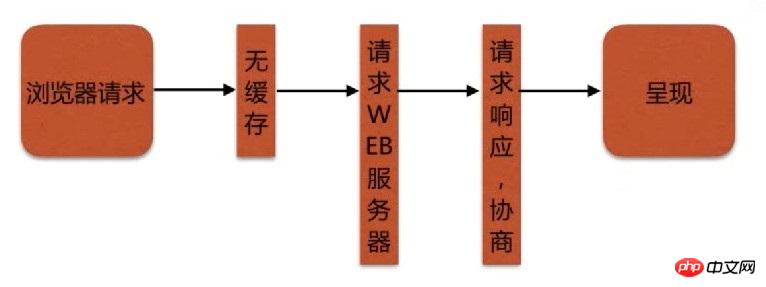
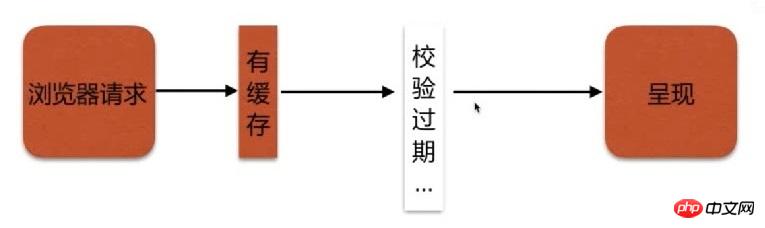
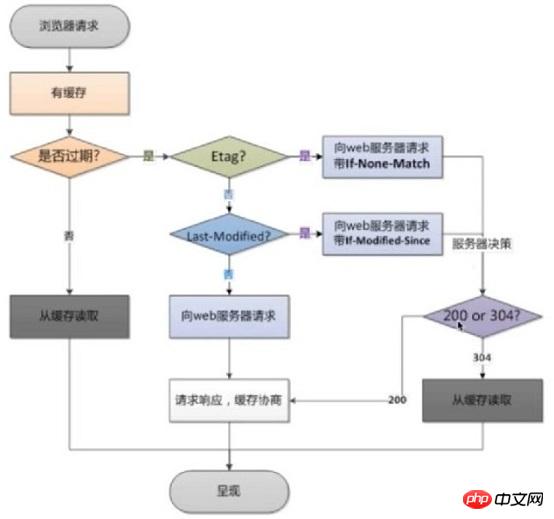
Nginx passes Control browser cache by adding Cache-Control (max-age) and Expires header information.
Syntax: expires [modified] time; expires epoch | max | off; Default: expires off; Context: http, server, location, if in location
This configuration item can control "Expires" and "Cache-Control" in the HTTP response "Header information, (which plays a role in controlling page caching).
The expiration time in the "Expires" header information is the sum of the current system time and the time value you set. If the modified parameter is specified, the expiration time is the sum of the last modification time of the file and the time value you set.
The content of the "Cache-Control" header depends on the symbol specifying time. You can use positive or negative numbers in the time value.
When time is a negative number, "Cache-Control: no-cache";
When time is a positive number or 0, "Cache-Control: max-age=time", the unit is seconds.
The epoch parameter is used to specify the value of "Expires" as 1 January, 1970, 00:00:01 GMT.
The max parameter is used to specify the value of "Expires" as "Thu, 31 Dec 2037 23:55:55 GMT" and the value of "Cache-Control" as 10 years. The
off parameter disables additions or modifications to the "Expires" and "Cache-Control" response header information.
server { location ~ .*\.(txt|xml)$ { # 设置过期时间为1天 expires 1d; root /vagrant/doc; } }
/vagrant/doc/hello.txtfile[root/etc/nginx]# curl -I 192.168.33.88/hello.txt HTTP/1.1 200 OK Server: nginx/1.14.0 Date: Tue, 17 Jul 2018 07:12:11 GMT Content-Type: text/plain Content-Length: 12 Last-Modified: Tue, 17 Jul 2018 07:07:22 GMT Connection: keep-alive ETag: "5b4d95aa-c" Expires: Wed, 18 Jul 2018 07:12:11 GMT Cache-Control: max-age=86400 Accept-Ranges: bytes
Focus onExpiresandCache-ControlField, it can be seen that the cache time of hello.txt is 1 day.
Purpose: To prevent resources from being misappropriated
Idea: Distinguish which requests are abnormal user requests
Syntax: valid_referers none | blocked | server_names | string ...; Default: — Context: server, location
none: There is no Referer field in the request header
blocked : Although the "Referer" field exists in the request header, its value has been deleted by the firewall or proxy server; these values are strings that do not start with "http://" or "https://";
server_names : The "Referer" request header field contains the server name
Any string: Defines a server name and an optional URI prefix. The server name can have "*" at the beginning or end. The server port in the "Referer" field is ignored when checking.
Regular expression: The string must start with ~. It is worth noting that the regular expression matches the content after "http://" or "https://".
valid_referers none blocked server_names *.example.com example.* www.example.org/galleries/ ~\.google\.;
server { location ~ .*\.(txt|xml)$ { # 配置防盗链规则 valid_referers none blocked 192.168.1.110 *.example.com example.* ~\.google\.; # 如果不符合防盗链规则,则返回403 if ($invalid_referer) { return 403; } root /vagrant/doc; } }
/vagrant/doc/hello.txtfilevim /vagrant/a/a.txt
Hello world!
Without referer, you can access it normally
[root~]# curl -I http://127.0.0.1/hello.txt HTTP/1.1 200 OK Server: nginx/1.14.0 Date: Fri, 03 Aug 2018 01:34:12 GMT Content-Type: text/plain Content-Length: 12 Last-Modified: Tue, 17 Jul 2018 07:07:22 GMT Connection: keep-alive ETag: "5b4d95aa-c" Accept-Ranges: bytes
The referer ishttp://www.baidu.com, and 403 is returned.
[root~]# curl -e "http://www.baidu.com" -I http://127.0.0.1/hello.txt HTTP/1.1 403 Forbidden Server: nginx/1.14.0 Date: Fri, 03 Aug 2018 01:34:34 GMT Content-Type: text/html Content-Length: 169 Connection: keep-alive
referer ishttp://192.168.1.110, which can be accessed normally
[root~]# curl -e "http://192.168.1.110" -I http://127.0.0.1/hello.txt HTTP/1.1 200 OK Server: nginx/1.14.0 Date: Thu, 02 Aug 2018 11:31:51 GMT Content-Type: text/plain Content-Length: 12 Last-Modified: Tue, 17 Jul 2018 07:07:22 GMT Connection: keep-alive ETag: "5b4d95aa-c" Accept-Ranges: bytes
referer starts withexample.or ends with.example.com, you can access
[root~]# curl -e "http://www.example.com" -I http://127.0.0.1/hello.txt HTTP/1.1 200 OK Server: nginx/1.14.0 Date: Thu, 02 Aug 2018 11:33:47 GMT Content-Type: text/plain Content-Length: 12 Last-Modified: Tue, 17 Jul 2018 07:07:22 GMT Connection: keep-alive ETag: "5b4d95aa-c" Accept-Ranges: bytes [root~]# curl -e "http://example.baidu.com" -I http://127.0.0.1/hello.txt HTTP/1.1 200 OK Server: nginx/1.14.0 Date: Thu, 02 Aug 2018 11:33:53 GMT Content-Type: text/plain Content-Length: 12 Last-Modified: Tue, 17 Jul 2018 07:07:22 GMT Connection: keep-alive ETag: "5b4d95aa-c" Accept-Ranges: bytes
referer ishttp://192.168.1.110, you can access it normally
[root~]# curl -e "http://192.168.1.110" -I http://127.0.0.1/hello.txt HTTP/1.1 200 OK Server: nginx/1.14.0 Date: Thu, 02 Aug 2018 11:31:51 GMT Content-Type: text/plain Content-Length: 12 Last-Modified: Tue, 17 Jul 2018 07:07:22 GMT Connection: keep-alive ETag: "5b4d95aa-c" Accept-Ranges: bytes
referer ishttp:// google.com, returns 403
[root~]# curl -e "http://google.com" -I http://127.0.0.1/hello.txt HTTP/1.1 403 Forbidden Server: nginx/1.14.0 Date: Thu, 02 Aug 2018 11:37:43 GMT Content-Type: text/html Content-Length: 169 Connection: keep-alive
referer ishttp://www.google.com, and can be accessed normally
[root~]# curl -e "http://www.google.com" -I http://127.0.0.1/hello.txt HTTP/1.1 200 OK Server: nginx/1.14.0 Date: Thu, 02 Aug 2018 11:37:50 GMT Content-Type: text/plain Content-Length: 12 Last-Modified: Tue, 17 Jul 2018 07:07:22 GMT Connection: keep-alive ETag: "5b4d95aa-c" Accept-Ranges: bytes
Recommended related articles:
Nginx serves as a static resource web service and performs static resource compression
| Check whether it has expired | Cache-Control(max-age), Expires |
|---|---|
| Etag | |
| Last-Modified |
The above is the detailed content of Nginx serves as a static resource web service to control browser caching and prevent hotlinking. For more information, please follow other related articles on the PHP Chinese website!





























![[Web front-end] Node.js quick start](https://img.php.cn/upload/course/000/000/067/662b5d34ba7c0227.png)



