


PHP Redis extension from installation to use

Redis is a memory-level nosql database that is widely used because of its high performance. This article mainly introduces the adding of Redis module and connection to PHP with pictures and texts. I hope to be helpful.
The following will introduce how to add Redis extension to php!
The PHP manual does not provide Redis classes and methods, nor does it provide related extension modules. However, we can download PHP extensions from the Redis official website. There are many extensions, only phpredis is the most popular one. example.
1.phpredis download
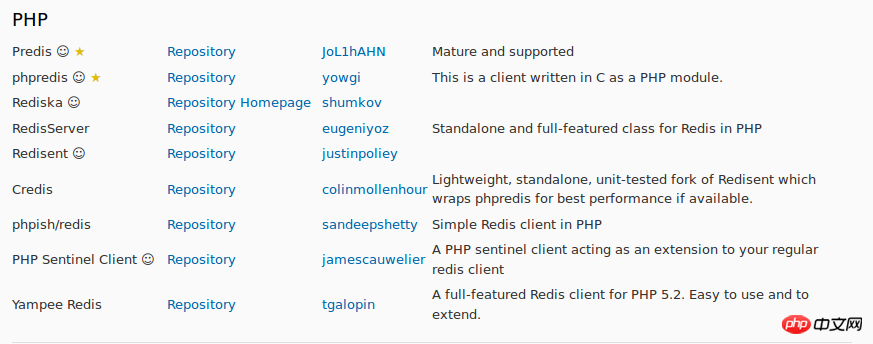
1. Click "Repository" to enter the Redis learning library, which contains Redis extended code files and related introductions as well as classes and methods
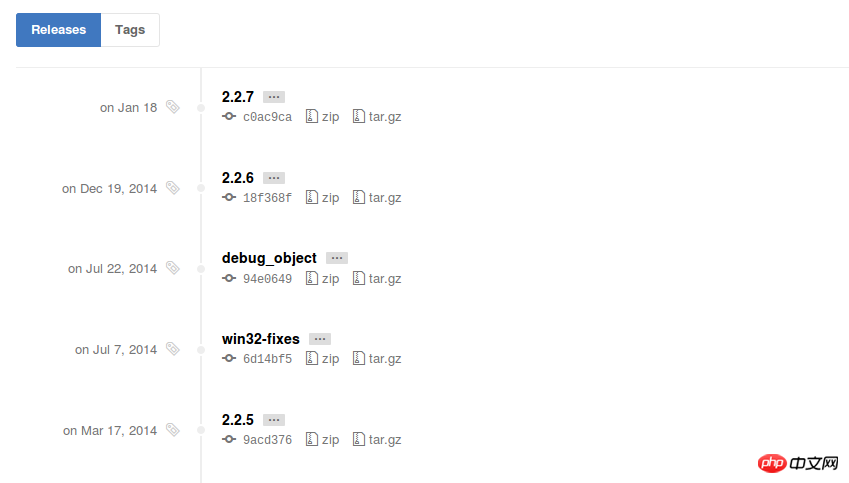
2. Click "releases" to enter the source file of phpredis

3. Download the latest version of phpredis source file, select "tar.gz" to download
2.phpredis configuration
1. Unzip phpredis file
tar -zxvf phpredis-2.2.7.tar.gz
2. Install and configure phpredis
1. Run the phpize5 command in the phpredis directory to generate the configure file
phpize5
.
4. Modify php.ini and add (in order, add igbinary.so first, then add redis.so)
wget http://pecl.php.net/get/igbinary-1.2.1.tgz
./configure
make
sudo make install
3 View phpredis

4.php to connect to the redis database
1. Open the database service 2. Create a new redis.php file and type the following code to connect
./configure --enable-redis-igbinary
make
sudo make install
3. Open the file in the browser and view the query results
Related Recommended:
 php redis distributed lock and task queue code examples detailed explanation
How to reduce PHP Redis Memory occupancy method sharing (picture and text) Detailed introduction of PHP redis implementation of super mini full-text retrieval code example
The above is the detailed content of PHP Redis extension from installation to use. For more information, please follow other related articles on the PHP Chinese website!

Hot AI Tools

Undresser.AI Undress
AI-powered app for creating realistic nude photos

AI Clothes Remover
Online AI tool for removing clothes from photos.

Undress AI Tool
Undress images for free

Clothoff.io
AI clothes remover

AI Hentai Generator
Generate AI Hentai for free.

Hot Article
Hot Tools

Notepad++7.3.1
Easy-to-use and free code editor

SublimeText3 Chinese version
Chinese version, very easy to use

Zend Studio 13.0.1
Powerful PHP integrated development environment

Dreamweaver CS6
Visual web development tools

SublimeText3 Mac version
God-level code editing software (SublimeText3)
Hot Topics
 1377
1377
 52
52

 The Future of PHP: Adaptations and Innovations
Apr 11, 2025 am 12:01 AM
The Future of PHP: Adaptations and Innovations
Apr 11, 2025 am 12:01 AM
The future of PHP will be achieved by adapting to new technology trends and introducing innovative features: 1) Adapting to cloud computing, containerization and microservice architectures, supporting Docker and Kubernetes; 2) introducing JIT compilers and enumeration types to improve performance and data processing efficiency; 3) Continuously optimize performance and promote best practices.
 PHP vs. Python: Understanding the Differences
Apr 11, 2025 am 12:15 AM
PHP vs. Python: Understanding the Differences
Apr 11, 2025 am 12:15 AM
PHP and Python each have their own advantages, and the choice should be based on project requirements. 1.PHP is suitable for web development, with simple syntax and high execution efficiency. 2. Python is suitable for data science and machine learning, with concise syntax and rich libraries.
 How to build the redis cluster mode
Apr 10, 2025 pm 10:15 PM
How to build the redis cluster mode
Apr 10, 2025 pm 10:15 PM
Redis cluster mode deploys Redis instances to multiple servers through sharding, improving scalability and availability. The construction steps are as follows: Create odd Redis instances with different ports; Create 3 sentinel instances, monitor Redis instances and failover; configure sentinel configuration files, add monitoring Redis instance information and failover settings; configure Redis instance configuration files, enable cluster mode and specify the cluster information file path; create nodes.conf file, containing information of each Redis instance; start the cluster, execute the create command to create a cluster and specify the number of replicas; log in to the cluster to execute the CLUSTER INFO command to verify the cluster status; make
 PHP: Is It Dying or Simply Adapting?
Apr 11, 2025 am 12:13 AM
PHP: Is It Dying or Simply Adapting?
Apr 11, 2025 am 12:13 AM
PHP is not dying, but constantly adapting and evolving. 1) PHP has undergone multiple version iterations since 1994 to adapt to new technology trends. 2) It is currently widely used in e-commerce, content management systems and other fields. 3) PHP8 introduces JIT compiler and other functions to improve performance and modernization. 4) Use OPcache and follow PSR-12 standards to optimize performance and code quality.
 How to use the redis command
Apr 10, 2025 pm 08:45 PM
How to use the redis command
Apr 10, 2025 pm 08:45 PM
Using the Redis directive requires the following steps: Open the Redis client. Enter the command (verb key value). Provides the required parameters (varies from instruction to instruction). Press Enter to execute the command. Redis returns a response indicating the result of the operation (usually OK or -ERR).
 How to start the server with redis
Apr 10, 2025 pm 08:12 PM
How to start the server with redis
Apr 10, 2025 pm 08:12 PM
The steps to start a Redis server include: Install Redis according to the operating system. Start the Redis service via redis-server (Linux/macOS) or redis-server.exe (Windows). Use the redis-cli ping (Linux/macOS) or redis-cli.exe ping (Windows) command to check the service status. Use a Redis client, such as redis-cli, Python, or Node.js, to access the server.
 How to read the source code of redis
Apr 10, 2025 pm 08:27 PM
How to read the source code of redis
Apr 10, 2025 pm 08:27 PM
The best way to understand Redis source code is to go step by step: get familiar with the basics of Redis. Select a specific module or function as the starting point. Start with the entry point of the module or function and view the code line by line. View the code through the function call chain. Be familiar with the underlying data structures used by Redis. Identify the algorithm used by Redis.
 How to use redis lock
Apr 10, 2025 pm 08:39 PM
How to use redis lock
Apr 10, 2025 pm 08:39 PM
Using Redis to lock operations requires obtaining the lock through the SETNX command, and then using the EXPIRE command to set the expiration time. The specific steps are: (1) Use the SETNX command to try to set a key-value pair; (2) Use the EXPIRE command to set the expiration time for the lock; (3) Use the DEL command to delete the lock when the lock is no longer needed.
