


Do selectors in css include hypertext tag selectors?

Not included. CSS selectors include: 1. Tag selector, which locates specific HTML elements through the element name of the HTML page; 2. Class selector, which locates specific HTML elements through the value of the class attribute of the HTML element; 3. ID selector, which Locate specific HTML elements through the value of the id attribute of the HTML element; 4. The wildcard selector "*" can refer to all types of tag elements, including custom elements; 5. The attribute selector uses the existing attribute name of the HTML element or attribute value to locate a specific HTML element.

The operating environment of this tutorial: Windows 7 system, CSS3&&HTML5 version, Dell G3 computer.
CSS selectors do not include "hypertext tag selectors", but include class selectors, tag selectors, ID selectors, attribute selectors, pseudo-class selectors, etc.
What is a css selector?
Style is the smallest syntax unit of CSS. Each style contains two parts: selector and Statement (rule), as shown below.
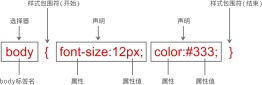
1. Selector (Selector)
The selector consists of the id, class attribute or element name itself of the HTML element and some Special symbols are used to specify which HTML element to define the style for. For example, the selector p means to define the style for all
tags in the page;
2. Declaration
There can be one or countless declarations. These declarations tell the browser how to render the object specified by the selector. All declarations are placed within a pair of curly braces { }, and then the entire declaration is placed immediately after the selector.
The statement must include two parts: attributes and attribute values, and use a semicolon to mark the end of a statement. The semicolon can be omitted for the last statement in a style.
Attribute: The style name you want to set for the HTML element, consisting of a series of keywords, such as color, border, font, etc., in CSS Provides many attributes, which you can view through the W3C official website;
Value: consists of a numerical value and a unit or keyword, used to control the display effect of a certain attribute, such as the value of the color attribute It can be red or #F1F1F1 etc.
#What are the css selectors?
We start with an Html structure
<div id="box">
    <div class="one">
        <p class="one_1">
        </p >
        <p class="one_1">
        </p >
    </div>
    <div class="two"></div>
    <div class="two"></div>
    <div class="two"></div>
</div>
Commonly used selectors for css are:
- ##id selector (# box), select the element with the id of box
- class selector (.one), select all elements with the class name one
- tag Selector (div), selects all elements with the label div
- Descendant selector (#box div), selects all div elements with the id inside the box element
- Child selector (.one>one_1), selects all .one_1 elements whose parent element is .one
- Adjacent sibling selector (.one .two ), select all .two elements immediately after .one
- Group selector (div, p), select all elements of div, p
- Pseudo-class selector
:link :选择未被访问的链接
:visited:选取已被访问的链接
:active:选择活动链接
:hover :鼠标指针浮动在上面的元素
:focus :选择具有焦点的
:first-child:父元素的首个子元素
- Pseudo element selector
:first-letter :用于选取指定选择器的首字母
:first-line :选取指定选择器的首行
:before : 选择器在被选元素的内容前面插入内容
:after : 选择器在被选元素的内容后面插入内容
- Attribute selector
[attribute] 选择带有attribute属性的元素
[attribute=value] 选择所有使用attribute=value的元素
[attribute~=value] 选择attribute属性包含value的元素
[attribute|=value]:选择attribute属性以value开头的元素
New selector in CSS3 There are the following:
- Hierarchical selector (p~ul), selects each ul element preceded by a p element
- Pseudo-class selector
:first-of-type 表示一组同级元素中其类型的第一个元素
:last-of-type 表示一组同级元素中其类型的最后一个元素
:only-of-type 表示没有同类型兄弟元素的元素
:only-child 表示没有任何兄弟的元素
:nth-child(n) 根据元素在一组同级中的位置匹配元素
:nth-last-of-type(n) 匹配给定类型的元素,基于它们在一组兄弟元素中的位置,从末尾开始计数
:last-child 表示一组兄弟元素中的最后一个元素
:root 设置HTML文档
:empty 指定空的元素
:enabled 选择可用元素
:disabled 选择被禁用元素
:checked 选择选中的元素
:not(selector) 选择与 <selector> 不匹配的所有元素
- Attribute selector
[attribute*=value]:选择attribute属性值包含value的所有元素
[attribute^=value]:选择attribute属性开头为value的所有元素
[attribute$=value]:选择attribute属性结尾为value的所有元素
css basic selector and priority
css basic selector
| Description | |
|---|---|
| Also known as type selector, this basic selector is through the elements of the HTML page Name locates specific HTML elements. If the type selector is used alone, it will locate all elements with this element name in the current HTML page. | |
| locates specific HTML elements through the value of the class attribute of the HTML element. The usage of this basic selector is in the form | .Class name. |
| is similar to the class selector. They match HTML elements based on a certain attribute. The class selector matches the class selector, while The ID selector matches the id attribute. It is worth noting that the ID attribute is the only non-repeatable in the entire page. | |
是一个星号(*),这个选择器是一个特殊的标签选择器,它可以指代所有类型的标签元素,包括自定义元素,以及<script>、<style>、<title>等元素,但是不包括伪元素。</script>
|
|
| 属性选择器 | 是通过HTML元素已经存在属性名或属性值来定位具体HTML元素,在官方文档中类选择器和ID选择器都属于属性选择器,因为本质上类选择器是HTML元素中class的属性值,ID选择器是 HTML 元素中id的属性值。 |
优先级
相信大家对CSS选择器的优先级都不陌生:
内联 > ID选择器 > 类选择器 > 标签选择器
到具体的计算层面,优先级是由 A 、B、C、D 的值来决定的,其中它们的值计算规则如下:
如果存在内联样式,那么 A = 1, 否则 A = 0
B的值等于 ID选择器出现的次数
C的值等于 类选择器 和 属性选择器 和 伪类 出现的总次数
D 的值等于 标签选择器 和 伪元素 出现的总次数
这里举个例子:
#nav-global > ul > li > a.nav-link
套用上面的算法,依次求出 A B C D 的值:
因为没有内联样式 ,所以 A = 0
ID选择器总共出现了1次, B = 1
类选择器出现了1次, 属性选择器出现了0次,伪类选择器出现0次,所以 C = (1 + 0 + 0) = 1
标签选择器出现了3次, 伪元素出现了0次,所以 D = (3 + 0) = 3
上面算出的A 、 B、C、D 可以简记作:(0, 1, 1, 3)
知道了优先级是如何计算之后,就来看看比较规则:
从左往右依次进行比较 ,较大者优先级更高
如果相等,则继续往右移动一位进行比较
如果4位全部相等,则后面的会覆盖前面的
经过上面的优先级计算规则,我们知道内联样式的优先级最高,如果外部样式需要覆盖内联样式,就需要使用!important
下面我们来看一个实例
nbsp;html>


    <meta>
    <title>这是一个demo</title>
    <style>
        #myid{color:red;}
        .myclass1{color:yellow;}
        h1,p {color:green;}

    </style>


        <h1 id="这是一个标题-请查看优先级">这是一个标题,请查看优先级</h1>
        <p>这是一个段落,请查看优先级</p>
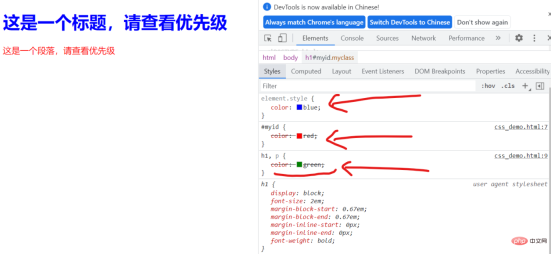
我们可以看到因为标签
有行内样式,所以它显示为了蓝色;
而标签
虽然定义了三种css样式,但是由于id选择器的优先级最高,所以显示为了红色
(学习视频分享:web前端)
The above is the detailed content of Do selectors in css include hypertext tag selectors?. For more information, please follow other related articles on the PHP Chinese website!

 Frontend Development with React: Advantages and TechniquesApr 17, 2025 am 12:25 AM
The advantages of React are its flexibility and efficiency, which are reflected in: 1) Component-based design improves code reusability; 2) Virtual DOM technology optimizes performance, especially when handling large amounts of data updates; 3) The rich ecosystem provides a large number of third-party libraries and tools. By understanding how React works and uses examples, you can master its core concepts and best practices to build an efficient, maintainable user interface.
 React vs. Other Frameworks: Comparing and Contrasting OptionsApr 17, 2025 am 12:23 AM
React is a JavaScript library for building user interfaces, suitable for large and complex applications. 1. The core of React is componentization and virtual DOM, which improves UI rendering performance. 2. Compared with Vue, React is more flexible but has a steep learning curve, which is suitable for large projects. 3. Compared with Angular, React is lighter, dependent on the community ecology, and suitable for projects that require flexibility.
 Demystifying React in HTML: How It All WorksApr 17, 2025 am 12:21 AM
React operates in HTML via virtual DOM. 1) React uses JSX syntax to write HTML-like structures. 2) Virtual DOM management UI update, efficient rendering through Diffing algorithm. 3) Use ReactDOM.render() to render the component to the real DOM. 4) Optimization and best practices include using React.memo and component splitting to improve performance and maintainability.
 React in Action: Examples of Real-World ApplicationsApr 17, 2025 am 12:20 AM
React is widely used in e-commerce, social media and data visualization. 1) E-commerce platforms use React to build shopping cart components, use useState to manage state, onClick to process events, and map function to render lists. 2) Social media applications interact with the API through useEffect to display dynamic content. 3) Data visualization uses react-chartjs-2 library to render charts, and component design is easy to embed applications.
 Frontend Architecture with React: Best PracticesApr 17, 2025 am 12:10 AM
Best practices for React front-end architecture include: 1. Component design and reuse: design a single responsibility, easy to understand and test components to achieve high reuse. 2. State management: Use useState, useReducer, ContextAPI or Redux/MobX to manage state to avoid excessive complexity. 3. Performance optimization: Optimize performance through React.memo, useCallback, useMemo and other methods to find the balance point. 4. Code organization and modularity: Organize code according to functional modules to improve manageability and maintainability. 5. Testing and Quality Assurance: Testing with Jest and ReactTestingLibrary to ensure the quality and reliability of the code
 React Inside HTML: Integrating JavaScript for Dynamic Web PagesApr 16, 2025 am 12:06 AM
To integrate React into HTML, follow these steps: 1. Introduce React and ReactDOM in HTML files. 2. Define a React component. 3. Render the component into HTML elements using ReactDOM. Through these steps, static HTML pages can be transformed into dynamic, interactive experiences.
 The Benefits of React: Performance, Reusability, and MoreApr 15, 2025 am 12:05 AM
React’s popularity includes its performance optimization, component reuse and a rich ecosystem. 1. Performance optimization achieves efficient updates through virtual DOM and diffing mechanisms. 2. Component Reuse Reduces duplicate code by reusable components. 3. Rich ecosystem and one-way data flow enhance the development experience.
 React: Creating Dynamic and Interactive User InterfacesApr 14, 2025 am 12:08 AM
React is the tool of choice for building dynamic and interactive user interfaces. 1) Componentization and JSX make UI splitting and reusing simple. 2) State management is implemented through the useState hook to trigger UI updates. 3) The event processing mechanism responds to user interaction and improves user experience.


Hot AI Tools

Undresser.AI Undress
AI-powered app for creating realistic nude photos

AI Clothes Remover
Online AI tool for removing clothes from photos.

Undress AI Tool
Undress images for free

Clothoff.io
AI clothes remover

AI Hentai Generator
Generate AI Hentai for free.

Hot Article
Hot Tools

SublimeText3 English version
Recommended: Win version, supports code prompts!

SecLists
SecLists is the ultimate security tester's companion. It is a collection of various types of lists that are frequently used during security assessments, all in one place. SecLists helps make security testing more efficient and productive by conveniently providing all the lists a security tester might need. List types include usernames, passwords, URLs, fuzzing payloads, sensitive data patterns, web shells, and more. The tester can simply pull this repository onto a new test machine and he will have access to every type of list he needs.

SAP NetWeaver Server Adapter for Eclipse
Integrate Eclipse with SAP NetWeaver application server.

VSCode Windows 64-bit Download
A free and powerful IDE editor launched by Microsoft

EditPlus Chinese cracked version
Small size, syntax highlighting, does not support code prompt function

