



The css text line height attribute is "line-height". This attribute can set the distance (line height) between lines. The syntax is "line-height: value;". The attribute value cannot be a negative number. The line-height attribute affects the layout of line boxes; when applied to a block-level element, the line-height attribute defines the minimum distance between baselines in that element, not the maximum distance.

The operating environment of this tutorial: Windows 7 system, CSS3&&HTML5 version, Dell G3 computer.
The row height includes the content area and the blank area that is symmetrically expanded based on the content area. Generally speaking, it can also be considered as the vertical distance between the baselines of adjacent text lines.
Baseline, bottom line, top line

- ##The row height includes the content area and is symmetrically expanded based on the content area The blank space; generally, it can also be considered as the vertical distance between the baselines of adjacent text lines.
- The baseline is not the lower edge of the Chinese character, but the lower edge of the English letter "x"
Line spacing and line height
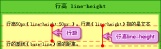
css text line height property
In CSS we can use the line-height property to set the line height. The line-height attribute can be used to set the distance between lines (line height). Negative values are not allowed. The line-height property affects the layout of the line box. When applied to a block-level element, it defines the minimum distance between baselines in that element rather than the maximum distance. The calculated difference between line-height and font-size (known as "line spacing" in CSS) is divided into two halves and added to the top and bottom of a line of text content. The smallest box that can contain this content is a line box. The attribute values that can be set by the line-height attribute:| Description | |
|---|---|
| Default. Set reasonable line spacing. | |
| number | Set a number that will be multiplied by the current font size to set the line spacing.|
| length | Set fixed line spacing.|
| % | Percent line spacing based on the current font size.|
| Specifies that the value of the line-height attribute should be inherited from the parent element. |
<!DOCTYPE html>
<html>
<head>
<style>
p
{
border:1px solid red;
}
p.small
{
line-height: 0.5
}
p.big
{
line-height: 2
}
</style>
</head>
<body>

<p>
这是一个标准What is the property of css text line height?的段落。
浏览器的默认What is the property of css text line height?为“1”。
这是一个标准What is the property of css text line height?的段落。
这是一个标准What is the property of css text line height?的段落。
</p>

<p class="small">
这是一个更小What is the property of css text line height?的段落。
这是一个更小What is the property of css text line height?的段落。
这是一个更小What is the property of css text line height?的段落。
这是一个更小What is the property of css text line height?的段落。
</p>

<p class="big">
这是一个更大What is the property of css text line height?的段落。
这是一个更大What is the property of css text line height?的段落。
这是一个更大What is the property of css text line height?的段落。
这是一个更大What is the property of css text line height?的段落。
</p>

</body>
</html>
Rendering: 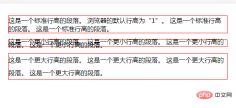
Element pair Influence of line height
- The line box height is the highest in-line box height in the line. It is adjusted by line-height. The line height of the content area is related to the font size; its padding, margin, border -top, border-bottom will not increase row height.
padding will be covered; margin will be reset to 0; border-top and border-bottom will also be covered.
padding-left, padding-right, border-left and border-right are available.
<div style="border:dashed 1px #0e0;margin-bottom:30px;">
                <span style="font-size:14px;background-color:#999;">This is a test</span>
</div>
<div style="border:dashed 1px #0e0;">
                <span style="font-size:14px;padding:20px;background-color:#999;">This is a test</span>
 </div>

- The img element will affect the line height
- Set the inline element Padding, border and margin will not increase the height of the outer element, as shown below:

The row height is inheritable, but it is not a simple copy of the row height of the parent element, but the calculated value is inherited.
<div   style="max-width:90%">
                <p style="font-size:30px;">
                    1232<br/>
                    123
                </p>
</div>
According to the general understanding, since line-height can be inherited, the line height of the p element is also 150%, but the fact is this
 Not only does it not It became 150%, but not even 100%. It overlapped! This is the result of inheritance calculation. If the line-height of the parent element has units (px, %), then the inherited value is a specific px-level value after conversion; in the above example, p gets 10px*150%= The line height is 15px and the font size of P is 30px, so the overlap occurs.
If the attribute value has no unit, the browser will directly inherit this "factor (value)" instead of the calculated specific value. At this time, its line-height will be based on its own font-size value. Recalculate the new line-height value.
<div style="border:dashed 1px #0e0;line-height:1.5;font-size:10px;">
                <p style="font-size:30px;">
                    1232<br/>
                    123
                </p>
</div>
 So when using line-height, unless you deliberately try to use multiple settings
(Learning video sharing:
Getting started with web front-endThe above is the detailed content of What is the property of css text line height?. For more information, please follow other related articles on the PHP Chinese website!

 Frontend Development with React: Advantages and TechniquesApr 17, 2025 am 12:25 AM
The advantages of React are its flexibility and efficiency, which are reflected in: 1) Component-based design improves code reusability; 2) Virtual DOM technology optimizes performance, especially when handling large amounts of data updates; 3) The rich ecosystem provides a large number of third-party libraries and tools. By understanding how React works and uses examples, you can master its core concepts and best practices to build an efficient, maintainable user interface.
 React vs. Other Frameworks: Comparing and Contrasting OptionsApr 17, 2025 am 12:23 AM
React is a JavaScript library for building user interfaces, suitable for large and complex applications. 1. The core of React is componentization and virtual DOM, which improves UI rendering performance. 2. Compared with Vue, React is more flexible but has a steep learning curve, which is suitable for large projects. 3. Compared with Angular, React is lighter, dependent on the community ecology, and suitable for projects that require flexibility.
 Demystifying React in HTML: How It All WorksApr 17, 2025 am 12:21 AM
React operates in HTML via virtual DOM. 1) React uses JSX syntax to write HTML-like structures. 2) Virtual DOM management UI update, efficient rendering through Diffing algorithm. 3) Use ReactDOM.render() to render the component to the real DOM. 4) Optimization and best practices include using React.memo and component splitting to improve performance and maintainability.
 React in Action: Examples of Real-World ApplicationsApr 17, 2025 am 12:20 AM
React is widely used in e-commerce, social media and data visualization. 1) E-commerce platforms use React to build shopping cart components, use useState to manage state, onClick to process events, and map function to render lists. 2) Social media applications interact with the API through useEffect to display dynamic content. 3) Data visualization uses react-chartjs-2 library to render charts, and component design is easy to embed applications.
 Frontend Architecture with React: Best PracticesApr 17, 2025 am 12:10 AM
Best practices for React front-end architecture include: 1. Component design and reuse: design a single responsibility, easy to understand and test components to achieve high reuse. 2. State management: Use useState, useReducer, ContextAPI or Redux/MobX to manage state to avoid excessive complexity. 3. Performance optimization: Optimize performance through React.memo, useCallback, useMemo and other methods to find the balance point. 4. Code organization and modularity: Organize code according to functional modules to improve manageability and maintainability. 5. Testing and Quality Assurance: Testing with Jest and ReactTestingLibrary to ensure the quality and reliability of the code
 React Inside HTML: Integrating JavaScript for Dynamic Web PagesApr 16, 2025 am 12:06 AM
To integrate React into HTML, follow these steps: 1. Introduce React and ReactDOM in HTML files. 2. Define a React component. 3. Render the component into HTML elements using ReactDOM. Through these steps, static HTML pages can be transformed into dynamic, interactive experiences.
 The Benefits of React: Performance, Reusability, and MoreApr 15, 2025 am 12:05 AM
React’s popularity includes its performance optimization, component reuse and a rich ecosystem. 1. Performance optimization achieves efficient updates through virtual DOM and diffing mechanisms. 2. Component Reuse Reduces duplicate code by reusable components. 3. Rich ecosystem and one-way data flow enhance the development experience.
 React: Creating Dynamic and Interactive User InterfacesApr 14, 2025 am 12:08 AM
React is the tool of choice for building dynamic and interactive user interfaces. 1) Componentization and JSX make UI splitting and reusing simple. 2) State management is implemented through the useState hook to trigger UI updates. 3) The event processing mechanism responds to user interaction and improves user experience.


Hot AI Tools

Undresser.AI Undress
AI-powered app for creating realistic nude photos

AI Clothes Remover
Online AI tool for removing clothes from photos.

Undress AI Tool
Undress images for free

Clothoff.io
AI clothes remover

AI Hentai Generator
Generate AI Hentai for free.

Hot Article
Hot Tools

SublimeText3 English version
Recommended: Win version, supports code prompts!

mPDF
mPDF is a PHP library that can generate PDF files from UTF-8 encoded HTML. The original author, Ian Back, wrote mPDF to output PDF files "on the fly" from his website and handle different languages. It is slower than original scripts like HTML2FPDF and produces larger files when using Unicode fonts, but supports CSS styles etc. and has a lot of enhancements. Supports almost all languages, including RTL (Arabic and Hebrew) and CJK (Chinese, Japanese and Korean). Supports nested block-level elements (such as P, DIV),

MinGW - Minimalist GNU for Windows
This project is in the process of being migrated to osdn.net/projects/mingw, you can continue to follow us there. MinGW: A native Windows port of the GNU Compiler Collection (GCC), freely distributable import libraries and header files for building native Windows applications; includes extensions to the MSVC runtime to support C99 functionality. All MinGW software can run on 64-bit Windows platforms.

SublimeText3 Chinese version
Chinese version, very easy to use

SublimeText3 Mac version
God-level code editing software (SublimeText3)

