


Sharing practical Word tips: Use the 'Recent Documents' function skillfully!

In the previous article " Sharing practical Word skills: 3 key points for setting page numbers! ", we introduced 3 key methods to make page number setting easy. Today we are going to talk about the “Recently Used Documents” function of Word, which can make it easier to find documents. Come and take a look!

At work, we often need to edit or view several commonly used documents. Generally, we will think of the fastest method, which is in the "Recently Used Documents" list Go and open it.
However, when we have opened multiple documents and then want to quickly open a document, this document is probably no longer in the "Recently Used Documents" list. This is because the number of files that can be displayed in the "Recently Used Documents" list is limited. When the files we access exceed the set number of documents, the old documents will be automatically replaced with new documents.
If there are some documents that we often need to use, in order to avoid being replaced, we can fix them in the list through the following method. No matter how many documents are opened later, it will not be replaced.
(1) Click the [File]-[Open]-[Recent] command. The recently used documents will be displayed in the list. Right-click the document that needs to be pinned, and select "Pin to List" in the expanded shortcut menu. "Order.
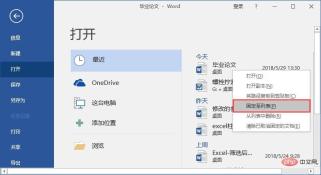
(2) After executing this command, the document can be fixed. (The symbol after the document title will change after fixing).

Tips: If you need to unpin a document in the list, you can right-click on the document and select "Unpin from List" .
In addition, sometimes for some privacy or confidentiality reasons, in order to prevent others from seeing which documents you have recently used from the recently used files list, you want to clear the "Recently Used Documents" list , how to operate?
(1) Click [File]-[Options] to open the "Word Options" dialog box.
(2) Select the "Advanced" option, set the [Display this number of recently used documents] value in the "Display" column, for example, set it to "0" here, and click the "OK" button.
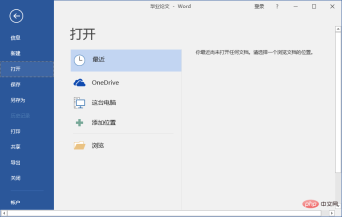
(3) can hide all recently used documents in the list.
Tips: [Display the value of this number of ‘recently used documents], children can set the specific value as needed.
Recommended tutorial: "Word Tutorial"
The above is the detailed content of Sharing practical Word tips: Use the 'Recent Documents' function skillfully!. For more information, please follow other related articles on the PHP Chinese website!

Hot AI Tools

Undresser.AI Undress
AI-powered app for creating realistic nude photos

AI Clothes Remover
Online AI tool for removing clothes from photos.

Undress AI Tool
Undress images for free

Clothoff.io
AI clothes remover

AI Hentai Generator
Generate AI Hentai for free.

Hot Article
Hot Tools

DVWA
Damn Vulnerable Web App (DVWA) is a PHP/MySQL web application that is very vulnerable. Its main goals are to be an aid for security professionals to test their skills and tools in a legal environment, to help web developers better understand the process of securing web applications, and to help teachers/students teach/learn in a classroom environment Web application security. The goal of DVWA is to practice some of the most common web vulnerabilities through a simple and straightforward interface, with varying degrees of difficulty. Please note that this software

PhpStorm Mac version
The latest (2018.2.1) professional PHP integrated development tool

SublimeText3 English version
Recommended: Win version, supports code prompts!

SecLists
SecLists is the ultimate security tester's companion. It is a collection of various types of lists that are frequently used during security assessments, all in one place. SecLists helps make security testing more efficient and productive by conveniently providing all the lists a security tester might need. List types include usernames, passwords, URLs, fuzzing payloads, sensitive data patterns, web shells, and more. The tester can simply pull this repository onto a new test machine and he will have access to every type of list he needs.

ZendStudio 13.5.1 Mac
Powerful PHP integrated development environment

