


 Web Front-end
JS Tutorial
A brief analysis of the event mechanism in JavaScript_Basic knowledge
Web Front-end
JS Tutorial
A brief analysis of the event mechanism in JavaScript_Basic knowledge
A brief analysis of the event mechanism in JavaScript_Basic knowledge

What is the event?
JavaScript interacts with HTML through events that occur on the page when the user or browser manipulates it.
When the page loads, this is an event. When the user clicks a button, this is an event. Another example of events are like pressing any key, closing window, resizing window, etc.
Developers can use these events to perform JavaScript-encoded responses, which cause buttons to close the window, messages to be displayed to the user, data to be validated, and virtually any other type of response that can occur.
Events are Level 3 of the Document Object Model (DOM). Every HTML element has a set of events that can trigger JavaScript code.
Example:
<html>
<head>
<script type="text/javascript">
<!--
function sayHello() {
  alert("Hello World")
}
//-->
</script>
</head>
<body>
<input type="button" onclick="sayHello()" value="Say Hello" />
</body>
</html>
This will produce the following result, when you click the "Hello" button, then the onclick event will trigger the sayHello() function.
onsubmit event type:
Another most important event type is onsubmit. This event is raised when an attempt is made to submit the form. Therefore, you can target form validation to this event type.
The following is a simple example to illustrate its usage. Here, we call a validate() function before submitting the form data to the web server. The validate() function returns true if the form will be submitted, otherwise the data will not be submitted.
Example:
<html>
<head>
<script type="text/javascript">
<!--
function validation() {
  all validation goes here
  .........
  return either true or false
}
//-->
</script>
</head>
<body>
<form method="POST" action="t.cgi" onsubmit="return validate()">
.......
<input type="submit" value="Submit" />
</form>
</body>
</html>
onmouseover and onmouseout:
These two event types will help create nice effects with pictures or even text. When the mouse is placed on any element, the onmouseout event occurs when the mouse is moved out of the element, and the onmouseover event occurs when the mouse moves over.
Example:
The following example shows that the group response is as follows:
<html>
<head>
<script type="text/javascript">
<!--
function over() {
  alert("Mouse Over");
}
function out() {
  alert("Mouse Out");
}
//-->
</script>
</head>
<body>
<div onmouseover="over()" onmouseout="out()">
<h2> This is inside the division </h2>
</div>
</body>
</html>
You can use these two event types to change different images and also create users to help you.
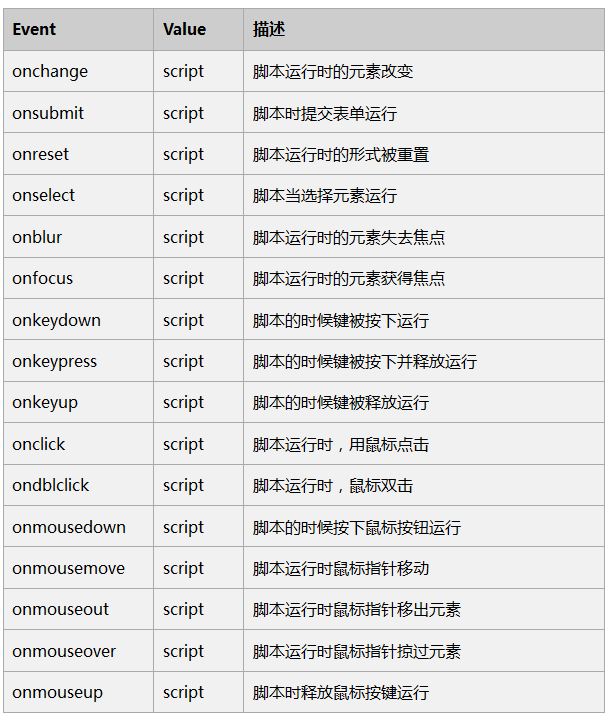
HTML 4 standard events
Standard HTML4 events are listed here for your reference. The script below displays a Javascript function to execute on this event.

Hot AI Tools

Undresser.AI Undress
AI-powered app for creating realistic nude photos

AI Clothes Remover
Online AI tool for removing clothes from photos.

Undress AI Tool
Undress images for free

Clothoff.io
AI clothes remover

AI Hentai Generator
Generate AI Hentai for free.

Hot Article
Hot Tools

Notepad++7.3.1
Easy-to-use and free code editor

SublimeText3 Chinese version
Chinese version, very easy to use

Zend Studio 13.0.1
Powerful PHP integrated development environment

Dreamweaver CS6
Visual web development tools

SublimeText3 Mac version
God-level code editing software (SublimeText3)
Hot Topics
 1386
1386
 52
52

 How to implement an online speech recognition system using WebSocket and JavaScript
Dec 17, 2023 pm 02:54 PM
How to implement an online speech recognition system using WebSocket and JavaScript
Dec 17, 2023 pm 02:54 PM
How to use WebSocket and JavaScript to implement an online speech recognition system Introduction: With the continuous development of technology, speech recognition technology has become an important part of the field of artificial intelligence. The online speech recognition system based on WebSocket and JavaScript has the characteristics of low latency, real-time and cross-platform, and has become a widely used solution. This article will introduce how to use WebSocket and JavaScript to implement an online speech recognition system.
 WebSocket and JavaScript: key technologies for implementing real-time monitoring systems
Dec 17, 2023 pm 05:30 PM
WebSocket and JavaScript: key technologies for implementing real-time monitoring systems
Dec 17, 2023 pm 05:30 PM
WebSocket and JavaScript: Key technologies for realizing real-time monitoring systems Introduction: With the rapid development of Internet technology, real-time monitoring systems have been widely used in various fields. One of the key technologies to achieve real-time monitoring is the combination of WebSocket and JavaScript. This article will introduce the application of WebSocket and JavaScript in real-time monitoring systems, give code examples, and explain their implementation principles in detail. 1. WebSocket technology
 How to use JavaScript and WebSocket to implement a real-time online ordering system
Dec 17, 2023 pm 12:09 PM
How to use JavaScript and WebSocket to implement a real-time online ordering system
Dec 17, 2023 pm 12:09 PM
Introduction to how to use JavaScript and WebSocket to implement a real-time online ordering system: With the popularity of the Internet and the advancement of technology, more and more restaurants have begun to provide online ordering services. In order to implement a real-time online ordering system, we can use JavaScript and WebSocket technology. WebSocket is a full-duplex communication protocol based on the TCP protocol, which can realize real-time two-way communication between the client and the server. In the real-time online ordering system, when the user selects dishes and places an order
 How to implement an online reservation system using WebSocket and JavaScript
Dec 17, 2023 am 09:39 AM
How to implement an online reservation system using WebSocket and JavaScript
Dec 17, 2023 am 09:39 AM
How to use WebSocket and JavaScript to implement an online reservation system. In today's digital era, more and more businesses and services need to provide online reservation functions. It is crucial to implement an efficient and real-time online reservation system. This article will introduce how to use WebSocket and JavaScript to implement an online reservation system, and provide specific code examples. 1. What is WebSocket? WebSocket is a full-duplex method on a single TCP connection.
 JavaScript and WebSocket: Building an efficient real-time weather forecasting system
Dec 17, 2023 pm 05:13 PM
JavaScript and WebSocket: Building an efficient real-time weather forecasting system
Dec 17, 2023 pm 05:13 PM
JavaScript and WebSocket: Building an efficient real-time weather forecast system Introduction: Today, the accuracy of weather forecasts is of great significance to daily life and decision-making. As technology develops, we can provide more accurate and reliable weather forecasts by obtaining weather data in real time. In this article, we will learn how to use JavaScript and WebSocket technology to build an efficient real-time weather forecast system. This article will demonstrate the implementation process through specific code examples. We
 Simple JavaScript Tutorial: How to Get HTTP Status Code
Jan 05, 2024 pm 06:08 PM
Simple JavaScript Tutorial: How to Get HTTP Status Code
Jan 05, 2024 pm 06:08 PM
JavaScript tutorial: How to get HTTP status code, specific code examples are required. Preface: In web development, data interaction with the server is often involved. When communicating with the server, we often need to obtain the returned HTTP status code to determine whether the operation is successful, and perform corresponding processing based on different status codes. This article will teach you how to use JavaScript to obtain HTTP status codes and provide some practical code examples. Using XMLHttpRequest
 How to implement change event binding of select elements in jQuery
Feb 23, 2024 pm 01:12 PM
How to implement change event binding of select elements in jQuery
Feb 23, 2024 pm 01:12 PM
jQuery is a popular JavaScript library that can be used to simplify DOM manipulation, event handling, animation effects, etc. In web development, we often encounter situations where we need to change event binding on select elements. This article will introduce how to use jQuery to bind select element change events, and provide specific code examples. First, we need to create a dropdown menu with options using labels:
 JavaScript and WebSocket: Building an efficient real-time image processing system
Dec 17, 2023 am 08:41 AM
JavaScript and WebSocket: Building an efficient real-time image processing system
Dec 17, 2023 am 08:41 AM
JavaScript is a programming language widely used in web development, while WebSocket is a network protocol used for real-time communication. Combining the powerful functions of the two, we can create an efficient real-time image processing system. This article will introduce how to implement this system using JavaScript and WebSocket, and provide specific code examples. First, we need to clarify the requirements and goals of the real-time image processing system. Suppose we have a camera device that can collect real-time image data
