


This time I will bring you the use of vue to make a mobile drop-down list. What are the precautions for using vue to make a mobile drop-down list? The following is a practical case, let's take a look.
Installation
cnpm install vue-droplist --save
Import in the component
import DropList from 'vue-droplist'
// 显示下拉列表
showDropList() {
// 配置信息
const configData = {
position: { // 设置显示位置
top: '',
right: '',
bottom: '',
left: ''
},
width: '40%', // 设置宽度
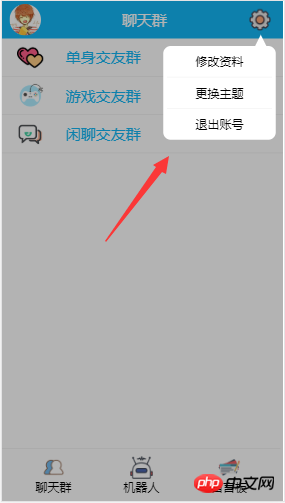
list: [ // 设置下拉列表数据和对应的点击事件
{text: '修改资料', action: this.updateUserInfo},
{text: '更换主题', action: this.updateTheme},
{text: '退出账号', action: this.signOut}
...
],
isShow: true //设置显示,默认false
}
DropList(configData) //执行配置信息
},
updateUserInfo() {
//do something
},
updateTheme() {
//do something
},
signOut() {
//do something
}
I believe I read the case in this article You have mastered the method. For more exciting information, please pay attention to other related articles on the php Chinese website!
Recommended reading:
Analysis of assets and static use cases
JS uses createElement() to dynamically add HTML
The above is the detailed content of Use vue to make a mobile drop-down list. For more information, please follow other related articles on the PHP Chinese website!

















![[Web front-end] Node.js quick start](https://img.php.cn/upload/course/000/000/067/662b5d34ba7c0227.png)



