This time I will show you how to use Vue to implement the countdown button, and what are the precautions for using Vue to implement the countdown button. The following is a practical case, let's take a look.
In project development, we often encounter a button that sends a verification code and has a 60-second countdown after clicking it. It is very common but also very simple, but there are certain places that you need to pay attention to when writing this button. Next, I will write it down today. If you have any questions, please correct me!
The completed effect is as follows:

In order to show the effect faster, I set the time to 5 seconds. After clicking the button, a countdown will appear. At the same time, the button will become unclickable, its style will also change, and the appearance of the mouse hovering will also change.
Next we use code to implement it:
<button class="button" @click="countDown">
 {{content}}
</button>
...
data () {
  return {
   content: '发送验证码',  // 按钮里显示的内容
   totalTime: 60      //记录具体倒计时时间
  }
},
methods: {
  countDown() {
    let clock = window.setInterval(() => {
      this.total--
      this.content = this.total + 's后重新发送'
    },1000)
  }
}
Copy after login
Add two pieces of data to the data, one to record the time, and one to hold the specific content of the countdown button. In the countDown function, we use the setInterval timer to decrement the totalTime by 1 every second and change the content displayed in the button. The arrow function is used in window.setInterval because it will automatically bind the external this, so there is no need to save this first.
The effect is as shown below:
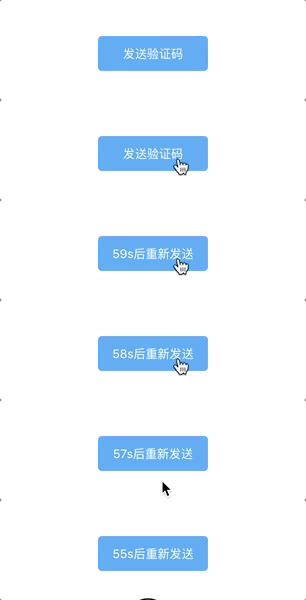
But there are still some problems with this button:
After clicking the button, after 1 second, it will go directly from The countdown starts at 59 seconds, and the 60 in the middle is gone.
You can still click during the countdown.
The countdown has not been cleared yet.
Next, you need to continue to improve the countDown function to solve these problems.
countDown () {
this.content = this.totalTime + 's后重新发送' //这里解决60秒不见了的问题
let clock = window.setInterval(() => {
this.totalTime--
this.content = this.totalTime + 's后重新发送'
if (this.totalTime < 0) { //当倒计时小于0时清除定时器
window.clearInterval(clock)
this.content = '重新发送验证码'
this.totalTime = 60
}
},1000)
},Copy after login
The above code solves the problem of 60 missing. At the same time, when totalTime is less than 0, it clears the synchronizer, resets the content in the button, and resets totalTime to 60 for next time use.
The effect of counting down for 10 seconds:
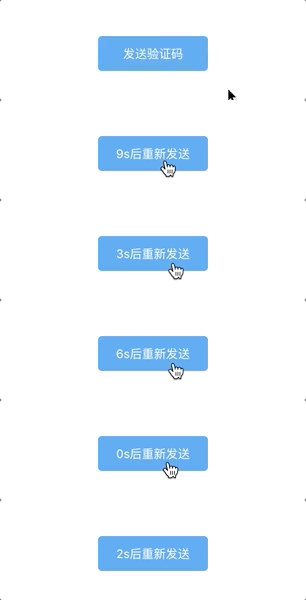
Found a bug. After clicking multiple times, the speed of rewinding becomes faster. This is because each click will Start a setInterval, these setIntervals will reduce totalTime. The solution is also very simple: simply throttle it, that is, make the code of the countDonw function non-executable after the first click of the button, and wait until the countdown is over before it can be executed again.
data () {
return {
content: '发送验证码',
totalTime: 10,
canClick: true //添加canClick
}
}
...
countDown () {
if (!this.canClick) return //改动的是这两行代码
this.canClick = false
this.content = this.totalTime + 's后重新发送'
let clock = window.setInterval(() => {
this.totalTime--
this.content = this.totalTime + 's后重新发送'
if (this.totalTime < 0) {
window.clearInterval(clock)
this.content = '重新发送验证码'
this.totalTime = 10
this.canClick = true //这里重新开启
}
},1000)
}Copy after login
Add canClick in data. The default is true. If canClick is true, the code in countDown can be executed. If it is false, it will not work. Set canClick to false every time it is executed, and only change it to true when the countdown ends. This way the problem just now disappears.
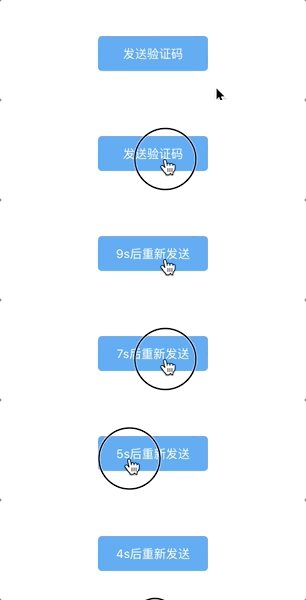
It’s almost done here, but you can also adjust the style:
<button class="button" :class="{disabled: !this.canClick}" @click="countDown">
...
.disabled{
 background-color: #ddd;
 border-color: #ddd;
 color:#57a3f3;
 cursor: not-allowed; // 鼠标变化
}
Copy after login
Effect:

This countdown button is very simple, but it was still very messy when I first wrote it, and I didn’t know the concept of function throttling at that time.
I believe you have mastered the method after reading the case in this article. For more exciting information, please pay attention to other related articles on the php Chinese website!
Recommended reading:
How to use Vue to write a two-way data binding
##How to use Vue to implement proxy proxy
The above is the detailed content of How to use Vue to implement a countdown button. For more information, please follow other related articles on the PHP Chinese website!



















![[Web front-end] Node.js quick start](https://img.php.cn/upload/course/000/000/067/662b5d34ba7c0227.png)



