


 Web Front-end
JS Tutorial
How to operate the local development and debugging environment for Koa2 WeChat public account development
Web Front-end
JS Tutorial
How to operate the local development and debugging environment for Koa2 WeChat public account development
How to operate the local development and debugging environment for Koa2 WeChat public account development

This time I will show you how to set up a local development and debugging environment for the development of Koa2 WeChat public account. What are the precautions , and the following are practical cases. , let’s take a look.
1. Introduction
The introduction to the WeChat public account is omitted, search it by yourself. Not to mention the registration process. We will directly register the test account to implement the code. This will be a series of tutorials that comprehensively explain the development of WeChat public accounts. This article is the first in the series, setting up a local development environment and accessing WeChat. Before you start, it is best to read the developer documentation and WeChat public platform technical documentation
2. Setting up a local development and debugging environment
2.1 Development environment##MacOs
- Node v8.9.1
-
Koa2 - 2.2 Basic principles of WeChat public platform development
Let’s first take a look at the basic principles of WeChat public platform development: When developing WeChat, we need to deploy services on our own server to process WeChat messages. The WeChat server is equivalent to a forwarding server. The terminal (mobile phone, Pad, etc.) initiates a request to the WeChat server, and the WeChat server then forwards the request to the custom service (here is our specific implementation). After the service is processed, it is forwarded to the WeChat server, and the WeChat server replies with a specific response to the terminal. The communication protocol is: HTTP; the data format is: XML.
What our service needs to do is respond to the request, parse the XML, perform corresponding processing and then return the specific XML. 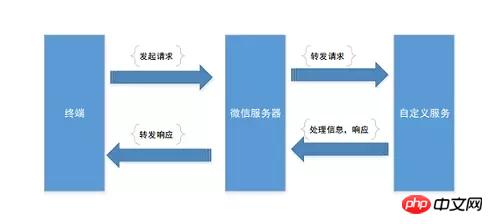
2.3 ngrok WeChat local development
Here we learned that accessing WeChat development requires a response server of its own. We can purchase a server or Sina Cloud, Baidu Cloud, etc. Serve. But this is very troublesome during our development phase. We need to build a useful local debugging environment and map the internal network so that it can be accessed by the external network.
It is recommended to use Ngrok service. Both win and mac are easy to use and stable, and the external domain name is fixed. Open its website www.ngrok.cc/Register and log in and open the tunnel. At the same time, you need to download the corresponding clientThis is a batchprocessing file
in win, run it and then fill in the corresponding tunnel id and press Enter. The command line execution in Mac is as follows Order../sunny clientid 隧道id
For more information, please refer to ngrok official website tutorial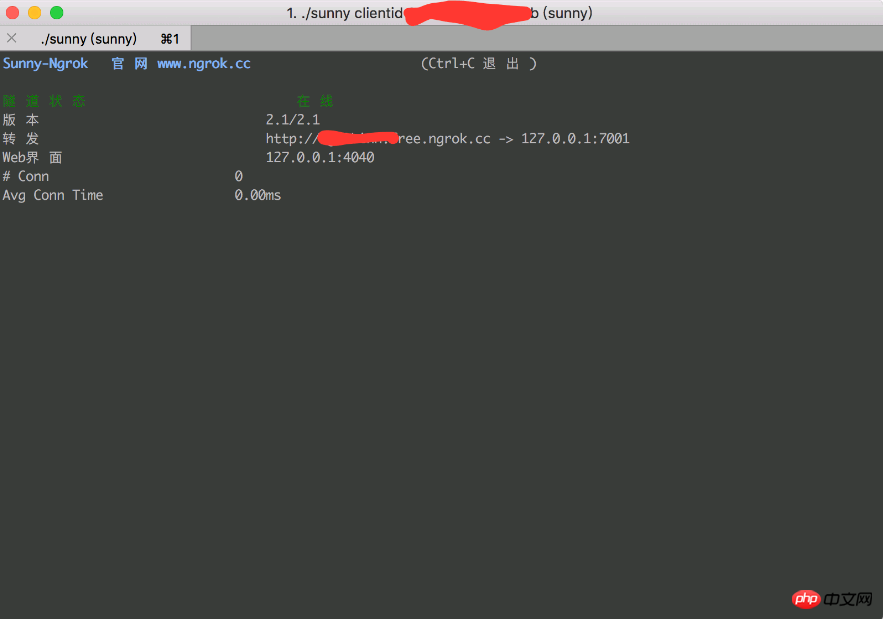
mkdir koa2-wechat && cd koa2-wechat
npm install koa --save
const Koa = require('koa')
const app = new Koa()
app.use(async ctx => {
 ctx.body = 'JavaScript之禅'
});
app.listen(7001);npm install -g supervisor supervisor app.js
./sunny clientid 隧道id
##3. Access to WeChat public platform development
3.1 Access process
To access the WeChat public platform for development, developers need to follow the following steps: 1. Fill in the server configuration
2. Verify the validity of the server address
3. Implement business logic based on the interface document
我们登录微信公众平台接口测试帐号https://mp.weixin.qq.com/debug/cgi-bin/sandbox?t=sandbox/login,登录后填写接口配置信息*(你的url地址以及token)*,这时肯定不能配置成功的。我们需要验证服务器地址的有效性,开发者提交信息后,微信服务器将发送GET请求到填写的服务器地址URL上,GET请求携带参数如下表所示:
| 参数 | 描述 |
|---|---|
| signature | 微信加密签名,signature结合了开发者填写的token参数和请求中的timestamp参数、nonce参数。 |
| timestamp | 时间戳 |
| nonce | 随机数 |
| echostr | 随机字符串 |
开发者通过检验signature对请求进行校验。若确认此次GET请求来自微信服务器,原样返回echostr参数内容,则接入生效,成为开发者成功,否则接入失败。加密/校验流程如下:
将token、timestamp、nonce三个参数进行字典序排序
将三个参数字符串拼接成一个字符串进行sha1加密
开发者获得加密后的字符串可与signature对比,标识该请求来源于微信
Talk is cheap. Show me the code
3.2 koa2验证服务器地址的有效性
修改app.js
const Koa = require('koa')
const app = new Koa()
// 引入node加密模块进行sha1加密
const crypto = require('crypto')
const config = {
 wechat: {
  appID: 'appID',
  appsecret: 'appsecret',
  token: 'zenofjavascript',
 }
}
app.use(async ctx => {
  const { signature, timestamp, nonce, echostr } = ctx.query
  const token = config.wechat.token
  let hash = crypto.createHash('sha1')
  const arr = [token, timestamp, nonce].sort()
  hash.update(arr.join(''))
  const shasum = hash.digest('hex')
  if(shasum === signature){
   return ctx.body = echostr
  }
  ctx.status = 401
  ctx.body = 'Invalid signature'
})
app.listen(7001)相信看了本文案例你已经掌握了方法,更多精彩请关注php中文网其它相关文章!
推荐阅读:
The above is the detailed content of How to operate the local development and debugging environment for Koa2 WeChat public account development. For more information, please follow other related articles on the PHP Chinese website!

Hot AI Tools

Undresser.AI Undress
AI-powered app for creating realistic nude photos

AI Clothes Remover
Online AI tool for removing clothes from photos.

Undress AI Tool
Undress images for free

Clothoff.io
AI clothes remover

AI Hentai Generator
Generate AI Hentai for free.

Hot Article
Hot Tools

Notepad++7.3.1
Easy-to-use and free code editor

SublimeText3 Chinese version
Chinese version, very easy to use

Zend Studio 13.0.1
Powerful PHP integrated development environment

Dreamweaver CS6
Visual web development tools

SublimeText3 Mac version
God-level code editing software (SublimeText3)
Hot Topics
 1378
1378
 52
52

 How do I create and publish my own JavaScript libraries?
Mar 18, 2025 pm 03:12 PM
How do I create and publish my own JavaScript libraries?
Mar 18, 2025 pm 03:12 PM
Article discusses creating, publishing, and maintaining JavaScript libraries, focusing on planning, development, testing, documentation, and promotion strategies.
 How do I optimize JavaScript code for performance in the browser?
Mar 18, 2025 pm 03:14 PM
How do I optimize JavaScript code for performance in the browser?
Mar 18, 2025 pm 03:14 PM
The article discusses strategies for optimizing JavaScript performance in browsers, focusing on reducing execution time and minimizing impact on page load speed.
 What should I do if I encounter garbled code printing for front-end thermal paper receipts?
Apr 04, 2025 pm 02:42 PM
What should I do if I encounter garbled code printing for front-end thermal paper receipts?
Apr 04, 2025 pm 02:42 PM
Frequently Asked Questions and Solutions for Front-end Thermal Paper Ticket Printing In Front-end Development, Ticket Printing is a common requirement. However, many developers are implementing...
 How do I debug JavaScript code effectively using browser developer tools?
Mar 18, 2025 pm 03:16 PM
How do I debug JavaScript code effectively using browser developer tools?
Mar 18, 2025 pm 03:16 PM
The article discusses effective JavaScript debugging using browser developer tools, focusing on setting breakpoints, using the console, and analyzing performance.
 Who gets paid more Python or JavaScript?
Apr 04, 2025 am 12:09 AM
Who gets paid more Python or JavaScript?
Apr 04, 2025 am 12:09 AM
There is no absolute salary for Python and JavaScript developers, depending on skills and industry needs. 1. Python may be paid more in data science and machine learning. 2. JavaScript has great demand in front-end and full-stack development, and its salary is also considerable. 3. Influencing factors include experience, geographical location, company size and specific skills.
 How do I use source maps to debug minified JavaScript code?
Mar 18, 2025 pm 03:17 PM
How do I use source maps to debug minified JavaScript code?
Mar 18, 2025 pm 03:17 PM
The article explains how to use source maps to debug minified JavaScript by mapping it back to the original code. It discusses enabling source maps, setting breakpoints, and using tools like Chrome DevTools and Webpack.
 The difference in console.log output result: Why are the two calls different?
Apr 04, 2025 pm 05:12 PM
The difference in console.log output result: Why are the two calls different?
Apr 04, 2025 pm 05:12 PM
In-depth discussion of the root causes of the difference in console.log output. This article will analyze the differences in the output results of console.log function in a piece of code and explain the reasons behind it. �...
 TypeScript for Beginners, Part 2: Basic Data Types
Mar 19, 2025 am 09:10 AM
TypeScript for Beginners, Part 2: Basic Data Types
Mar 19, 2025 am 09:10 AM
Once you have mastered the entry-level TypeScript tutorial, you should be able to write your own code in an IDE that supports TypeScript and compile it into JavaScript. This tutorial will dive into various data types in TypeScript. JavaScript has seven data types: Null, Undefined, Boolean, Number, String, Symbol (introduced by ES6) and Object. TypeScript defines more types on this basis, and this tutorial will cover all of them in detail. Null data type Like JavaScript, null in TypeScript
