


Canvas and JS implement dynamic clock animation

This time I will bring you canvas and JS to implement dynamic clock animation. What are the precautions for implementing dynamic clock animation with canvas and JS? The following is a practical case, let's take a look.
Let’s take a look at the running effect first:
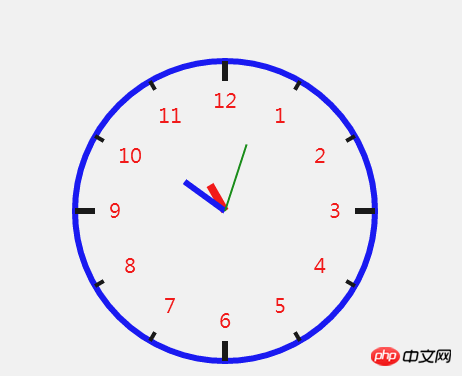
Complete example code:
nbsp;html>
<meta>
<title>canvas时钟</title>
<style>
canvas {
border: 1px solid red;
}
</style>
<canvas></canvas>
<script>
function Clock(opt) {
for (var key in opt) {
this[key] = opt[key];
}
this.init();
}
Clock.prototype = {
init: function () {
var self = this;
var ctx = this.ctx;
this.timer = setInterval(function(){
ctx.clearRect(0,0,ctx.canvas.width,ctx.canvas.height);
self.drawDial();
self.drawDegreeScale();
self.drawNumber();
self.drawPointers();
},1000);
},
drawDial: function () {
var ctx = this.ctx;
ctx.save();
ctx.beginPath();
ctx.lineWidth = this.clockDialW;
ctx.strokeStyle = this.clockDialColor;
ctx.arc(this.clockX, this.clockY, this.clockRadius, 0, 2 * Math.PI);
ctx.stroke();
ctx.restore();
},
drawDegreeScale: function () {
var ctx = this.ctx;
var clockRadius = this.clockRadius;
var clockX = this.clockX;
var clockY = this.clockY;
var bigDegreeScaleL = this.bigDegreeScaleL;
var smallDegreeScale = this.smallDegreeScale;
var startX, startY, endX, endY, radian;
ctx.save();
for (var i = 0; i < 12; i++) {
radian = i * Math.PI / 6;
endX = clockX + clockRadius * Math.cos(radian);
endY = clockY + clockRadius * Math.sin(radian);
if (radian % (Math.PI / 2) == 0) {
startX = clockX + (clockRadius - bigDegreeScaleL) * Math.cos(radian);
startY = clockY + (clockRadius - bigDegreeScaleL) * Math.sin(radian);
ctx.lineWidth = this.bigDCWidth;
} else {
startX = clockX + (clockRadius - smallDegreeScale) * Math.cos(radian);
startY = clockY + (clockRadius - smallDegreeScale) * Math.sin(radian);
ctx.lineWidth = this.smallDCWidth;
}
ctx.beginPath();
ctx.moveTo(startX, startY);
ctx.lineTo(endX, endY);
ctx.stroke();
ctx.restore();
}
},
drawNumber: function () {
var ctx = this.ctx;
var textX, textY, textRadian;
var clockX = this.clockX;
var clockY = this.clockY;
var clockRadius = this.clockRadius;
ctx.font = '20px 微软雅黑';
ctx.fillStyle = 'red';
ctx.textAlign = 'center';
ctx.textBaseline = 'middle';
ctx.save();
for (var i = 0; i < 12; i++) {
textRadian = i * Math.PI / 6 - Math.PI/3;
textX = clockX + (clockRadius - 40) * Math.cos(textRadian);
textY = clockY + (clockRadius - 40) * Math.sin(textRadian);
ctx.beginPath();
ctx.fillText(i + 1, textX, textY);
}
ctx.restore();
},
drawPointers: function () {
var date = new Date();
var h = date.getHours();
var m = date.getMinutes();
var s = date.getSeconds();
h = h % 12;
var hRadian = 2 * Math.PI / 12 * h - Math.PI / 2;
this.drawPoint(hRadian,30,'red',8);
var mRadian = 2 * Math.PI / 60 * m - Math.PI / 2;
this.drawPoint(mRadian,50,'blue',6);
var sRadian = 2 * Math.PI / 60 * s - Math.PI / 2;
this.drawPoint(sRadian,70,'green',2);
},
drawPoint: function (radian, length,color,lineWidth) {
var x = this.clockX + Math.cos(radian) * length;
var y = this.clockY + Math.sin(radian) * length;
var ctx = this.ctx;
ctx.save();
ctx.beginPath();
ctx.strokeStyle = color;
ctx.lineWidth = lineWidth;
ctx.moveTo(this.clockX,this.clockY);
ctx.lineTo(x,y);
ctx.stroke();
ctx.restore();
}
};
</script>
<script>
var canvas = document.querySelector('canvas');
var ctx = canvas.getContext('2d');
var clock = new Clock({
ctx: this.ctx,
clockRadius: 150,
clockX: 300,
clockY: 300,
clockDialW: 6,
clockDialColor: 'blue',
bigDegreeScaleL: 20,
bigDCWidth: 6,
smallDegreeScale: 10,
smallDCWidth: 4
});
</script>
I believe you have mastered the method after reading the case in this article. For more exciting information, please pay attention to other related articles on the PHP Chinese website!
Recommended reading:
Optimize page loading speed plug-in InstantClick
Preloading InstantClick usage detailed explanation
How to set up InstantClick to be compatible with MathJax and Baidu Statistics, etc.
The above is the detailed content of Canvas and JS implement dynamic clock animation. For more information, please follow other related articles on the PHP Chinese website!

Hot AI Tools

Undresser.AI Undress
AI-powered app for creating realistic nude photos

AI Clothes Remover
Online AI tool for removing clothes from photos.

Undress AI Tool
Undress images for free

Clothoff.io
AI clothes remover

AI Hentai Generator
Generate AI Hentai for free.

Hot Article
Hot Tools

Notepad++7.3.1
Easy-to-use and free code editor

SublimeText3 Chinese version
Chinese version, very easy to use

Zend Studio 13.0.1
Powerful PHP integrated development environment

Dreamweaver CS6
Visual web development tools

SublimeText3 Mac version
God-level code editing software (SublimeText3)
Hot Topics
 1381
1381
 52
52

![Animation not working in PowerPoint [Fixed]](https://img.php.cn/upload/article/000/887/227/170831232982910.jpg?x-oss-process=image/resize,m_fill,h_207,w_330) Animation not working in PowerPoint [Fixed]
Feb 19, 2024 am 11:12 AM
Animation not working in PowerPoint [Fixed]
Feb 19, 2024 am 11:12 AM
Are you trying to create a presentation but can't add animation? If animations are not working in PowerPoint on your Windows PC, then this article will help you. This is a common problem that many people complain about. For example, animations may stop working during presentations in Microsoft Teams or during screen recordings. In this guide, we will explore various troubleshooting techniques to help you fix animations not working in PowerPoint on Windows. Why aren't my PowerPoint animations working? We have noticed that some possible reasons that may cause the animation in PowerPoint not working issue on Windows are as follows: Due to personal
 How to set up ppt animation to enter first and then exit
Mar 20, 2024 am 09:30 AM
How to set up ppt animation to enter first and then exit
Mar 20, 2024 am 09:30 AM
We often use ppt in our daily work, so are you familiar with every operating function in ppt? For example: How to set animation effects in ppt, how to set switching effects, and what is the effect duration of each animation? Can each slide play automatically, enter and then exit the ppt animation, etc. In this issue, I will first share with you the specific steps of entering and then exiting the ppt animation. It is below. Friends, come and take a look. Look! 1. First, we open ppt on the computer, click outside the text box to select the text box (as shown in the red circle in the figure below). 2. Then, click [Animation] in the menu bar and select the [Erase] effect (as shown in the red circle in the figure). 3. Next, click [
 After a two-year delay, the domestic 3D animated film 'Er Lang Shen: The Deep Sea Dragon' is scheduled to be released on July 13
Jan 26, 2024 am 09:42 AM
After a two-year delay, the domestic 3D animated film 'Er Lang Shen: The Deep Sea Dragon' is scheduled to be released on July 13
Jan 26, 2024 am 09:42 AM
This website reported on January 26 that the domestic 3D animated film "Er Lang Shen: The Deep Sea Dragon" released a set of latest stills and officially announced that it will be released on July 13. It is understood that "Er Lang Shen: The Deep Sea Dragon" is produced by Mihuxing (Beijing) Animation Co., Ltd., Horgos Zhonghe Qiancheng Film Co., Ltd., Zhejiang Hengdian Film Co., Ltd., Zhejiang Gongying Film Co., Ltd., Chengdu The animated film produced by Tianhuo Technology Co., Ltd. and Huawen Image (Beijing) Film Co., Ltd. and directed by Wang Jun was originally scheduled to be released in mainland China on July 22, 2022. Synopsis of the plot of this site: After the Battle of the Conferred Gods, Jiang Ziya took the "Conferred Gods List" to divide the gods, and then the Conferred Gods List was sealed by the Heavenly Court under the deep sea of Kyushu Secret Realm. In fact, in addition to conferring divine positions, there are also many powerful evil spirits sealed in the Conferred Gods List.
 Simple JavaScript Tutorial: How to Get HTTP Status Code
Jan 05, 2024 pm 06:08 PM
Simple JavaScript Tutorial: How to Get HTTP Status Code
Jan 05, 2024 pm 06:08 PM
JavaScript tutorial: How to get HTTP status code, specific code examples are required. Preface: In web development, data interaction with the server is often involved. When communicating with the server, we often need to obtain the returned HTTP status code to determine whether the operation is successful, and perform corresponding processing based on different status codes. This article will teach you how to use JavaScript to obtain HTTP status codes and provide some practical code examples. Using XMLHttpRequest
 Best Free AI Animation Art Generator
Feb 19, 2024 pm 10:50 PM
Best Free AI Animation Art Generator
Feb 19, 2024 pm 10:50 PM
If you are eager to find the top free AI animation art generator, you can end your search. The world of anime art has been captivating audiences for decades with its unique character designs, captivating colors and captivating plots. However, creating anime art requires talent, skill, and a lot of time. However, with the continuous development of artificial intelligence (AI), you can now explore the world of animation art without having to delve into complex technologies with the help of the best free AI animation art generator. This will open up new possibilities for you to unleash your creativity. What is an AI anime art generator? The AI Animation Art Generator utilizes sophisticated algorithms and machine learning techniques to analyze an extensive database of animation works. Through these algorithms, the system learns and identifies different animation styles
 Learn the canvas framework and explain the commonly used canvas framework in detail
Jan 17, 2024 am 11:03 AM
Learn the canvas framework and explain the commonly used canvas framework in detail
Jan 17, 2024 am 11:03 AM
Explore the Canvas framework: To understand what are the commonly used Canvas frameworks, specific code examples are required. Introduction: Canvas is a drawing API provided in HTML5, through which we can achieve rich graphics and animation effects. In order to improve the efficiency and convenience of drawing, many developers have developed different Canvas frameworks. This article will introduce some commonly used Canvas frameworks and provide specific code examples to help readers gain a deeper understanding of how to use these frameworks. 1. EaselJS framework Ea
 How to make animated thunderstorm in thunderstorm ppt
Mar 20, 2024 pm 02:41 PM
How to make animated thunderstorm in thunderstorm ppt
Mar 20, 2024 pm 02:41 PM
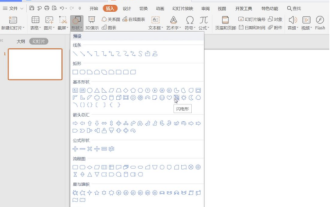
Sometimes we encounter the need to add animation to a ppt. For example, if we want to make a thunderstorm ppt and add some animated thunderstorm effects to it, what should we do? Today, the editor will introduce to you how to make an animated thunderstorm in thunderstorm ppt. It is actually very simple, come and learn it! 1. First we open a PPT page, "Insert" - "Shape" - "Basic Shape" - "Lightning Shape", as shown in the picture. 2. In the "Fill and Line" tab on the right, select "Fill": white; "Select" "Line": black, as shown in the figure. 3. Click "Animation" - "Custom Animation" - "Add Effects" - "Emphasis" - "Subtle" - "Flickering",
 How to get HTTP status code in JavaScript the easy way
Jan 05, 2024 pm 01:37 PM
How to get HTTP status code in JavaScript the easy way
Jan 05, 2024 pm 01:37 PM
Introduction to the method of obtaining HTTP status code in JavaScript: In front-end development, we often need to deal with the interaction with the back-end interface, and HTTP status code is a very important part of it. Understanding and obtaining HTTP status codes helps us better handle the data returned by the interface. This article will introduce how to use JavaScript to obtain HTTP status codes and provide specific code examples. 1. What is HTTP status code? HTTP status code means that when the browser initiates a request to the server, the service
