


jQuery visual form drag and drop editing code
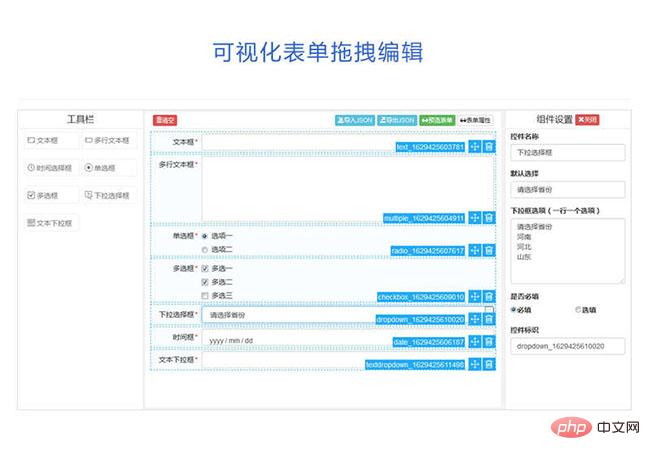
jQuery visual form drag and drop editing code is a visual form based on jQuery and bootstrap framework.
All resources on this site are contributed by netizens or reprinted by major download sites. Please check the integrity of the software yourself! All resources on this site are for learning reference only. Please do not use them for commercial purposes. Otherwise, you will be responsible for all consequences! If there is any infringement, please contact us to delete it. Contact information: admin@php.cn

 How to add a reset button to an html form
11 Nov 2025
Use the input or button element of type="reset" to add a reset button. After clicking, the form content will be cleared and the default values will be restored. Make sure the button is located within the form tag.
 How to prevent form submission on button click in HTML?
11 Dec 2025
Use type="button" to prevent non-submit buttons from triggering submission, or call preventDefault() in JavaScript to conditionally prevent form submission, so that the form is not submitted when the button is clicked.
 Solve the style update problem caused by the default behavior of HTML buttons
29 Dec 2025
This article aims to solve the problem that the style of button elements in HTML cannot be updated correctly due to the default behavior within the form. When a button is in a form, even if its associated JavaScript function executes, the page may refresh on form submission, preventing CSS class changes from being persisted. The core solution is to explicitly set the button's type attribute to "button" to prevent it from triggering the default form submission behavior.
 Angular responsive form: disabling form and buttons after submission
02 Dec 2025
This tutorial details how to make the entire form and its submit button uneditable in an Angular responsive form by clicking the "Save" button once. This article will guide you on how to use the formGroup.disable() method to disable form controls, and combine Boolean flags and attribute binding to disable buttons to ensure that the form content is only viewable after data submission, improving user experience and data integrity.
 Guide to preventing the Enter key from triggering button click events in HTML forms
18 Dec 2025
In an HTML form, when the input box gains focus and the Enter key is pressed, buttons within the form may accidentally trigger their click events or cause the form to be submitted. This is usually caused by the button's default type being "submit". This tutorial will explain the reason for this behavior in detail and provide a simple and effective solution: explicitly set the type of the button to type="button" to avoid unnecessary behavior triggers and ensure the expected form interaction.
 How to add a reset button to an HTML form?
27 Nov 2025
Use the input or button element of type="reset" to add a reset button. After clicking, the form fields will restore their initial values, which is suitable for clearing user input.
 How to differentiate between multiple submit buttons in Laravel form
09 Nov 2025
This tutorial details how to add name and value attributes to the submit button of an HTML form in a Laravel application to accurately identify which button the user clicked in the back-end controller. Through this method, developers can implement different operations such as updating roles and deleting users in the same form, and execute corresponding business logic based on user selections, improving the flexibility of form processing and the maintainability of the code.
 Angular responsive form: disable and read-only form and buttons after submission
04 Dec 2025
This tutorial explains in detail how to use the responsive form mechanism in Angular applications to set the entire form and its associated input fields to a non-editable state after the user clicks the "Save" button, and disable the submit button at the same time to ensure one-time data entry and prevent repeated submissions.
 Tutorial to solve the problem of unexpected page reset caused by JavaScript click event
08 Dec 2025
This article aims to solve the problem of the page being reset immediately after a brief DOM update when using addEventListener('click') in an HTML form to listen for button events. The core reason is that the default type of the HTML element inside is submit, causing the form to be submitted and the page to be refreshed. The tutorial details how to resolve this issue by explicitly setting the button type to button or preventing the default form submission behavior in JavaScript, ensuring that the click event executes as expected without triggering a page reload.


Popular tool

HTML5 cool button particle animation effects
A cool HTML5 button animation that can be used to create burst particle animations

Frosted glass effect form login interface
A very atmospheric frosted glass effect form login interface

Multiple sets of creative CSS3 switch button codes
Pure css3 to create creative switch button switching.

Registration login interface js special effects cool switching code
Registration login interface js special effects cool switching code.

5 classic switching button interaction effects
5 classic switching button interactive effect designs