


Simple and beautiful navigation bar special effects code
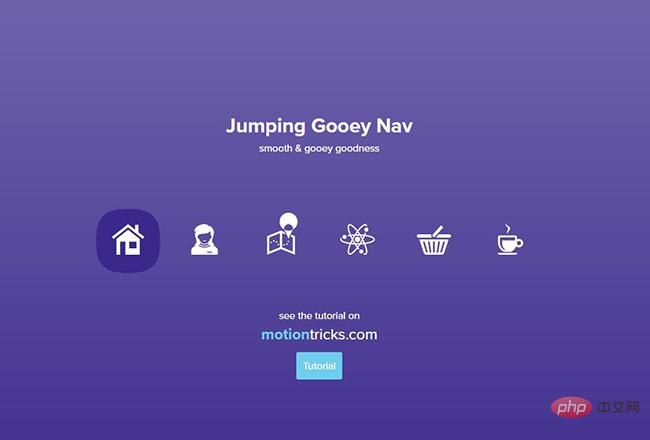
Share a good-looking sticky navigation bar special effects code. The jumping navigation bar special effects code creates a custom motion path for the target to follow each time it is clicked. You can easily enter hard drive for your design, animation or SVG sticky navigation. Encoded value.
All resources on this site are contributed by netizens or reprinted by major download sites. Please check the integrity of the software yourself! All resources on this site are for learning reference only. Please do not use them for commercial purposes. Otherwise, you will be responsible for all consequences! If there is any infringement, please contact us to delete it. Contact information: admin@php.cn

 Optimize mobile navigation: realize the automatic closing function of clicking menu items
27 Nov 2025
This tutorial aims to solve the user experience problem of the mobile navigation menu not automatically closing after clicking any menu item. We will optimize the JavaScript event listening mechanism, bind the click event to the entire navigation menu container, and use CSS styles to dynamically switch the display state of the menu, so that the navigation menu can be automatically closed after clicking on a menu item, switch button or menu area, improving the smoothness and intuitiveness of user interaction.
 JavaScript event processing: automatically close the dynamic menu after clicking the navigation link
26 Nov 2025
This tutorial aims to solve common hamburger menu interaction problems in web development. When the user clicks the hamburger button to open the navigation menu, and then clicks any of the navigation links, the menu usually does not close automatically. This article will introduce in detail how to add event listeners to navigation links through JavaScript so that they can automatically remove the display state of the menu after being clicked, thereby optimizing the user experience and ensuring the smoothness and intuitiveness of the navigation process.
 JavaScript implements automatic closing of responsive navigation menu
02 Dec 2025
This article will guide you on how to implement the function of automatically closing the menu after clicking an internal link in a responsive navigation menu. By adding a unified event listener to the navigation item, when the user selects any navigation link, the system will remove the display style of the menu, thus improving the user experience and avoiding the problem of the menu blocking content or needing to be closed manually.
 JavaScript implements automatic closing of mobile menu after clicking navigation link
21 Nov 2025
This tutorial will guide how to use JavaScript to automatically close the full-screen overlay menu after clicking the navigation link in the hamburger menu in responsive web design. We will optimize the user experience by adding unified class names for navigation links and listening for click events, and removing CSS classes that control menu visibility.
 Solve the problem that Bootstrap NavWalker navigation fails in the mobile drop-down menu
10 Dec 2025
This article aims to solve the problem of the navigation menu created in WordPress using Bootstrap NavWalker. The drop-down menu displays normally on the desktop but fails on the mobile side. By adding specific CSS classes, you can effectively solve the problem that the mobile drop-down menu cannot be expanded and ensure that the navigation can be used normally on various devices.
 Implementing a responsive navigation menu: JavaScript practice to automatically close the menu when clicking a link
08 Nov 2025
This article details how to optimize the user experience of responsive navigation menus. For the common problem of the hamburger menu remaining open after clicking the navigation link, the tutorial provides a JavaScript-based solution. By adding a unified class name to the navigation link and listening for click events, we can automatically close the menu after the user selects the target page, thereby improving the interactive fluency and user-friendliness of the website.
 WordPress dynamic navigation menu: realizing fixed main menu and switching of secondary menus according to user status
15 Dec 2025
This tutorial will guide you on how to dynamically switch navigation menus in WordPress based on user login status while ensuring that the main menu remains unchanged. By utilizing the wp_nav_menu_args filter and accurately identifying the theme menu location, you can achieve flexible configuration where logged in/logged out users display different secondary menus without affecting the core navigation.
 Solve the problem of CSS drop-down navigation menu positioning and hover closing
10 Nov 2025
This article aims to solve the common problems in CSS drop-down navigation menus such as inaccurate positioning and menu closing caused by moving the mouse too quickly. By analyzing the root cause of the inconsistent height of the parent li element, a CSS solution is provided to ensure that the navigation items are highly unified, thereby optimizing the stability and user experience of the drop-down menu and achieving precise menu positioning and smooth hover interaction.
 Fix the CSS drop-down navigation menu: solve the problem of positioning and mouse hover failure
15 Nov 2025
This tutorial explains in detail how to solve the common problems of inaccurate positioning and closing of CSS drop-down navigation menus when the mouse is moved out. By adjusting the CSS height of the parent list item (li) to ensure that it is consistent with the height of the navigation bar, the gap between the parent menu item and the drop-down menu is eliminated, effectively improving the stability and user experience of the drop-down menu.


Popular tool

Black left navigation management panel ui special effects
Native js css3 is used to create a black and practical left-hand category navigation management panel with icon text vertical navigation menu ui layout. Suitable for: functional and backend management UI website templates.

jQuery left drop-down navigation menu background frame template
jQuery creates a vertical drop-down navigation bar on the left and an embedded iframe navigation menu background page template.

js-realize expandable hidden navigation menu button special effects
Simple and practical expandable hidden navigation menu button js special effects code download. The feature of this menu is that the menu can be expanded when the button is clicked. When expanded, it has flexible animation effects, which is quite cool. Menu items are small icons. Of course, you can also use icons combined with text. Since the hidden/expanded method is relatively space-saving, this menu can be applied to mobile devices.

Interactive liquid navigation tab bar
A super popular HTML+CSS interactive liquid navigation tab bar with a very beautiful and concise design
