


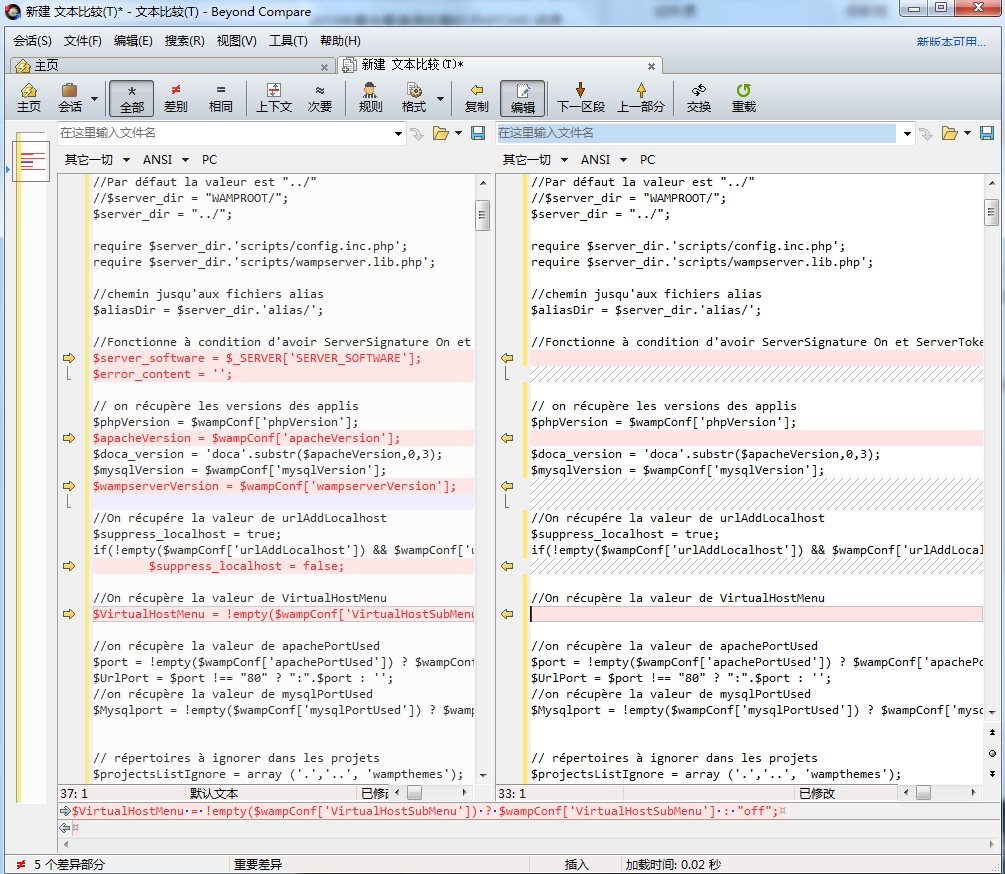
BCompare is a folder and file comparison tool. You can use it to easily compare the differences between two folders or codes, and display each byte of the difference in color. It is easy to view and supports a variety of Rule comparison.
Instructions for use: After downloading and unzipping, open the folder and click to run "Beyond_Compare.exe".
All resources on this site are contributed by netizens or reprinted by major download sites. Please check the integrity of the software yourself! All resources on this site are for learning reference only. Please do not use them for commercial purposes. Otherwise, you will be responsible for all consequences! If there is any infringement, please contact us to delete it. Contact information: admin@php.cn

 How To Set Up A New Computer With Windows 11: A Step-by-Step Guide
10 Nov 2025
Read our disclosure page to find out how can you help MSPoweruser sustain the editorial team Read more .restoro-download-arrow { z-index: 1000;
 How to fix Windows Wi-Fi connected but no internet?
10 Nov 2025
IfyourWindowsdeviceshowsWi-Ficonnectedbutnointernet,trythesesteps:1.Restartrouterandmodem.2.RunNetworkTroubleshooter.3.RenewIPandflushDNS.4.Updateorreinstallnetworkdriver.5.DisableIPv6.6.ResetTCP/IPstack.
 Selenium Java: Use explicit wait to solve the problem of dynamic page element interaction failure
10 Nov 2025
In Selenium automated testing, when the page state fails to update as expected after clicking a button (such as not jumping to the next step in a single-page application), this is usually due to the element not being fully ready for interaction. This article will introduce in detail how to use Selenium's WebDriverWait combined with the ExpectedConditions.elementToBeClickable() method to ensure that the element is in an interactive state before being clicked, thereby effectively solving such dynamic page interaction problems and improving the stability and reliability of automated scripts.
 A deep dive into PHP magic methods
10 Nov 2025
PHP magic methods trigger automatic actions by special naming. ①__construct() and __destruct() manage the object life cycle; ②__get(), __set(), etc. control access to private attributes; ③__call() handles undefined method calls; ④__toString() defines object string output; ⑤__invoke() makes the object callable; ⑥__sleep() and __wakeup() manage serialization; ⑦__clone() customizes cloning logic.
 How to use WeChat's 'People Nearby' feature safely
10 Nov 2025
TosafelyuseWeChat's"PeopleNearby"feature:understanditsharesyourlocationwhenactive,limitusagetime,avoidsharingpersonalinfo,useneutralprofiles,adjustprivacysettingstorestrictvisibility,andreportsuspicioususersimmediately.
 How to manage optional features in Windows 10? A guide to adding or removing components.
10 Nov 2025
TocustomizeWindows10bymanagingoptionalfeatures,useSettingsforasimpleinterface,PowerShellforadvancedcontrol,orControlPanelforlegacycomponents.Add,remove,ormodifyfeatureslike.NETFrameworkorHyper-Vasneeded.


Popular tool

PS CS6 Green Lite Edition
The best image processing software

Website imitation gadget 2.1
The latest PHP website imitation gadget

FileZilla 3.24
Free and open source FTP software

TortoiseSVN 1.9.5
Free open source SVN client

Git
A must-have version control tool for programmers