


 Development tools
php development environment (integrated)
Server data synchronization server side cwRsync_Server_2.1.5_Installer
Development tools
php development environment (integrated)
Server data synchronization server side cwRsync_Server_2.1.5_Installer
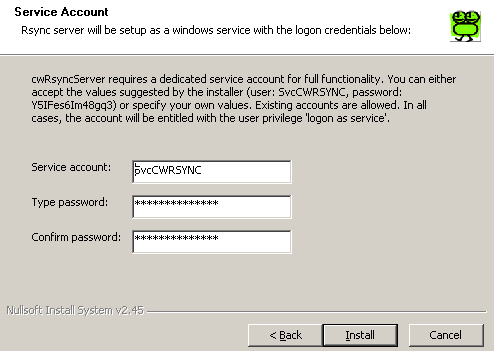
The latest version now is 1.61, which is recommended for download. The directory synchronization is more complete. Some directories in version 1.4 cannot be backed up. The latest version 1.61
has been packaged for everyone. Features of the software:
1. Supports all FTP servers and can back up FTP servers in various websites.
2. Realize fully automatic FTP data backup and easily back up your FTP data.
3. There are a variety of backup plans to choose from, which can realize automatic backup every month, every week, every day, every hour, every minute, and every second.
4. Can automatically back up all files in the entire directory (including subdirectories).
5. You can only back up files that have been updated to speed up the backup.
6. Files and directories that are not in the source directory can be automatically deleted (to achieve synchronization of the source directory and the destination directory)
7. Detailed backup log list, recording every backup action.
8. Background backup can be achieved without affecting the daily operation of the computer.
9. Support custom hotkeys to easily display/hide the backup window.
10. Pure green software, you can use it after decompression. No installation is required, no registry writing or system file modification is required.
11. It is completely free to use and there are no restrictions on its functions.
All resources on this site are contributed by netizens or reprinted by major download sites. Please check the integrity of the software yourself! All resources on this site are for learning reference only. Please do not use them for commercial purposes. Otherwise, you will be responsible for all consequences! If there is any infringement, please contact us to delete it. Contact information: [email protected]

 Strategies for handling client-side generated SVG elements in Vaadin: from DOM synchronization to server-side rendering
17 Dec 2025
Vaadin does not automatically synchronize DOM elements created by client-side JavaScript to the server by default to avoid performance issues. This article will explore two main strategies to handle SVG content dynamically generated on the client side: First, use LitTemplate combined with @Id annotation to achieve server-side access to specific elements in the template, but it should be noted that Vaadin has limited in-depth support for SVG; second, in response to user download needs, it is recommended to dynamically generate SVG directly on the server side through string splicing, thereby achieving complete control of SVG content and convenient downloading.
 How to safely pass data from server-side components to client-side components in Next.js?
02 Apr 2026
In Next.js App Router, you can prefetch data in the server page component and pass it to the client component as props to achieve a reasonable division of labor between server caching and client interaction, avoid repeated requests, and improve first-screen performance.
 Go TCP client instant data sending: Nagle algorithm and server-side impact
20 Nov 2025
This article discusses the common problem of data sending delay in the Go language TCP client after enabling SetNoDelay. By analyzing the role of Nagle's algorithm and providing an example of a diagnostic TCP server, it is revealed that problems often lie in the way data is processed on the server side. The tutorial emphasizes the practical effect of client-side SetNoDelay and guides readers on how to verify and debug the data flow in TCP communication by building a simple echo server to ensure that data can be received and processed immediately.
 Implement server-side data streaming loading in SvelteKit to avoid page blocking
05 Apr 2026
This article explains in detail how to return Promise sub-properties (i.e. streaming loading) through the load function in SvelteKit, so that the page HTML can be rendered quickly without waiting for asynchronous data, while taking into account SEO and user experience.
 New Mac configuration PHP development environment tutorial, macphp development tutorial_PHP tutorial
12 Jul 2016
New Mac configuration PHP development environment tutorial, macphp development tutorial. New Mac configuration PHP development environment tutorial, macphp development tutorial. I have used Mac OS
 A Complete Guide to Sending JSON Data to PHP with AJAX: Client-Side vs. Server-Side Implementation
16 Nov 2025
This tutorial details how to send complex JavaScript objects such as arrays to a PHP backend via AJAX and have them parsed correctly. The core is that the client uses JSON.stringify() to serialize data into a JSON string, and then uses json_decode() in server-side PHP to deserialize it into an operable PHP array, thereby achieving efficient and reliable data interaction between the front and back ends.


Popular tool

Website malicious web Trojan scanner (WebshellScanner)
Website malicious web Trojan scanner (WebshellScanner)

Hailink virtual serial port v1.0.0.2
Hailink virtual serial port v1.0.0.2

Super batch batch text replacement V5.02 green version (server web page hanging horse batch replacement)
Super batch batch text replacement V5.02 green version (server web page hanging horse batch replacement)

Dragon Shield Feibao Web Trojan Remover
Dragon Shield Feibao Web Trojan Remover

McAfee VirusScan Enterprise 8.8 Licensed Edition
McAfee VirusScan Enterprise 8.8 Licensed Edition