


PHP development of simple book background management system administrator password change page
The previous left page shows various background functions
This section first displays the administrator login password modification page
As shown
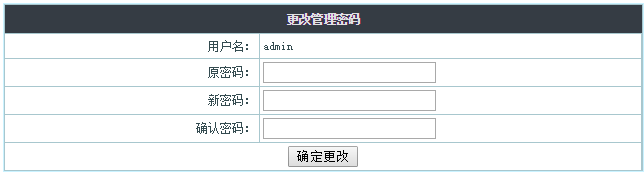
Use <form><input type= password> to display the required original password box and new input password box.
Use <tr><td> in the <table> tag for layout.
<table cellpadding="3" cellspacing="1" border="0" width="100%" class="table" align=center>
  <form name="renpassword" method="post" action="">
    <tr>
      <th height=25 colspan=4 align="center" class="bg_tr">更改管理密码</th>
    </tr>
    <tr>
      <td width="40%" align="right" class="td_bg">用户名:</td>
      <td width="60%" class="td_bg"><?php echo $rows["username"] ?></td>
    </tr>
    <tr>
      <td align="right" class="td_bg">原密码:</td>
      <td class="td_bg"><input name="password" type="password" id="password" size="20"></td>
    </tr>
    <tr>
      <td align="right" class="td_bg">新密码:</td>
      <td class="td_bg"><input name="password1" type="password" id="password1" size="20"></td>
    </tr>
    <tr>
      <td align="right" class="td_bg">确认密码:</td>
      <td class="td_bg"><input  name="password2" type="password" id="password2" size="20"></td>
    </tr>
    <tr>
      <td colspan="2" align="center" class="td_bg">
        <input class="button" onClick="return check();" type="submit" name="Submit" value="确定更改">
      </td>
    </tr>
  </form>
</table>
html is just the basic structure of the page. Friends can add css styles and pictures to render it.
new file
<html>
<head>
<meta http-equiv="Content-Type" content="text/html; charset=utf-8">
<title>图书管理系统--更改密码页</title>
<style>
.table{
border: 1px solid #CAF2FF;/*边框颜色*/
margin-top: 5px;
margin-bottom: 5px;
background:#a8c7ce;
}
.td_bgf {
background:#d3eaef;
color:#000000;
}
.ACT_btn {
height:26px;
width:94px;
cursor:hand;
border:solid 0 #111;
font-size: 12px;
}
.bg_tr {
font-family: "微软雅黑,Verdana, 新宋体";
color:#e1e2e3;/*标题字体色*/
font-size:12px;
font-weight:bolder;
background:#353c44;/*标题背景色*/
line-height: 22px;
}td {
color:#1E5494;
font-size:12px;
line-height: 18px;
}
.tdbg1 {
background:#F9F9F9;
}
.tdbg {
BACKGROUND: #ffffff;
}
.top_link{text-decoration:none;font-size:14px;color:#FFDED2;height:0;filter:dropshadow(offX=1,offY=1,color=BD3400);}
A.top_link:link{text-decoration:none;font-size:14px;color:#FFDED2;height:0;filter:dropshadow(offX=1,offY=1,color=BD3400);}
A.top_link:visited{text-decoration:none;font-size:14px;color:#FFDED2;height:0;filter:dropshadow(offX=1,offY=1,color=BD3400);}
A.top_link:active{text-decoration:underline;font-size:14px;color:#fff;height:0;filter:dropshadow(offX=1,offY=1,color=BD3400);}
A.top_link:hover{text-decoration:underline;font-size:14px;color:#fff;height:0;filter:dropshadow(offX=1,offY=1,color=BD3400);}
.topbar {color:#ffffff}
.topbar a:link,.topbar a:visited{color:#ffffff;}
.topbar a:hover{background:#ccffcc; display:block; height:26px; padding-top:6px; color:#000000; text-decoration:none}
#table2 {
width:100%;
height:30px;
border-bottom : 1px solid #fff;
background-color: #6E4000;
}
.titledaohang {
FONT-SIZE: 12px;
COLOR: #551C02;
font-weight:bolder;
FONT-FAMILY: '微软雅黑,宋体'
}
/*input{
height:15px;padding-top:2px;border:1px solid #7F9DB9;color:#1E5494;
}*/
.Leftback {
background:#865802;
}
.leftframetable{
border: 1px solid #4C3500;
margin-top: 3px;
margin-bottom: 3px;
background:#FDF6E6;
}
</style>
</head>
<body>
<table cellpadding="3" cellspacing="1" border="0" width="100%" class="table" align=center>
<form name="renpassword" method="post" action="">
<tr>
<th height=25 colspan=4 align="center" class="bg_tr">更改管理密码</th>
</tr>
<tr>
<td width="40%" align="right" class="td_bg">用户名:</td>
<td width="60%" class="td_bg"><?php echo $rows["username"] ?></td>
</tr>
<tr>
<td align="right" class="td_bg">原密码:</td>
<td class="td_bg"><input name="password" type="password" id="password" size="20"></td>
</tr>
<tr>
<td align="right" class="td_bg">新密码:</td>
<td class="td_bg"><input name="password1" type="password" id="password1" size="20"></td>
</tr>
<tr>
<td align="right" class="td_bg">确认密码:</td>
<td class="td_bg"><input name="password2" type="password" id="password2" size="20"></td>
</tr>
<tr>
<td colspan="2" align="center" class="td_bg">
<input class="button" onClick="return check();" type="submit" name="Submit" value="确定更改">
</td>
</tr>
</form>
</table>
</body>
</html>
Preview
Clear
- Course Recommendations
- Courseware download














 The courseware is not available for download at the moment. The staff is currently organizing it. Please pay more attention to this course in the future~
Students who have watched this course are also learning

Let's briefly talk about starting a business in PHP
Quick introduction to web front-end development
Large-scale practical Tianlongbabu development of Mini version MVC framework imitating the encyclopedia website of embarrassing things
Getting Started with PHP Practical Development: PHP Quick Creation [Small Business Forum]
Login verification and classic message board
Computer network knowledge collection
Quick Start Node.JS Full Version
The front-end course that understands you best: HTML5/CSS3/ES6/NPM/Vue/...[Original]
Write your own PHP MVC framework (40 chapters in depth/big details/must read for newbies to advance)