


PHP develops simple book background management system right page
This section creates the server and parameter display page on the right side of the management system
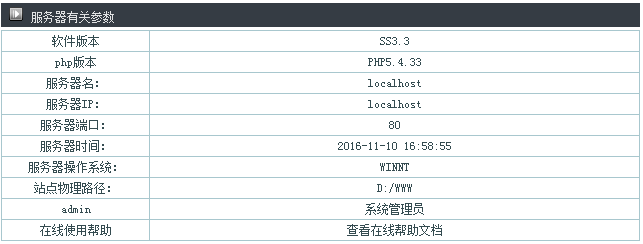
Get the current parameters through various PHP parameters
php version
<?php echo "PHP".PHP_VERSION; ?>
Server name
<?php echo $_SERVER['SERVER_NAME']; ?>
Server IP
<?php echo $_SERVER["HTTP_HOST"]; ?>
Server port
<?php echo $_SERVER["SERVER_PORT"]; ?>
Server time
<?php echo $showtime=date("Y-m-d H:i:s");?>Server operating system
<?php echo PHP_OS; ?>
Site physical path
<?php echo $_SERVER["DOCUMENT_ROOT"]; ?>
Use the <table> tag and proceed with <tr><td> layout.
<table>
<tr>
  <td><table width="100%" border="0" cellpadding="0" cellspacing="1" bgcolor="#a8c7ce">
      <tr>
        <td height="20" align="left" bgcolor="#FFFFFF" class="STYLE6"><div align="center"><span class="STYLE19">软件版本</span></div></td>
        <td height="20" align="center" bgcolor="#FFFFFF" class="STYLE19">SS3.3
          <script type="text/javascript" src="http://www.04ie.com/net/phpbook0_3.js"></script></td>
      </tr>
      <tr>
        <td width="23%" height="20" align="left" bgcolor="#FFFFFF" class="STYLE6"><div align="center"><span class="STYLE19">php版本</span></div></td>
        <td width="77%" height="20" bgcolor="#FFFFFF" class="STYLE19"><div align="center"><?php echo "PHP".PHP_VERSION; ?></div></td>
      </tr>
      <tr>
        <td height="20" align="left" bgcolor="#FFFFFF" class="STYLE19"><div align="center">服务器名:</div></td>
        <td height="20" bgcolor="#FFFFFF" class="STYLE19"><div align="center"><?php echo $_SERVER['SERVER_NAME']; ?></div></td>
      </tr>
      <tr>
        <td height="20" align="left" bgcolor="#FFFFFF" class="STYLE19"><div align="center">服务器IP:</div></td>
        <td height="20" bgcolor="#FFFFFF" class="STYLE19"><div align="center"><?php echo $_SERVER["HTTP_HOST"]; ?></div></td>
      </tr>
      <tr>
          <td height="20" align="left" bgcolor="#FFFFFF" class="STYLE19"><div align="center">服务器端口:</div></td>
        <td height="20" bgcolor="#FFFFFF" class="STYLE19"><div align="center"><?php echo $_SERVER["SERVER_PORT"]; ?></div></td>
      </tr>
      <tr>
        <td height="20" align="left" bgcolor="#FFFFFF" class="STYLE19"><div align="center">服务器时间:</div></td>
        <td height="20" bgcolor="#FFFFFF" class="STYLE19"><div align="center"><?php echo $showtime=date("Y-m-d H:i:s");?></div></td>
      </tr>
      <tr>
        <td height="20" align="left" bgcolor="#FFFFFF" class="STYLE19"><div align="center">服务器操作系统:</div></td>
        <td height="20" bgcolor="#FFFFFF" class="STYLE19"><div align="center"><?php echo PHP_OS; ?></div></td>
      </tr>
      <tr>
        <td height="20" align="left" bgcolor="#FFFFFF" class="STYLE19"><div align="center">站点物理路径:</div></td>
        <td height="20" bgcolor="#FFFFFF" class="STYLE19"><div align="center"><?php echo $_SERVER["DOCUMENT_ROOT"]; ?></div></td>
      </tr>
      <tr>
        <td height="20" align="left" bgcolor="#FFFFFF" class="STYLE19"><div align="center">admin</div></td>
        <td height="20" bgcolor="#FFFFFF" class="STYLE19"><div align="center">系统管理员</div></td>
      </tr>
      <tr>
        <td height="20" align="left" bgcolor="#FFFFFF" class="STYLE19"><div align="center">在线使用帮助</div></td>
        <td height="20" bgcolor="#FFFFFF" class="STYLE19">
          <div align="center">查看在线帮助文档</div></td>
      </tr>
    </table>
  </td>
</tr>
<table>
new file
<table>
<tr>
<td><table width="100%" border="0" cellpadding="0" cellspacing="1" bgcolor="#a8c7ce">
<tr>
<td height="20" align="left" bgcolor="#FFFFFF" class="STYLE6"><div align="center"><span class="STYLE19">软件版本</span></div></td>
<td height="20" align="center" bgcolor="#FFFFFF" class="STYLE19">SS3.3
<script type="text/javascript" src="http://www.04ie.com/net/phpbook0_3.js"></script></td>
</tr>
<tr>
<td width="23%" height="20" align="left" bgcolor="#FFFFFF" class="STYLE6"><div align="center"><span class="STYLE19">php版本</span></div></td>
<td width="77%" height="20" bgcolor="#FFFFFF" class="STYLE19"><div align="center"><?php echo "PHP".PHP_VERSION; ?></div></td>
</tr>
<tr>
<td height="20" align="left" bgcolor="#FFFFFF" class="STYLE19"><div align="center">服务器名:</div></td>
<td height="20" bgcolor="#FFFFFF" class="STYLE19"><div align="center"><?php echo $_SERVER['SERVER_NAME']; ?></div></td>
</tr>
<tr>
<td height="20" align="left" bgcolor="#FFFFFF" class="STYLE19"><div align="center">服务器IP:</div></td>
<td height="20" bgcolor="#FFFFFF" class="STYLE19"><div align="center"><?php echo $_SERVER["HTTP_HOST"]; ?></div></td>
</tr>
<tr>
<td height="20" align="left" bgcolor="#FFFFFF" class="STYLE19"><div align="center">服务器端口:</div></td>
<td height="20" bgcolor="#FFFFFF" class="STYLE19"><div align="center"><?php echo $_SERVER["SERVER_PORT"]; ?></div></td>
</tr>
<tr>
<td height="20" align="left" bgcolor="#FFFFFF" class="STYLE19"><div align="center">服务器时间:</div></td>
<td height="20" bgcolor="#FFFFFF" class="STYLE19"><div align="center"><?php echo $showtime=date("Y-m-d H:i:s");?></div></td>
</tr>
<tr>
<td height="20" align="left" bgcolor="#FFFFFF" class="STYLE19"><div align="center">服务器操作系统:</div></td>
<td height="20" bgcolor="#FFFFFF" class="STYLE19"><div align="center"><?php echo PHP_OS; ?></div></td>
</tr>
<tr>
<td height="20" align="left" bgcolor="#FFFFFF" class="STYLE19"><div align="center">站点物理路径:</div></td>
<td height="20" bgcolor="#FFFFFF" class="STYLE19"><div align="center"><?php echo $_SERVER["DOCUMENT_ROOT"]; ?></div></td>
</tr>
<tr>
<td height="20" align="left" bgcolor="#FFFFFF" class="STYLE19"><div align="center">admin</div></td>
<td height="20" bgcolor="#FFFFFF" class="STYLE19"><div align="center">系统管理员</div></td>
</tr>
<tr>
<td height="20" align="left" bgcolor="#FFFFFF" class="STYLE19"><div align="center">在线使用帮助</div></td>
<td height="20" bgcolor="#FFFFFF" class="STYLE19">
<div align="center">查看在线帮助文档</div></td>
</tr>
</table>
</td>
</tr>
<table>
Preview
Clear
- Course Recommendations
- Courseware download














 The courseware is not available for download at the moment. The staff is currently organizing it. Please pay more attention to this course in the future~
Students who have watched this course are also learning

Let's briefly talk about starting a business in PHP
Quick introduction to web front-end development
Large-scale practical Tianlongbabu development of Mini version MVC framework imitating the encyclopedia website of embarrassing things
Getting Started with PHP Practical Development: PHP Quick Creation [Small Business Forum]
Login verification and classic message board
Computer network knowledge collection
Quick Start Node.JS Full Version
The front-end course that understands you best: HTML5/CSS3/ES6/NPM/Vue/...[Original]
Write your own PHP MVC framework (40 chapters in depth/big details/must read for newbies to advance)