


With the popularization and development of the Internet, network security issues have attracted more and more people's attention. Tinder Security Software, as a multi-functional and all-round security protection software, is highly trusted by the majority of users. However, sometimes we encounter network connection problems when using Tinder security software, such as being unable to connect to the Internet, etc. Well, PHP editor Yuzai will share with you today the method of repairing the network with Tinder security software. I hope it can be helpful to you.
How to repair network with Tinder Security Software
After entering the page, you can see four options: [Virus Scanning] [Protection Center] [Access Control] [Security Tools], click [Security Tools] to enter.

2. Then find the [Network Disconnect Repair] option in the opened page and click to open it.

3. After opening, click [Comprehensive Check] in the upper right corner of the page to repair it.
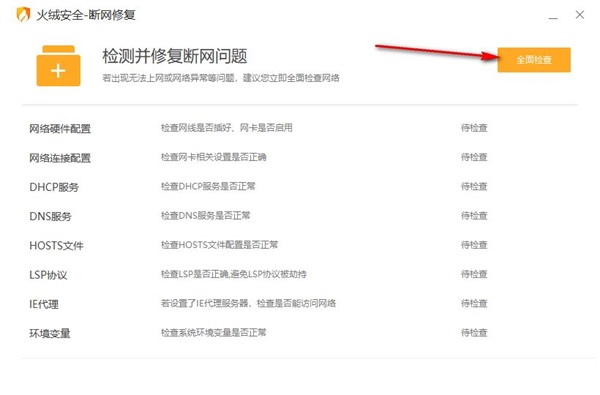
Most of the time, network connections can be easily repaired using this tool.
The above is the detailed content of How does Tinder Security software repair the network? How to repair network with Tinder Security Software. For more information, please follow other related articles on the PHP Chinese website!
 Three major frameworks for android development
 Configure Java runtime environment
 How to use dc.rectangle
 What to do if your IP address is attacked
 What are the data backup software?
 Why the computer keeps restarting automatically
 How to remove the watermark of Douyin account from downloaded videos from Douyin
 How to draw pert diagram




















![[Web front-end] Node.js quick start](https://img.php.cn/upload/course/000/000/067/662b5d34ba7c0227.png)



