


php Xiaobian Xigua will introduce to you how to DIY a map using Amap. Amap is a powerful map software. In addition to providing basic functions such as navigation and real-time traffic conditions, it also supports user-defined maps. Through the Amap DIY map tutorial, you can customize the map style, add markers and overlays, and other operations to display the map information you need in a personalized way. Whether you want to add a unique mark to your travel route or create an exclusive guide map, Amap can meet your needs. Let us learn how to use Amap to DIY maps and enjoy the convenience and fun brought by maps!
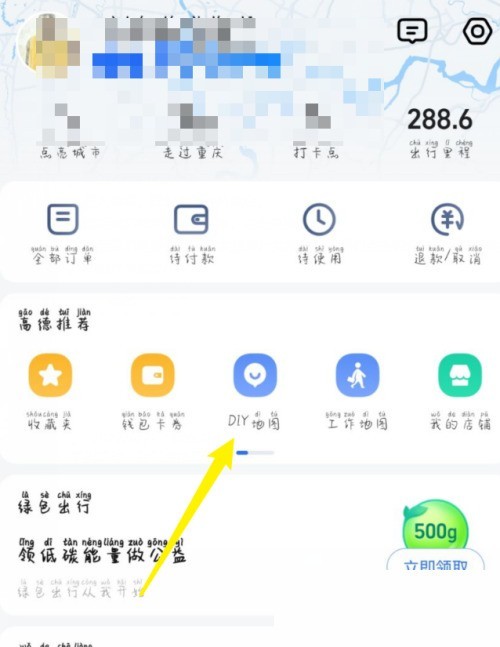
1. First, we enter the Amap, go to the personal homepage and click DIY Map.
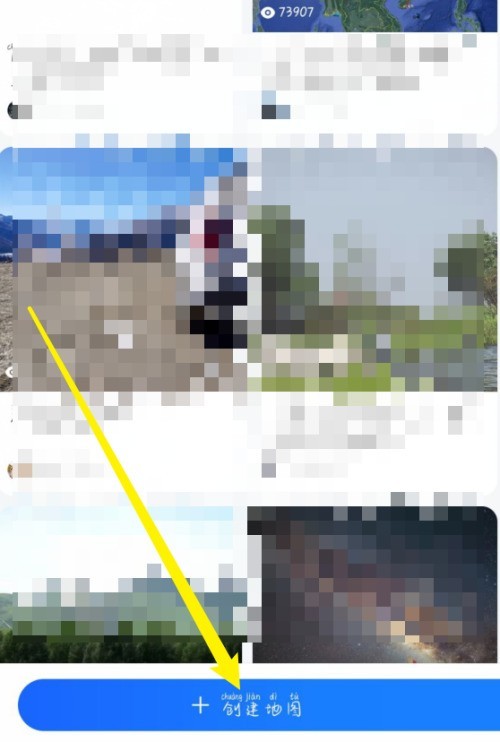
2. Then we click Create Map here.
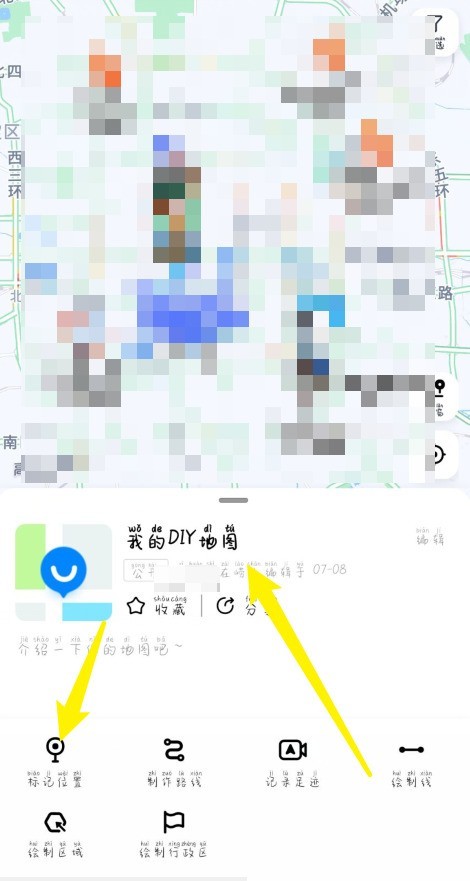
3. Finally, here we can DIY our own map in Gaode Map.
The above is the detailed content of How to DIY a map on Amap_DIY map tutorial on Amap. For more information, please follow other related articles on the PHP Chinese website!
 Basic building blocks of presentations
 How to increase download speed
 Introduction to html text box types
 sort function python usage
 win10 bluetooth switch is missing
 Unable to start your computer properly
 How to solve the "NTLDR is missing" error on your computer
 Win11 My Computer Added to Desktop Tutorial




















![[Web front-end] Node.js quick start](https://img.php.cn/upload/course/000/000/067/662b5d34ba7c0227.png)



