


Xiaomi 10 running memory check steps

php editor Xinyi brings you detailed steps to check the running memory of Xiaomi 10. Memory is one of the important parameters for mobile phone performance. Understanding memory usage can help optimize mobile phone performance and improve user experience. Through simple operations, you can easily check the running memory usage of Xiaomi Mi 10, allowing you to better understand the performance of your phone. Next, let’s take a look at how to check the running memory of Xiaomi Mi 10!
1. Go to the desktop and click to open the settings option.
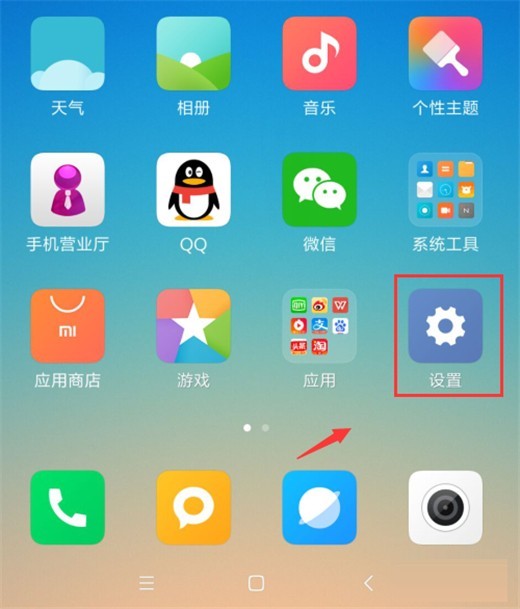
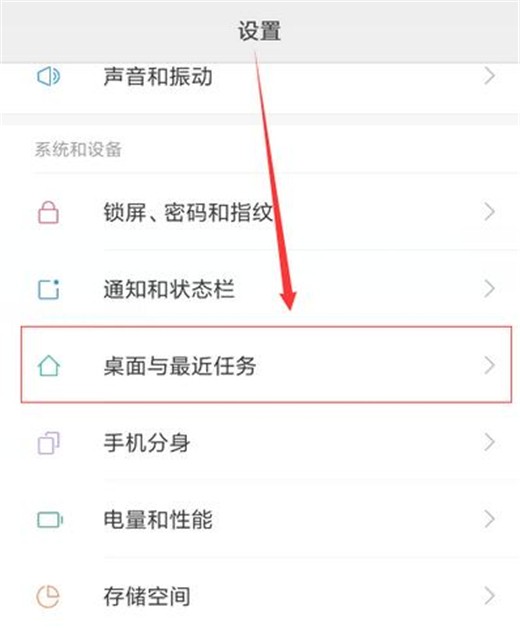
2. Swipe down to find the desktop and recent tasks options, and click to enter.
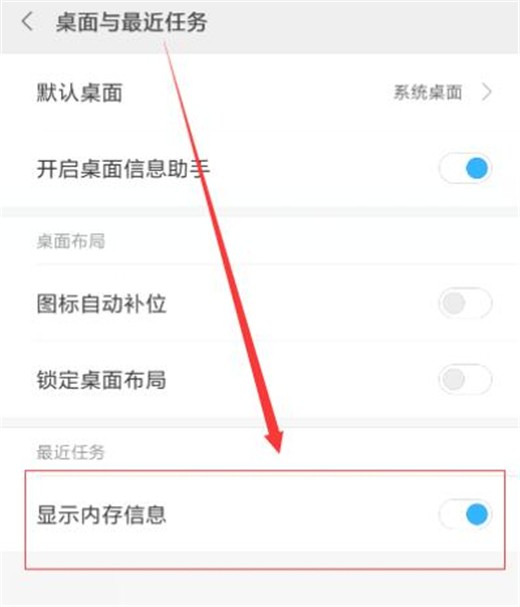
3. On the desktop and recent tasks interface, turn on the display memory information switch below.
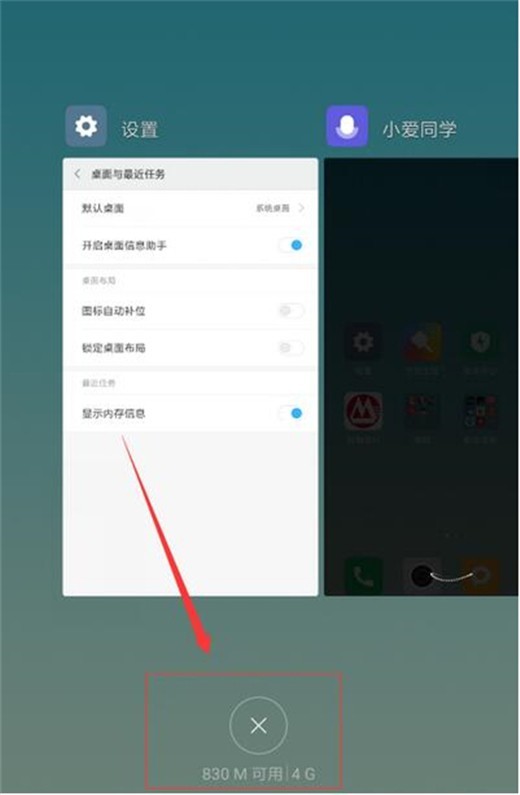
4. Open multi-task management to check the running memory situation.
The above is the detailed content of Xiaomi 10 running memory check steps. For more information, please follow other related articles on the PHP Chinese website!

Hot AI Tools

Undresser.AI Undress
AI-powered app for creating realistic nude photos

AI Clothes Remover
Online AI tool for removing clothes from photos.

Undress AI Tool
Undress images for free

Clothoff.io
AI clothes remover

AI Hentai Generator
Generate AI Hentai for free.

Hot Article
Hot Tools

Notepad++7.3.1
Easy-to-use and free code editor

SublimeText3 Chinese version
Chinese version, very easy to use

Zend Studio 13.0.1
Powerful PHP integrated development environment

Dreamweaver CS6
Visual web development tools

SublimeText3 Mac version
God-level code editing software (SublimeText3)
Hot Topics
 1385
1385
 52
52

 Is there any difference between 12+256 and 8+256?
Aug 15, 2023 am 09:31 AM
Is there any difference between 12+256 and 8+256?
Aug 15, 2023 am 09:31 AM
There is a difference between 12+256 and 8+256: 1. "12+256" means that the mobile phone has a running memory capacity of 12GB and a storage memory capacity of 256GB, while "8+256" means that the mobile phone has a running memory capacity of 8GB and a storage memory capacity of 256GB. It is 256GB; 2. 12GB running memory can provide larger memory capacity, while 8G running memory is slightly worse.
 Where to set the Xiaomi 10 charging prompt sound_How to customize the Xiaomi 10 charging prompt sound
Mar 25, 2024 pm 07:01 PM
Where to set the Xiaomi 10 charging prompt sound_How to customize the Xiaomi 10 charging prompt sound
Mar 25, 2024 pm 07:01 PM
1. First open the [Settings] application on the Xiaomi phone and select the [Sound and Vibration] setting in the settings; 2. Then continue in the Sound and Vibration settings and scroll down to find the [More Sounds] setting; 3. Then you can see [Charging prompt sound] item, the system defaults to this function being on; 4. If you need to turn it off, click the slider on the right. When it turns gray, it means that the charging prompt sound has been turned off; 5. After that, the phone is plugged into the charger for charging. The charging prompt sound will no longer be emitted; 6. If the charging prompt sound needs to be modified, because Xiaomi has not yet opened this permission, users cannot customize the charging prompt sound. . How to turn off the charging reminder sound 1. In the sound and vibration settings, scroll down to find [More Sound Settings]; 2. Then find and turn off [Charging Sound Settings].
 How to check the running memory of opporeno5_How to display memory information of opporeno5
Mar 25, 2024 pm 03:50 PM
How to check the running memory of opporeno5_How to display memory information of opporeno5
Mar 25, 2024 pm 03:50 PM
1. Open the phone settings and click the [Other Settings] option. 2. Click [Recent Task Management]. 3. Turn on the switch behind [Show memory information for recent tasks].
 Xiaomi 10 running memory check steps
Mar 25, 2024 pm 12:40 PM
Xiaomi 10 running memory check steps
Mar 25, 2024 pm 12:40 PM
1. Go to the desktop and click to open the settings option. 2. Swipe down to find the desktop and recent tasks options, and click to enter. 3. On the desktop and recent tasks interface, turn on the display memory information switch below. 4. Open multi-task management to check the running memory situation.
 Xiaomi 10 and 11 series mobile phones are expected to be updated with ThePaper HyperOS system in mid-April
Apr 03, 2024 pm 09:28 PM
Xiaomi 10 and 11 series mobile phones are expected to be updated with ThePaper HyperOS system in mid-April
Apr 03, 2024 pm 09:28 PM
According to news on April 3, Zhang Guoquan, director of Xiaomi’s mobile system software department, responded to the HyperOS update adaptation plan for Xiaomi 10 and 11 series mobile phones, saying that the Pampers HyperOS system is expected to be updated in mid-April. It is reported that after Zhang Guoquan posted a Weibo post about Xiaomi SU7 car delivery status today, some netizens asked in the comment area whether the HyperOS of Xiaomi 10 series mobile phones will be launched at the beginning of the month or at the end of the month. He replied: "It is expected to be released in the middle of the month and 11." In March this year, when Zhang Guoquan revealed the launch of internal testing of the travel assistant, he said that Xiaomi 10 series mobile phones will update the HyperOS system in April. It is learned that Xiaomi HyperOS will be released in December 2023, based on AOSP and self-developed XiaomiVelaOS
 Introduction to how to cancel photo watermark on Xiaomi Mi 10
Mar 25, 2024 pm 01:20 PM
Introduction to how to cancel photo watermark on Xiaomi Mi 10
Mar 25, 2024 pm 01:20 PM
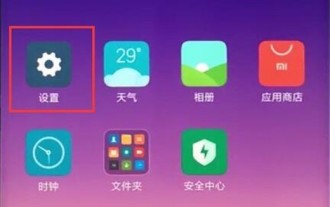
1. First, find the settings option on Xiaomi desktop and click to enter. 2. In the settings interface, click the system application option. 3. In the system application, find the camera and click to open it. 4. Finally, turn off the time watermark and dual camera watermark switches.
 What does mobile phone running memory mean?
Mar 01, 2023 am 11:49 AM
What does mobile phone running memory mean?
Mar 01, 2023 am 11:49 AM
Mobile phone running memory refers to the memory used by mobile phones when running programs. It can only temporarily store data and is used to exchange cache data with the CPU. The running memory of a mobile phone refers to the place where programs are stored or temporarily stored when running programs. With larger running memory, the mobile phone can open more programs.
 Introduction to the running memory size of iPhone 14
Mar 23, 2024 am 08:26 AM
Introduction to the running memory size of iPhone 14
Mar 23, 2024 am 08:26 AM
Compared with the previous generation of iPhone 13, the running memory of iPhone 14 has been greatly improved, reaching 6GB. Although it does not look as good as many Android flagship phones, it is still very smooth to use. Introduction to the running memory size of Apple 14: It is 6GB1. Apple 14 uses 6GB of running memory, which is a big improvement compared to the 134GB memory of the previous generation of Apple. 2. All Apple 14 series mobile phones use 6GB memory specifications and use LPDDR5 memory. 3. It has very good performance in terms of memory delay, transmission and response speed. 4. 6GB memory is still helpful for improving the performance of the mobile phone and can run multiple applications. 5. Larger running memory can effectively avoid application lags and crashes.
