


php editor Xinyi introduces to you how to check the remaining amount of printer consumables on MAC system. In the process of using the MAC system, it is very important to know the remaining amount of printer consumables, which can help you replace the consumables in time to ensure the printing effect and the normal operation of the printer. Next, we will introduce in detail how to check the remaining amount of printer consumables conveniently and quickly in the MAC system.
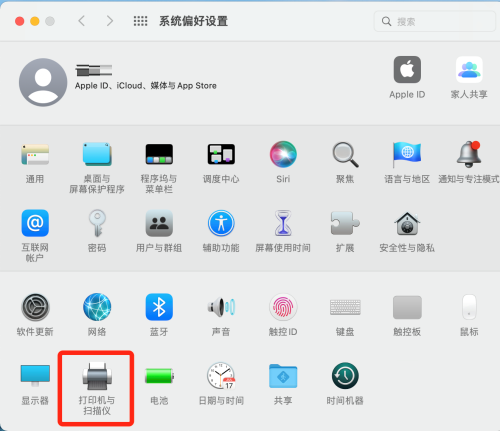
First, to open System Preferences, you can find the corresponding icon at the bottom of the screen and click to open it. In the System Preferences page, find and click the "Printers & Scanners" option.
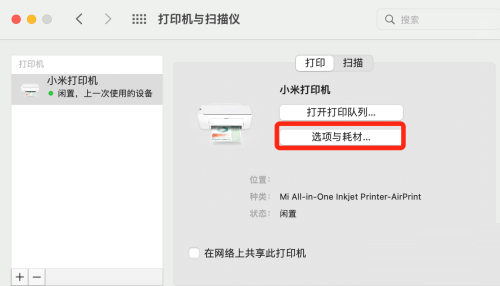
Step 2: Find the "Options & Supplies" button under the "Print" menu and click it.
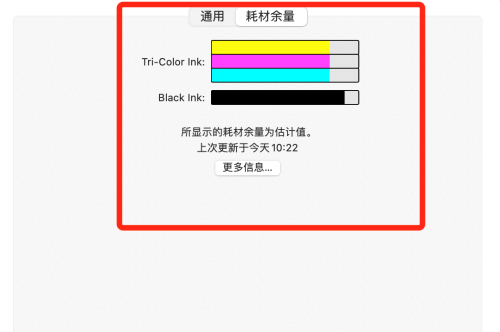
Step 3: In this way, you can see the current printer’s consumables remaining and update time, etc.
The above is the detailed content of How to check printer consumables remaining on MAC system-How to check printer consumables remaining. For more information, please follow other related articles on the PHP Chinese website!
 What are the seven principles of PHP code specifications?
 Detailed explanation of imp command in oracle
 What are the uses of dezender?
 The relationship between js and vue
 dsp application areas
 The difference between wildcard masking and unmasking
 What is nfc access control card
 How to switch between Huawei dual systems





















![[Web front-end] Node.js quick start](https://img.php.cn/upload/course/000/000/067/662b5d34ba7c0227.png)



