


 Software Tutorial
Computer Software
Word is locked and cannot be typed or edited, nor can the review button be pressed?
Software Tutorial
Computer Software
Word is locked and cannot be typed or edited, nor can the review button be pressed?
Word is locked and cannot be typed or edited, nor can the review button be pressed?

php editor Youzi will share with you how to solve the problem of Word being locked and unable to type, edit, and review. When dealing with this problem, you need to first check whether the document is protected and solve it by removing the protection or modifying the permission settings. In addition, sometimes it may be caused by software problems. You can try to restart Word or repair the Office software. Through these simple methods, you can easily solve the problem of being unable to edit Word documents and improve work efficiency.
Method 1: Cancel "Restrict Editing"
In order to edit a Word document, we can cancel the "Restrict Editing" option set and just enter the correct password.

2. First, after opening the Word document, click "Review" > "Restrict Editing" in the menu.
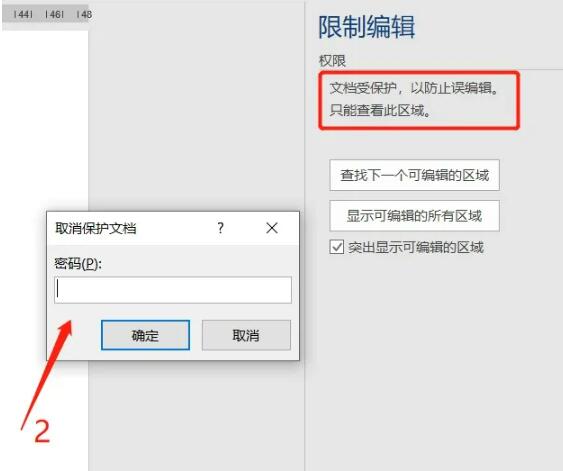
3. After the "Restricted Editing" page appears, click the "Stop Protection" button below, enter the originally set password in the pop-up "Unprotect Document" page, and click "OK" to cancel the "Restricted Editing" of the document. .

Method 2: Save as txt format text
1. If you forget the "restriction password" of the Word document and want to edit the document, we can save the Word document as txt text. Although Word documents under "Restrict Editing" cannot be edited or modified, they can be saved as new files.
2. It should be noted that after saving as txt text, in addition to the text, the original format, charts, etc. cannot be saved, so it is only suitable for pure text Word documents.
3. First, click the "File" option in the Word document menu, then click "Save As" and select the save path on the right. When the "Save As" page appears, click Plain Text (*.txt) in "Save as Type", and then click the "Save As" button.

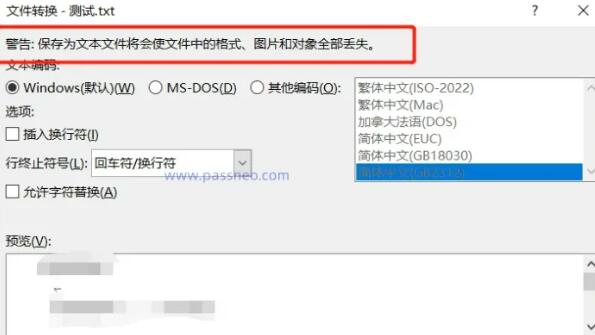
4. Subsequently, a page will pop up warning "Saving as a text file will cause all formats, images and objects in the file to be lost", and you can preview the converted text. If you only want to keep the text, click "OK" to save it. It is txt text and can be edited.
Method 3: Convert to PDF file
If you forget the "restriction password" of a Word document and don't want to lose the pictures, tables, etc. in the document, we can save the Word document as a PDF file and then use a PDF editor to edit it.
1. First, click the "File" option in the Word document menu, and then click "Export" > "Create PDF/XPS" document.
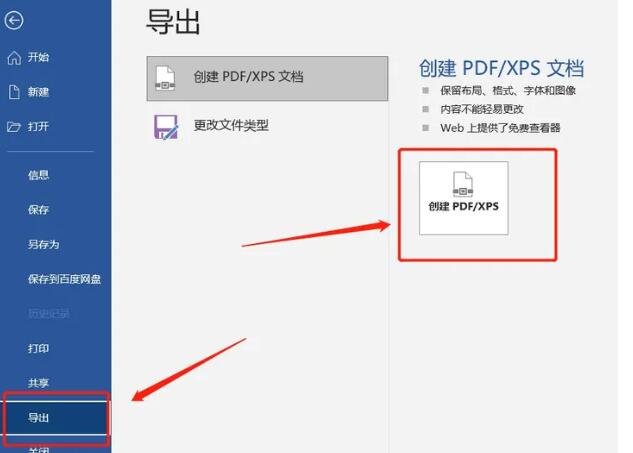
2. After the [Save As] page appears, select the "PDF" option in the "Save Type", and then click "Publish" below to complete the conversion.
3. After the Word document is converted to PDF, the text, charts, etc. will be retained. After opening the file through the PDF editor, click "Edit Object" > "All" to edit the content.

The above is the detailed content of Word is locked and cannot be typed or edited, nor can the review button be pressed?. For more information, please follow other related articles on the PHP Chinese website!

Hot AI Tools

Undress AI Tool
Undress images for free

Undresser.AI Undress
AI-powered app for creating realistic nude photos

AI Clothes Remover
Online AI tool for removing clothes from photos.

Clothoff.io
AI clothes remover

Video Face Swap
Swap faces in any video effortlessly with our completely free AI face swap tool!

Hot Article
Hot Tools

Notepad++7.3.1
Easy-to-use and free code editor

SublimeText3 Chinese version
Chinese version, very easy to use

Zend Studio 13.0.1
Powerful PHP integrated development environment

Dreamweaver CS6
Visual web development tools

SublimeText3 Mac version
God-level code editing software (SublimeText3)


 How to view word documents in vscode How to view word documents in vscode
May 09, 2024 am 09:37 AM
How to view word documents in vscode How to view word documents in vscode
May 09, 2024 am 09:37 AM
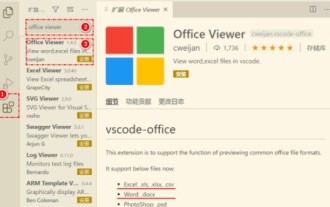
First, open the vscode software on the computer, click the [Extension] icon on the left, as shown in ① in the figure. Then, enter [officeviewer] in the search box of the extension interface, as shown in ② in the figure. Then, from the search Select [officeviewer] to install in the results, as shown in ③ in the figure. Finally, open the file, such as docx, pdf, etc., as shown below
 WPS and Office do not have Chinese fonts, and Chinese font names are displayed in English.
Jun 19, 2024 am 06:56 AM
WPS and Office do not have Chinese fonts, and Chinese font names are displayed in English.
Jun 19, 2024 am 06:56 AM
My friend's computer, all Chinese fonts such as imitation Song, Kai style, Xing Kai, Microsoft Yahei, etc. cannot be found in WPS and OFFICE. The editor below will tell you how to solve this problem. The fonts in the system are normal, but all fonts in the WPS font options are not available, only cloud fonts. OFFICE only has English fonts, not any Chinese fonts. After installing different versions of WPS, English fonts are available, but there is also no Chinese font. Solution: Control Panel → Categories → Clock, Language, and Region → Change Display Language → (Region and Language) Management → (Language for Non-Unicode Programs) Change System Regional Settings → Chinese (Simplified, China) → Restart. Control Panel, change the view mode in the upper right corner to "Category", Clock, Language and Region, change
 What are the recommended configurations for building a computer? What is the best configuration for assembling a computer that costs around 2,500?
May 08, 2024 pm 07:22 PM
What are the recommended configurations for building a computer? What is the best configuration for assembling a computer that costs around 2,500?
May 08, 2024 pm 07:22 PM
What are the recommended configurations for building a computer? 1. Entry-level office computer configuration: The Celeron series is Intel's most entry-level CPU model. This configuration uses the Celeron G5905, dual core, no hyper-threading, and built-in integrated graphics. It is one of the most cost-effective models for building an ordinary office computer. one. If you don't mind the AMD platform, AMD's A6-7480 can also be considered. Since 8G memory is now not much more expensive than 4G, it is recommended to use 8G directly. Second, the mainstream office computer configuration single Intel Pentium G6405 also has dual-core and four-thread specifications. More threads can make it more convenient when facing multi-tasking and will not appear. Stuttering situation. Because the operating system itself consumes several gigabytes of memory, and multiple tasks also consume memory.
 How to convert PDF to PPT in Foxit PDF Editor_Tutorial on how to convert PDF to PPT in Foxit PDF Editor
Apr 30, 2024 pm 03:13 PM
How to convert PDF to PPT in Foxit PDF Editor_Tutorial on how to convert PDF to PPT in Foxit PDF Editor
Apr 30, 2024 pm 03:13 PM
1. First open Foxit PDF Editor software. 2. Then use Foxit PDF Editor to open the PDF document, as shown in the figure: 3. Switch to the [Convert] tab on the top toolbar. 4. Then select [PowerPoint] in the [To MSOffice] drop-down menu. 5. Finally, save the converted PPT document to the desired location.
 3d rendering, computer configuration? What kind of computer is needed to design 3D rendering?
May 06, 2024 pm 06:25 PM
3d rendering, computer configuration? What kind of computer is needed to design 3D rendering?
May 06, 2024 pm 06:25 PM
3d rendering, computer configuration? 1 Computer configuration is very important for 3D rendering, and sufficient hardware performance is required to ensure rendering effect and speed. 23D rendering requires a lot of calculations and image processing, so it requires high-performance CPU, graphics card and memory. 3 It is recommended to configure at least one computer with at least 6 cores and 12 threads CPU, more than 16GB of memory and a high-performance graphics card to meet the higher 3D rendering needs. At the same time, you also need to pay attention to the computer's heat dissipation and power supply configuration to ensure the stable operation of the computer. What kind of computer is needed to design 3D rendering? I am also a designer, so I will give you a set of configurations (I will use it again) CPU: amd960t with 6 cores (or 1090t directly overclocked) Memory: 1333
 How to convert deepseek pdf
Feb 19, 2025 pm 05:24 PM
How to convert deepseek pdf
Feb 19, 2025 pm 05:24 PM
DeepSeek cannot convert files directly to PDF. Depending on the file type, you can use different methods: Common documents (Word, Excel, PowerPoint): Use Microsoft Office, LibreOffice and other software to export as PDF. Image: Save as PDF using image viewer or image processing software. Web pages: Use the browser's "Print into PDF" function or the dedicated web page to PDF tool. Uncommon formats: Find the right converter and convert it to PDF. It is crucial to choose the right tools and develop a plan based on the actual situation.
 Simple steps to apply format brush across documents in WPS
Apr 26, 2024 pm 01:20 PM
Simple steps to apply format brush across documents in WPS
Apr 26, 2024 pm 01:20 PM
Use wps to open the formatted document (hereinafter referred to as the sample document) and multiple documents that need to be formatted (hereinafter referred to as the target document). Because WPS adopts the multi-page browsing method popular in browsers, it is very convenient to perform operations such as cutting, cutting, pasting, and dragging. In the sample document, locate the text containing a specific format, use the mouse to blacken it and select it, and then click the Format Paint button. Click the document tab and switch to the target document. Drag the mouse cursor with the format painter symbol to the text, so that the format will be "cloned" to the corresponding text in the target document. In addition, the same content may appear in two documents, such as subtitles, etc. Here, just select the text that needs to be cloned in the sample document and drag it
 3D drawing computer configuration and assembly recommendations?
May 04, 2024 am 09:34 AM
3D drawing computer configuration and assembly recommendations?
May 04, 2024 am 09:34 AM
3D drawing computer configuration and assembly recommendations? If used for 3D renderings, the laptop configuration requirements are as follows: 1. Operating system: Windows 7 (64-bit is recommended) 2. Memory: at least 2GB (4GB and above are recommended) 3. Graphics card: 1G of video memory and above, bit width 256bit or above, the video memory type is DDR3 or above, it is recommended to use NVIDIA brand graphics card (it is recommended to use professional graphics cards certified by solidworks: such as: NVIDIA Quadro series, ATI FireGL series or Firepro series) 4. CPU: Intel dual-core high frequency 64bit, it is recommended to use i5 series or i7 series, it is recommended that the CPU frequency is higher than 2.8GHz, in the center
