


 Software Tutorial
Computer Software
The driver cannot be loaded on this device. How to solve it? (Personally tested and valid)
Software Tutorial
Computer Software
The driver cannot be loaded on this device. How to solve it? (Personally tested and valid)
The driver cannot be loaded on this device. How to solve it? (Personally tested and valid)

php editor Banana has the answer for you: When you encounter the "The driver cannot be loaded on this device" error, it may be caused by the driver being damaged or incompatible. Solutions include uninstalling and reinstalling drivers, updating the operating system, checking hardware connections, etc. This article will give you a detailed introduction to effective methods to solve this problem.
Unable to load the driver on this device Solution
1. Search for "Kernel Isolation" in the Start menu.
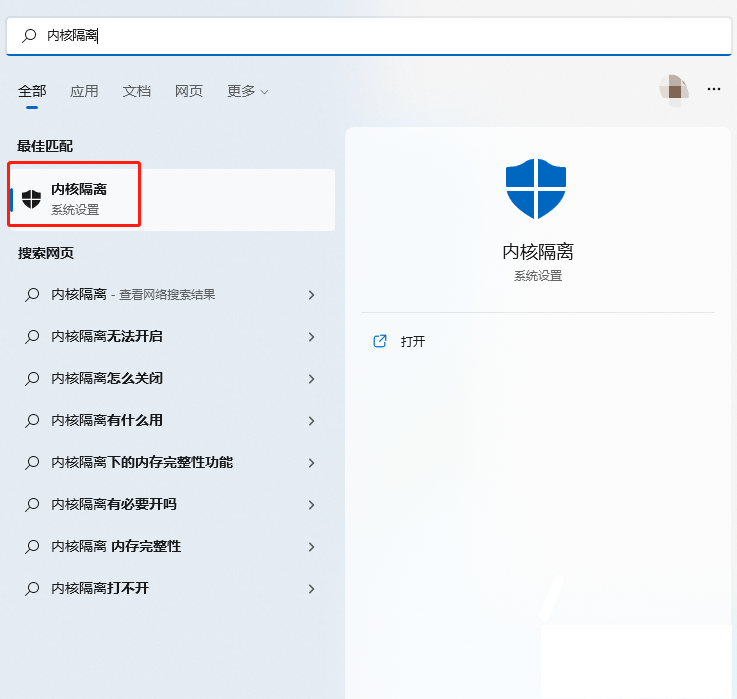
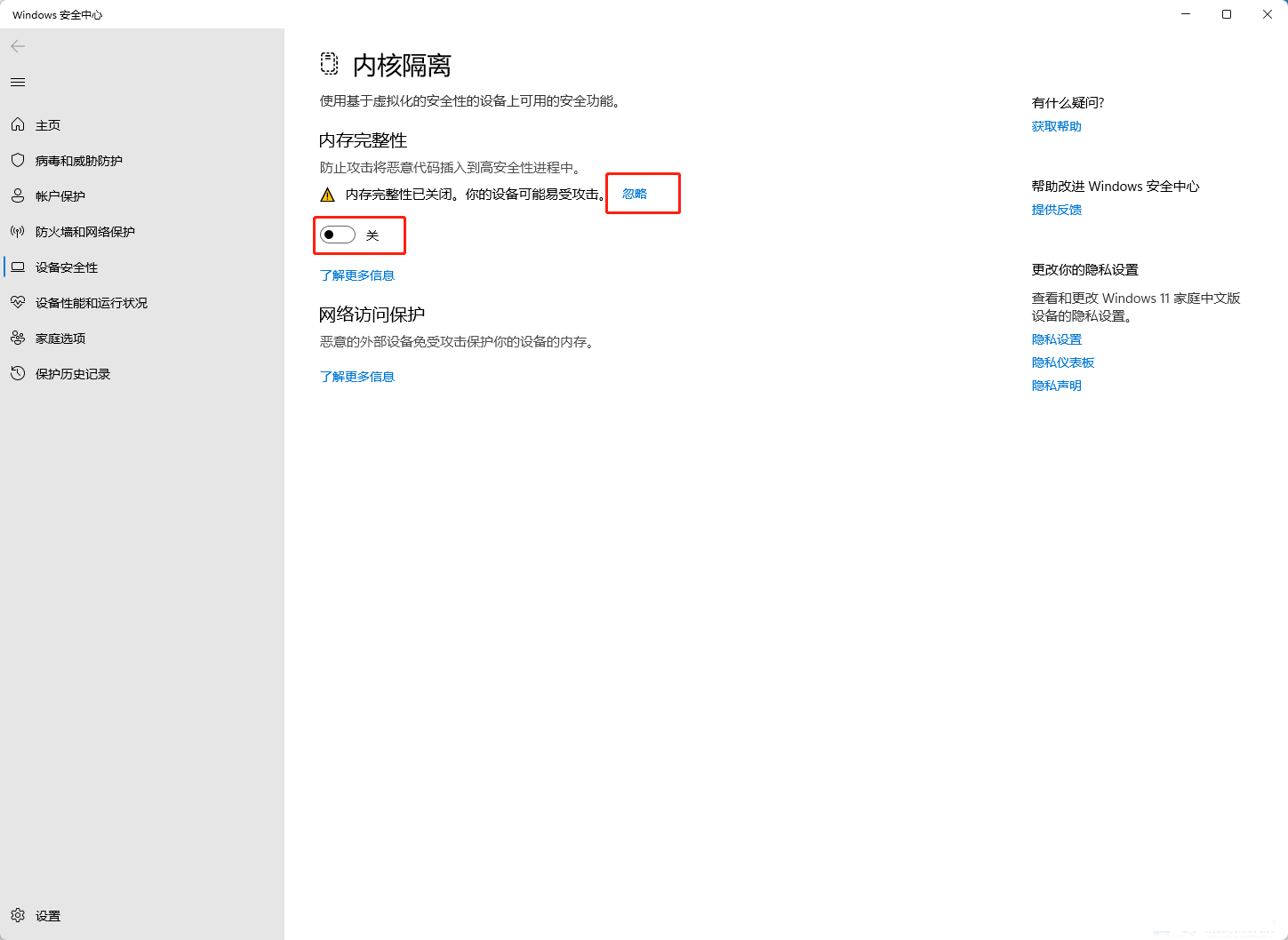
2. Turn off memory integrity. The message above reads "Memory integrity has been turned off. Your device may be vulnerable." Click the back button to ignore it. It will not affect the use.
3. The problem can be solved after restarting the machine.
The above is the detailed content of The driver cannot be loaded on this device. How to solve it? (Personally tested and valid). For more information, please follow other related articles on the PHP Chinese website!

Hot AI Tools

Undresser.AI Undress
AI-powered app for creating realistic nude photos

AI Clothes Remover
Online AI tool for removing clothes from photos.

Undress AI Tool
Undress images for free

Clothoff.io
AI clothes remover

AI Hentai Generator
Generate AI Hentai for free.

Hot Article
Hot Tools

Notepad++7.3.1
Easy-to-use and free code editor

SublimeText3 Chinese version
Chinese version, very easy to use

Zend Studio 13.0.1
Powerful PHP integrated development environment

Dreamweaver CS6
Visual web development tools

SublimeText3 Mac version
God-level code editing software (SublimeText3)
Hot Topics
 1378
1378
 52
52

 How to Fix Steam Error Code 118
Feb 19, 2024 pm 05:56 PM
How to Fix Steam Error Code 118
Feb 19, 2024 pm 05:56 PM
Steam is a world-renowned gaming platform that allows users to purchase, download and play games. However, sometimes users may encounter some problems when using Steam, such as error code 118. In this article, we will explore this problem and how to solve it. First, let’s understand what error code 118 means. Error code 118 appears when you try to log into Steam, which means your computer cannot connect to the Steam servers. This may be due to network issues, firewall settings, proxy settings, or
 Solution to the problem that Win11 system cannot install Chinese language pack
Mar 09, 2024 am 09:48 AM
Solution to the problem that Win11 system cannot install Chinese language pack
Mar 09, 2024 am 09:48 AM
Solution to the problem that Win11 system cannot install Chinese language pack With the launch of Windows 11 system, many users began to upgrade their operating system to experience new functions and interfaces. However, some users found that they were unable to install the Chinese language pack after upgrading, which troubled their experience. In this article, we will discuss the reasons why Win11 system cannot install the Chinese language pack and provide some solutions to help users solve this problem. Cause Analysis First, let us analyze the inability of Win11 system to
 How to solve steam error code E20
Feb 19, 2024 pm 09:17 PM
How to solve steam error code E20
Feb 19, 2024 pm 09:17 PM
When using Steam to download, update or install games, you often encounter various error codes. Among them, a common error code is E20. This error code usually means that the Steam client is having trouble trying to update the game. Fortunately, though, it's not that difficult to fix this problem. First, we can try the following solutions to fix error code E20. 1. Restart the Steam client: Sometimes, directly restarting the Steam client can solve this problem. In the Steam window
 Five tips to teach you how to solve the problem of Black Shark phone not turning on!
Mar 24, 2024 pm 12:27 PM
Five tips to teach you how to solve the problem of Black Shark phone not turning on!
Mar 24, 2024 pm 12:27 PM
As smartphone technology continues to develop, mobile phones play an increasingly important role in our daily lives. As a flagship phone focusing on gaming performance, the Black Shark phone is highly favored by players. However, sometimes we also face the situation that the Black Shark phone cannot be turned on. At this time, we need to take some measures to solve this problem. Next, let us share five tips to teach you how to solve the problem of Black Shark phone not turning on: Step 1: Check the battery power. First, make sure your Black Shark phone has enough power. It may be because the phone battery is exhausted
 The driver cannot be loaded on this device. How to solve it? (Personally tested and valid)
Mar 14, 2024 pm 09:00 PM
The driver cannot be loaded on this device. How to solve it? (Personally tested and valid)
Mar 14, 2024 pm 09:00 PM
Everyone knows that if the computer cannot load the driver, the device may not work properly or interact with the computer correctly. So how do we solve the problem when a prompt box pops up on the computer that the driver cannot be loaded on this device? The editor below will teach you two ways to easily solve the problem. Unable to load the driver on this device Solution 1. Search for "Kernel Isolation" in the Start menu. 2. Turn off Memory Integrity, and it will prompt "Memory Integrity has been turned off. Your device may be vulnerable." Click behind to ignore it, and it will not affect the use. 3. The problem can be solved after restarting the machine.
 How to solve the problem of automatically saving pictures when publishing on Xiaohongshu? Where is the automatically saved image when posting?
Mar 22, 2024 am 08:06 AM
How to solve the problem of automatically saving pictures when publishing on Xiaohongshu? Where is the automatically saved image when posting?
Mar 22, 2024 am 08:06 AM
With the continuous development of social media, Xiaohongshu has become a platform for more and more young people to share their lives and discover beautiful things. Many users are troubled by auto-save issues when posting images. So, how to solve this problem? 1. How to solve the problem of automatically saving pictures when publishing on Xiaohongshu? 1. Clear the cache First, we can try to clear the cache data of Xiaohongshu. The steps are as follows: (1) Open Xiaohongshu and click the "My" button in the lower right corner; (2) On the personal center page, find "Settings" and click it; (3) Scroll down and find the "Clear Cache" option. Click OK. After clearing the cache, re-enter Xiaohongshu and try to post pictures to see if the automatic saving problem is solved. 2. Update the Xiaohongshu version to ensure that your Xiaohongshu
 How to solve Chinese garbled characters in Linux
Feb 21, 2024 am 10:48 AM
How to solve Chinese garbled characters in Linux
Feb 21, 2024 am 10:48 AM
The Linux Chinese garbled problem is a common problem when using Chinese character sets and encodings. Garbled characters may be caused by incorrect file encoding settings, system locale not being installed or set, and terminal display configuration errors, etc. This article will introduce several common workarounds and provide specific code examples. 1. Check the file encoding setting. Use the file command to view the file encoding. Use the file command in the terminal to view the encoding of the file: file-ifilename. If there is "charset" in the output
 Share the method to solve the problem that PyCharm cannot be opened
Feb 22, 2024 am 09:03 AM
Share the method to solve the problem that PyCharm cannot be opened
Feb 22, 2024 am 09:03 AM
Title: How to solve the problem that PyCharm cannot be opened. PyCharm is a powerful Python integrated development environment, but sometimes we may encounter the problem that PyCharm cannot be opened. In this article, we'll share some common workarounds and provide specific code examples. Hope this helps those who encounter this problem. Method 1: Clear the cache Sometimes PyCharm’s cache files may cause the program to fail to open normally. We can try clearing the cache to solve this problem. Tool
