


php editor Strawberry will introduce to you how to display Baidu Netdisk on your computer. Baidu Netdisk is a convenient cloud storage tool, but sometimes it cannot be found on the computer. Below we will explain in detail how to display Baidu Netdisk on your computer so that you can manage and use cloud storage services more conveniently.
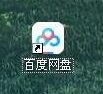
First turn on your computer and double-click the Baidu Netdisk icon.
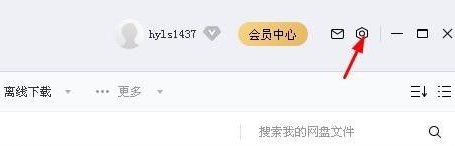
After Baidu Cloud Disk opens, click the settings icon.
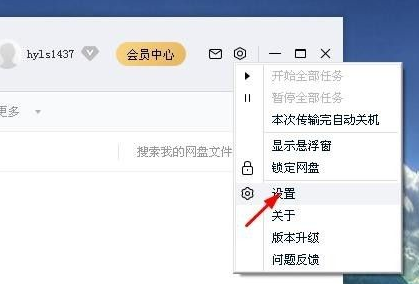
After clicking the Settings icon, in the drop-down menu, click Settings.
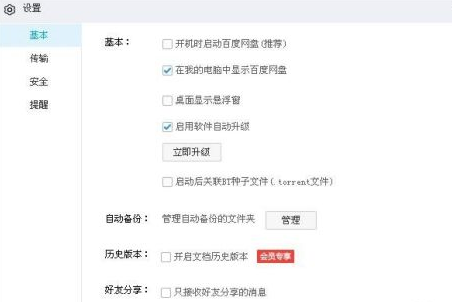
After clicking Settings, in Basic, click Show Baidu Cloud Disk in My Computer.
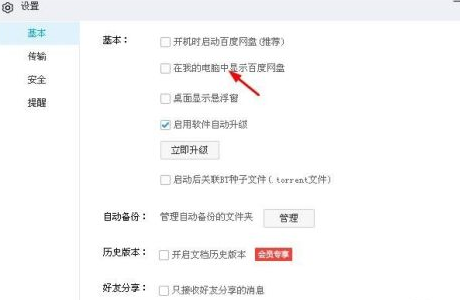
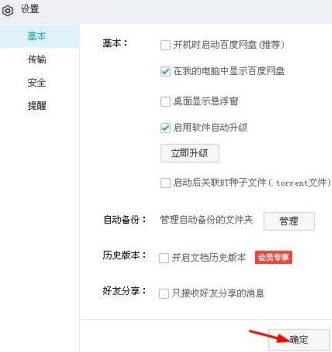
After clicking Show Baidu Cloud Disk in My Computer, click Apply.
After clicking Apply, click OK.
The above is the detailed content of How to display Baidu Netdisk on my computer - How to display Baidu Netdisk on my computer. For more information, please follow other related articles on the PHP Chinese website!
 Computer is infected and cannot be turned on
 How to prevent the computer from automatically installing software
 Summary of commonly used computer shortcut keys
 Computer freeze screen stuck
 How to measure internet speed on computer
 How to set the computer to automatically connect to WiFi
 Computer 404 error page
 How to set up computer virtual memory





















![[Web front-end] Node.js quick start](https://img.php.cn/upload/course/000/000/067/662b5d34ba7c0227.png)



