


 Java
javaTutorial
In-depth understanding of Maven local warehouse configuration: improve project management efficiency
Java
javaTutorial
In-depth understanding of Maven local warehouse configuration: improve project management efficiency
In-depth understanding of Maven local warehouse configuration: improve project management efficiency


Detailed explanation of Maven local warehouse configuration: Make your project management more efficient
As a build tool for Java projects, Maven is one of the indispensable tools in development. In Maven, we can configure a local warehouse to store the dependency packages required by the project, so that dependencies can be quickly obtained when the project is built, speeding up the build speed and improving the maintainability of the project. This article will introduce the configuration method of Maven local warehouse in detail, and provide you with some specific code examples, hoping to help readers better understand and use Maven local warehouse.
1. Configure the local warehouse path
In Maven, the default path of the local warehouse is ~/.m2/repository, but we can also specify it through configuration. Defined local repository path. Generally speaking, we can set the path in Maven's settings.xml configuration file. The following is an example configuration:
<settings>
  <localRepository>/path/to/custom/repository</localRepository>
</settings>
Through the above configuration, we can specify the local warehouse path as /path/to/custom/repository, so that Maven will dependency when building the project Items are downloaded to this path. The advantage of this is that the dependencies of the project can be managed uniformly and the problems of repeated downloads and dependency conflicts can be avoided.
2. Use the mirror warehouse to accelerate downloads
Sometimes, we may encounter slow download speeds of Maven dependencies. In this case, you can configure the mirror warehouse to speed up the download. The mirror warehouse refers to a warehouse that is synchronized with the central warehouse. It can be obtained from the mirror warehouse when downloading dependencies to speed up downloading. The following is an example configuration:
<mirrors>
  <mirror>
    <id>mirrorId</id>
    <url>http://mirrorUrl</url>
    <mirrorOf>central</mirrorOf>
  </mirror>
</mirrors>Through the above configuration, we can speed up the download speed of the central warehouse and improve the efficiency of project construction.
3. Set warehouse cache
In Maven, we can set the cache time of the warehouse so that existing dependencies will not be re-downloaded within a certain period. The following is a sample configuration:
<pluginRepositories>
  <pluginRepository>
    <id>pluginRepo</id>
    <url>http://pluginRepoUrl</url>
    <releases>
      <updatePolicy>daily</updatePolicy>
      <checksumPolicy>warn</checksumPolicy>
    </releases>
    <snapshots>
      <updatePolicy>always</updatePolicy>
      <checksumPolicy>fail</checksumPolicy>
    </snapshots>
  </pluginRepository>
</pluginRepositories>Through the above configuration, we can set the update strategy of the plug-in warehouse, regularly check and update plug-in information, and ensure that the project always uses the latest plug-in version.
4. Summary
Through the introduction of this article, we have a detailed understanding of the configuration method of the Maven local warehouse, including configuring the local warehouse path, using the mirror warehouse to accelerate downloads, setting up the warehouse cache, etc. By properly configuring the local warehouse, project management can be made more efficient, project construction speed can be accelerated, and development efficiency can be improved. I hope the above content will be helpful to readers and allow everyone to better use Maven for project development.
5. Reference materials
- Maven official documentation: [https://maven.apache.org/index.html]()
- Maven configuration guide: [https://maven.apache.org/settings.html]()
The above is the detailed content of In-depth understanding of Maven local warehouse configuration: improve project management efficiency. For more information, please follow other related articles on the PHP Chinese website!

Hot AI Tools

Undresser.AI Undress
AI-powered app for creating realistic nude photos

AI Clothes Remover
Online AI tool for removing clothes from photos.

Undress AI Tool
Undress images for free

Clothoff.io
AI clothes remover

AI Hentai Generator
Generate AI Hentai for free.

Hot Article
Hot Tools

Notepad++7.3.1
Easy-to-use and free code editor

SublimeText3 Chinese version
Chinese version, very easy to use

Zend Studio 13.0.1
Powerful PHP integrated development environment

Dreamweaver CS6
Visual web development tools

SublimeText3 Mac version
God-level code editing software (SublimeText3)
Hot Topics
 1384
1384
 52
52

 Understand Linux Bashrc: functions, configuration and usage
Mar 20, 2024 pm 03:30 PM
Understand Linux Bashrc: functions, configuration and usage
Mar 20, 2024 pm 03:30 PM
Understanding Linux Bashrc: Function, Configuration and Usage In Linux systems, Bashrc (BourneAgainShellruncommands) is a very important configuration file, which contains various commands and settings that are automatically run when the system starts. The Bashrc file is usually located in the user's home directory and is a hidden file. Its function is to customize the Bashshell environment for the user. 1. Bashrc function setting environment
 Java Maven build tool advancement: optimizing compilation speed and dependency management
Apr 17, 2024 pm 06:42 PM
Java Maven build tool advancement: optimizing compilation speed and dependency management
Apr 17, 2024 pm 06:42 PM
Optimize Maven build tools: Optimize compilation speed: Take advantage of parallel compilation and incremental compilation. Optimize dependencies: Analyze dependency trees and use BOM (bill of materials) to manage transitive dependencies. Practical case: illustrate optimizing compilation speed and dependency management through examples.
 How to configure and install FTPS in Linux system
Mar 20, 2024 pm 02:03 PM
How to configure and install FTPS in Linux system
Mar 20, 2024 pm 02:03 PM
Title: How to configure and install FTPS in Linux system, specific code examples are required. In Linux system, FTPS is a secure file transfer protocol. Compared with FTP, FTPS encrypts the transmitted data through TLS/SSL protocol, which improves Security of data transmission. In this article, we will introduce how to configure and install FTPS in a Linux system and provide specific code examples. Step 1: Install vsftpd Open the terminal and enter the following command to install vsftpd: sudo
 What tool does git use to pull remote code to local?
Apr 09, 2024 pm 01:24 PM
What tool does git use to pull remote code to local?
Apr 09, 2024 pm 01:24 PM
Specific steps for Git to pull remote code to the local warehouse: Open Git Bash or a terminal window. Navigate to the local repository directory where you want to pull the code. Run command: git pull
 How to submit code in eclipse
May 05, 2024 pm 07:30 PM
How to submit code in eclipse
May 05, 2024 pm 07:30 PM
To commit code using Eclipse, follow these steps: Set up a version control system: Configure the Git path and initialize the remote repository. Create a Git repository: Select the project, right-click Shared Project and select Git. Add files to the staging area: Select the file in the "Git Staging" view and click the "+" button. Submit changes: Enter the information in the Submit message and click the Submit button. Push changes to the remote repository: Right-click the remote repository in the Git Repositories view and select Push.
 Where can I check the configuration of my win11 computer? How to find the configuration information of win11 computer
Mar 06, 2024 am 10:10 AM
Where can I check the configuration of my win11 computer? How to find the configuration information of win11 computer
Mar 06, 2024 am 10:10 AM
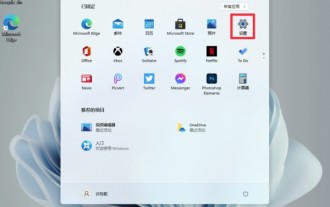
When we use win11 system, we sometimes need to check the configuration of our computer, but many users are also asking where to check the configuration of win11 computer? In fact, the method is very simple. Users can directly open the system information under settings, and then view the computer configuration information. Let this site carefully introduce to users how to find win11 computer configuration information. How to find win11 computer configuration information. Method 1: 1. Click Start and open Computer Settings. 3. You can view computer configuration information on this page. 2. In the command prompt window, enter systeminfo and press Enter to view the computer configuration.
 Getting Started with Java Git: A Beginner's Guide to Version Control
Mar 27, 2024 pm 02:21 PM
Getting Started with Java Git: A Beginner's Guide to Version Control
Mar 27, 2024 pm 02:21 PM
A version control system (VCS) is an indispensable tool in software development that allows developers to track and manage code changes. git is a popular and powerful VCS that is widely used in Java development. This guide will introduce the basic concepts and operations of Git, providing Java developers with the basics of version control. The basic concept of Git Repository: where code and version history are stored. Branch: An independent line of development in a code base that allows developers to make changes without affecting the main line of development. Commit: A change to the code in the code base. Rollback: Revert the code base to a previous commit. Merge: Merge changes from two or more branches into a single branch. Getting Started with Git 1. Install Git Download and download from the official website
 What computer configuration does Black Myth Wukong require?
Mar 08, 2024 pm 01:22 PM
What computer configuration does Black Myth Wukong require?
Mar 08, 2024 pm 01:22 PM
The game Black Myth Wukong will be launched on all major platforms in the summer of 2024. Players need to meet certain computer configurations when downloading the game to experience it. The following is an introduction to the minimum configuration required for Black Myth Wukong. What computer configuration is required for Black Myth Wukong? Minimum configuration operating system: Windows 7, Windows 8.1, Windows 10 (all 64-bit) Processor: Intel Corei5-4430/AMDFX-6300 Running memory: 8GB RAM Graphics card: NVIDIA GeForce GTX9602GB/AMDRadeon R73702GB Storage space: 100GB required Available space recommended operating system: Windows 7, Win
