


Game opens on wrong monitor on Windows 11/10

If you have problems opening games on the wrong monitor in Windows 11/10, this article will guide you to solve this problem. Windows 11/10 supports multiple monitor connections, which may cause problems sometimes. Multiple monitors may cause errors when launching the game. Please follow the suggestions provided in this article to resolve this issue.
Game on Windows 11/10 opens on wrong monitor
If your game opens on the wrong display in Windows 11/10, the following fixes will help you.
Let’s take a look at all these fixes in detail.
1] Disconnect and reconnect the second monitor
The easiest way to resolve the issue is to first disconnect the second monitor and then launch the game. Then reconnect the second monitor, launch the game again, and check if the problem still exists.
2]Change the main display
You can also try changing the main display. The following instructions will guide you in doing this:
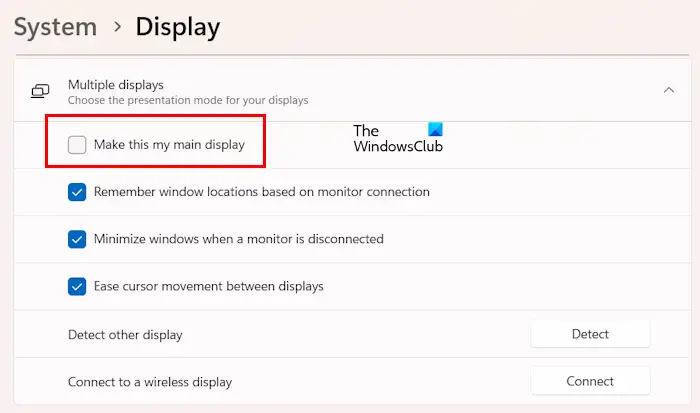
Now, check if the problem still exists.
3]Use keyboard shortcuts
If the program opens on the wrong monitor, use the shortcut Win Shift left or right arrow keys to return to the main monitor display.
If this shortcut key does not work, please press the Alt Enter key combination. This shortcut switches the game to windowed mode. Now you can drag it onto your main monitor with the help of your mouse.
4]Did you last open a game on a second monitor?
Did you last open a game on a second monitor? Windows will remember open applications on the second monitor. The next time you open these applications, they will open on the same monitor. To resolve this issue, use the keyboard shortcut to bring the game to your primary monitor and then close it. From now on, the game should open on the primary monitor.
5]Update your graphics card driver
We also recommend that you update your graphics card driver to the latest version. You can download the latest version of the graphics card driver from the manufacturer's official website.
After downloading the latest version of the graphics card driver, install the DDU (Display Driver Uninstaller) tool and use it to completely remove the graphics card driver from your PC. After uninstalling the graphics card driver, run the GPU driver's installer file to install it.
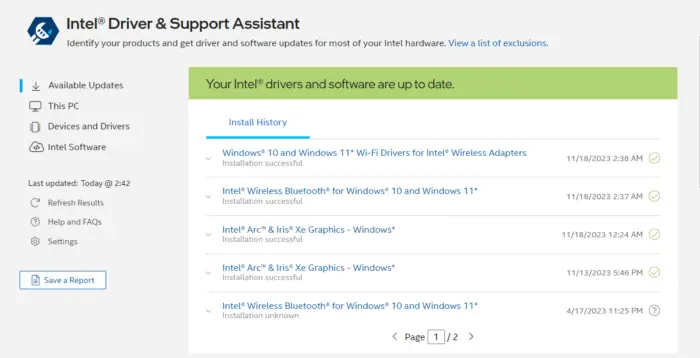
You can also update your graphics card driver using a specialized application developed by your computer manufacturer or graphics card manufacturer. Some of these applications include:
- Intel Driver and Support Assistant
- HP Support Assistant
- MyASUS App
- Dell Support Assistant
6]Edit the Windowinfo.JSON file (if applicable)
If you have the game installed, there may be a Windowinfo.JSON file in its installation location. You can edit this file to open the game window on your desired monitor. Check to see if you have this file in your game library.
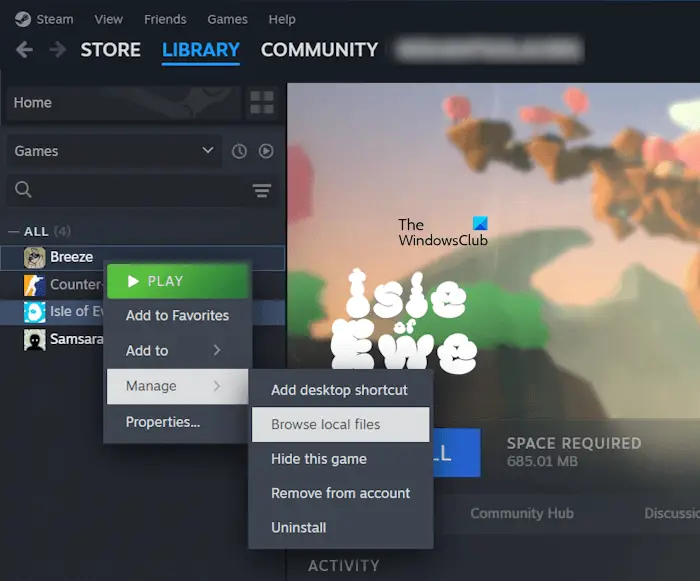
Follow the steps provided below:
Now, look for the Windowinfo.JSON file. If the file exists, open it in a JSON file editing software and search for value monitor. Depending on the number of monitors you have, change its value to 0, 1, 2, etc.
7]Using Microsoft PowerToys
If the problem persists, you can use Microsoft PowerToys to resolve the issue. Install Microsoft PowerToys and launch it. After launching PowerToys, follow these steps:
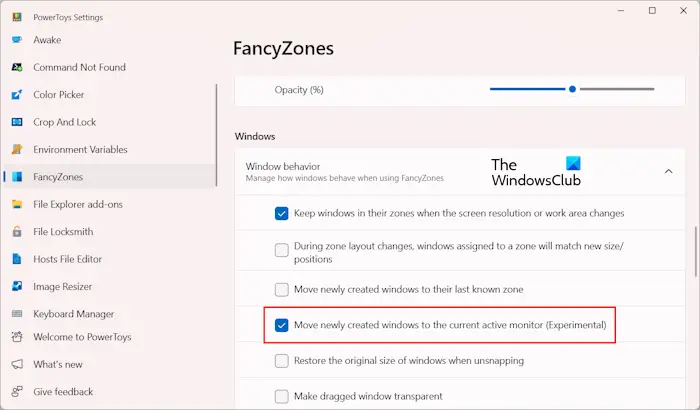
With the above option enabled, Windows will automatically move your game to the active window when you launch it.
that's all. I hope this helps you.
How to open a game on a specific Windows 11 monitor?
You can use different methods to open a game or app on a specific display in Windows 11. You can set the target monitor as the primary monitor. Alternatively, you can use Microsoft PowerToys to make the game open in the active window.
How to move a full-screen game to another Windows 11 monitor?
You can move a full-screen game to another monitor using the keyboard shortcut Win Shift Left or Right Arrow keys. I tried this shortcut and it worked for me. If this doesn't work for you, you'll have to set your game to windowed mode and move it to a second monitor. You can now set the game to full screen mode.
Read next: How to set up Multi-Monitor Gaming on Windows PC.
The above is the detailed content of Game opens on wrong monitor on Windows 11/10. For more information, please follow other related articles on the PHP Chinese website!

Hot AI Tools

Undresser.AI Undress
AI-powered app for creating realistic nude photos

AI Clothes Remover
Online AI tool for removing clothes from photos.

Undress AI Tool
Undress images for free

Clothoff.io
AI clothes remover

AI Hentai Generator
Generate AI Hentai for free.

Hot Article
Hot Tools

Notepad++7.3.1
Easy-to-use and free code editor

SublimeText3 Chinese version
Chinese version, very easy to use

Zend Studio 13.0.1
Powerful PHP integrated development environment

Dreamweaver CS6
Visual web development tools

SublimeText3 Mac version
God-level code editing software (SublimeText3)
Hot Topics
 1378
1378
 52
52

 Four ways to implement multithreading in C language
Apr 03, 2025 pm 03:00 PM
Four ways to implement multithreading in C language
Apr 03, 2025 pm 03:00 PM
Multithreading in the language can greatly improve program efficiency. There are four main ways to implement multithreading in C language: Create independent processes: Create multiple independently running processes, each process has its own memory space. Pseudo-multithreading: Create multiple execution streams in a process that share the same memory space and execute alternately. Multi-threaded library: Use multi-threaded libraries such as pthreads to create and manage threads, providing rich thread operation functions. Coroutine: A lightweight multi-threaded implementation that divides tasks into small subtasks and executes them in turn.
 Can I install mysql on Windows 7
Apr 08, 2025 pm 03:21 PM
Can I install mysql on Windows 7
Apr 08, 2025 pm 03:21 PM
Yes, MySQL can be installed on Windows 7, and although Microsoft has stopped supporting Windows 7, MySQL is still compatible with it. However, the following points should be noted during the installation process: Download the MySQL installer for Windows. Select the appropriate version of MySQL (community or enterprise). Select the appropriate installation directory and character set during the installation process. Set the root user password and keep it properly. Connect to the database for testing. Note the compatibility and security issues on Windows 7, and it is recommended to upgrade to a supported operating system.
 Where to download Python .whl files under Windows?
Apr 01, 2025 pm 08:18 PM
Where to download Python .whl files under Windows?
Apr 01, 2025 pm 08:18 PM
Python binary library (.whl) download method explores the difficulties many Python developers encounter when installing certain libraries on Windows systems. A common solution...
 How to speed up the loading speed of PS?
Apr 06, 2025 pm 06:27 PM
How to speed up the loading speed of PS?
Apr 06, 2025 pm 06:27 PM
Solving the problem of slow Photoshop startup requires a multi-pronged approach, including: upgrading hardware (memory, solid-state drive, CPU); uninstalling outdated or incompatible plug-ins; cleaning up system garbage and excessive background programs regularly; closing irrelevant programs with caution; avoiding opening a large number of files during startup.
 How to efficiently read Windows system logs and get only information from the last few days?
Apr 01, 2025 pm 11:21 PM
How to efficiently read Windows system logs and get only information from the last few days?
Apr 01, 2025 pm 11:21 PM
Efficient reading of Windows system logs: Reversely traverse Evtx files When using Python to process Windows system log files (.evtx), direct reading will be from the earliest...
 In front-end development, how to use CSS and JavaScript to achieve searchlight effects similar to Windows 10 settings interface?
Apr 05, 2025 pm 10:21 PM
In front-end development, how to use CSS and JavaScript to achieve searchlight effects similar to Windows 10 settings interface?
Apr 05, 2025 pm 10:21 PM
How to implement Windows-like in front-end development...
 c What are the differences between the three implementation methods of multithreading
Apr 03, 2025 pm 03:03 PM
c What are the differences between the three implementation methods of multithreading
Apr 03, 2025 pm 03:03 PM
Multithreading is an important technology in computer programming and is used to improve program execution efficiency. In the C language, there are many ways to implement multithreading, including thread libraries, POSIX threads, and Windows API.
 Why can't my code get the data returned by the API? How to solve this problem?
Apr 01, 2025 pm 08:09 PM
Why can't my code get the data returned by the API? How to solve this problem?
Apr 01, 2025 pm 08:09 PM
Why can't my code get the data returned by the API? In programming, we often encounter the problem of returning null values when API calls, which is not only confusing...
