


php editor Zimo will introduce to you how to check the frequency of the memory module in Win7 system. Knowing the frequency of your memory modules is important to optimizing your computer's performance and expanding your memory capacity. In Win7 system, you can easily check the frequency of the memory module through simple operations. The following will give you a detailed tutorial on checking the frequency of the memory module in Win7 system, so that you can easily obtain the information you need.
How to check the memory frequency in Win7 system?
Press the Win key R key combination to open Run, enter cmd and press Enter.
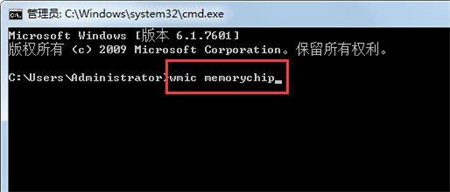
Enter the command prompt window and enter wmic memorychip (note, do not ignore the space between the words wmic and memorychip.)
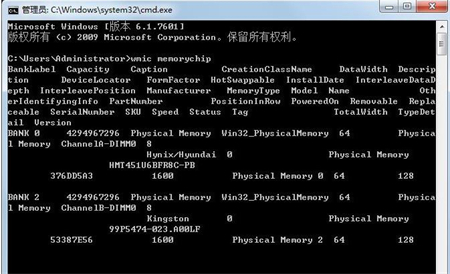
View Get very detailed information about the memory, including frequency, memory number, capacity, bit width, description, etc.
The above is the detailed content of How to check the memory frequency in Win7 system? Tutorial on checking memory module frequency in Win7. For more information, please follow other related articles on the PHP Chinese website!
 How to create virtual wifi in win7
 How to change file type in win7
 How to set up hibernation in Win7 system
 How to open Windows 7 Explorer
 How to solve the problem of not being able to create a new folder in Win7
 Solution to Win7 folder properties not sharing tab page
 Win7 prompts that application data cannot be accessed. Solution
 Introduction to screenshot shortcut keys in Windows 7 system




















![[Web front-end] Node.js quick start](https://img.php.cn/upload/course/000/000/067/662b5d34ba7c0227.png)



