


 Computer Tutorials
Computer Knowledge
How to solve the problem of the device being used when the win11 mobile hard disk ejects
Computer Tutorials
Computer Knowledge
How to solve the problem of the device being used when the win11 mobile hard disk ejects
How to solve the problem of the device being used when the win11 mobile hard disk ejects

php editor Banana will introduce to you how to solve the problem of "win11 mobile hard disk pop-up always says that the device is in use". When using a mobile hard drive, sometimes the device cannot be safely removed, and a message appears that the device is in use. This may be caused by the operating system or other programs accessing the external hard drive. In order to solve this problem, we can try the following methods to free the device and remove the mobile hard drive safely.
Win11 mobile hard disk pop-up always says the device is in use, what is the solution?
1. Open win x, event viewer, click manage events, and then we click to eject the USB disk.
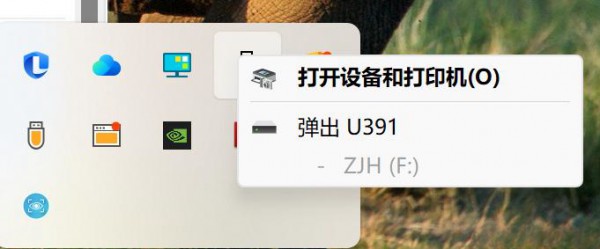
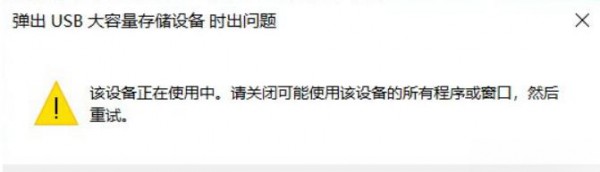
#2. The question will be displayed, and then we click the refresh event, and a warning will appear.
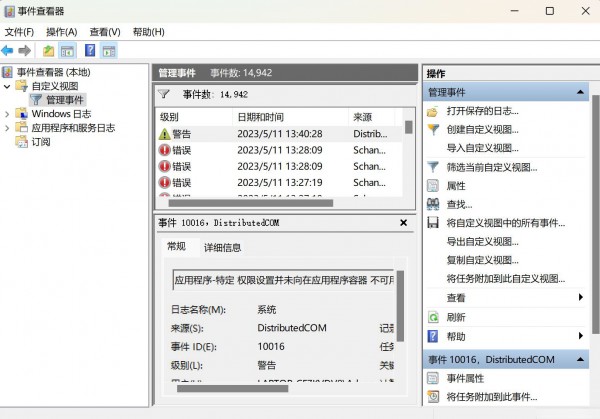
3. Click to view the first event. When this text appears, remember the process ID.
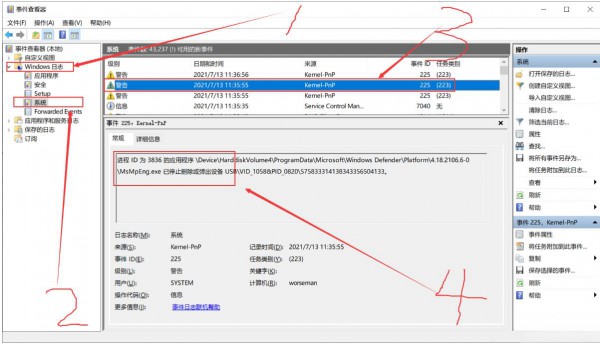
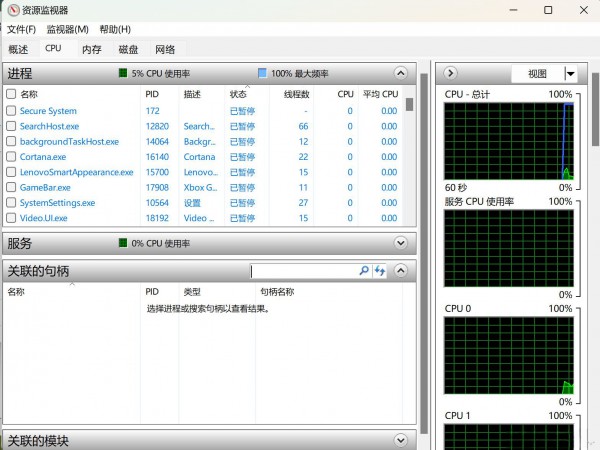
4. ctrl shift Esc to open the task manager and click on the resource manager.
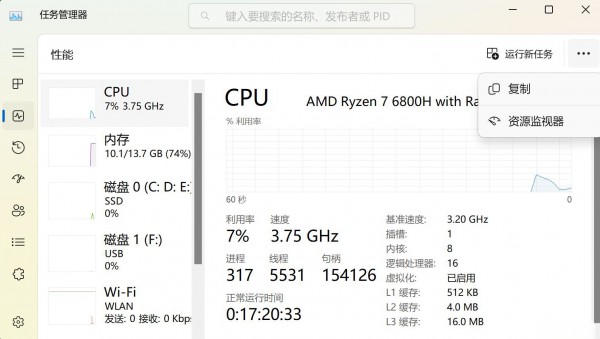
#5. Search for the process ID at the location of the associated handle, then click the first one and right-click to close the process. Then we can exit the USB drive normally.
The above is the detailed content of How to solve the problem of the device being used when the win11 mobile hard disk ejects. For more information, please follow other related articles on the PHP Chinese website!

Hot AI Tools

Undress AI Tool
Undress images for free

Undresser.AI Undress
AI-powered app for creating realistic nude photos

AI Clothes Remover
Online AI tool for removing clothes from photos.

Clothoff.io
AI clothes remover

Video Face Swap
Swap faces in any video effortlessly with our completely free AI face swap tool!

Hot Article
Hot Tools

Notepad++7.3.1
Easy-to-use and free code editor

SublimeText3 Chinese version
Chinese version, very easy to use

Zend Studio 13.0.1
Powerful PHP integrated development environment

Dreamweaver CS6
Visual web development tools

SublimeText3 Mac version
God-level code editing software (SublimeText3)


 the win 11 trusted platform module (tpm) is not detected or has malfunctioned
Aug 13, 2025 pm 02:24 PM
the win 11 trusted platform module (tpm) is not detected or has malfunctioned
Aug 13, 2025 pm 02:24 PM
First,checkifyourPChasTPM2.0byopeningtpm.mscviaRun(Windows R);if"CompatibleTPMcannotbefound"appears,yoursystemmaylackaTPMchip,oritmaybeversion1.2,whichisinsufficientforWindows11.2.EnableTPMinBIOS/UEFIbyrestartingandenteringsetup(viaF2,F10,D
 Win11 computer suddenly black screen but still running. Recovery method with black screen without display
Aug 12, 2025 pm 09:03 PM
Win11 computer suddenly black screen but still running. Recovery method with black screen without display
Aug 12, 2025 pm 09:03 PM
Common reasons for the computer's black screen but still running include driver problems, hardware connection failure or graphics card damage. The solutions are forced to restart, check the monitor connection, try different monitors or ports, update or roll back the graphics card driver, enter safe mode to troubleshoot software conflicts, check hardware such as graphics card and memory, confirm that the BIOS is set correctly, and restore the system if necessary; if you want to distinguish software and hardware problems, you can test in safe mode, observe the startup process, use diagnostic tools, replace the hardware, and listen to abnormal sounds of the computer; to prevent recurrence, keep the driver updated, install genuine software, regularly maintain the system, pay attention to the stability of heat dissipation and power supply, avoid overclocking, regularly backup data, and monitor hardware temperature.
 How to bypass the TPM 2.0 requirement for Win11
Aug 21, 2025 am 04:08 AM
How to bypass the TPM 2.0 requirement for Win11
Aug 21, 2025 am 04:08 AM
ToinstallWindows11onadevicewithoutTPM2.0,trythesemethods:1.ModifytheregistryduringsetupusingLabConfigtobypasschecks.2.Usesetup.exefromamountedISOandoverridecompatibilitywithtoolslikeWhyNotWin11.3.Performacleaninstallwithanautounattend.xmlfilethatskip
 How to turn on dark mode in Win11
Aug 16, 2025 am 09:01 AM
How to turn on dark mode in Win11
Aug 16, 2025 am 09:01 AM
ToenabledarkmodeinWindows11forreducedeyestrainorbetterbatterylife,useSettings:pressWindows I,gotoPersonalization>Colors,andsetboth"Windowsmode"and"Appmode"toDark.Alternatively,toggleDarkModeinstantlyviaQuickSettings.Advanceduse
 Where to change mouse pointer settings in Win11
Aug 27, 2025 am 07:42 AM
Where to change mouse pointer settings in Win11
Aug 27, 2025 am 07:42 AM
TocustomizethemousepointerinWindows11,adjustsize,color,andstyleviaSettingsorControlPanel.Choosepredefinedschemes,modifyindividualcursors,orchangepointerspeedandprecisionforbettercontrolandvisibility.
 How to change system language in Win11
Aug 22, 2025 am 10:36 AM
How to change system language in Win11
Aug 22, 2025 am 10:36 AM
TochangethesystemlanguageinWindows11,useSettings,ControlPanel,orPowerShell.Installthedesiredlanguagepack,setitasdefault,andrestartyourcomputertoapplychanges.
 How to reset network settings in Win11
Aug 22, 2025 pm 12:54 PM
How to reset network settings in Win11
Aug 22, 2025 pm 12:54 PM
Ifyou'rehavingconnectivityissuesonWindows11,tryresettingnetworksettings:1.UseSettings>Networkreset.2.RunnetworkresetcommandsinCommandPrompt(Admin).3.ReinstallthenetworkadapterviaDeviceManager.Restartyourdeviceaftereachstep.
 There is no sound in front of the win11 headphones? Is it a plug or a driver problem?
Aug 14, 2025 pm 06:51 PM
There is no sound in front of the win11 headphones? Is it a plug or a driver problem?
Aug 14, 2025 pm 06:51 PM
Windows 11 headphones are silent? It could be a plug or driver problem! This article will guide you to troubleshoot the sound-free failure of Windows 11 headphones, covering plug failures, driver problems and other possible causes. 1. Check for poor contact between the headphones and the interface: Poor contact between the headphone plug and the computer interface is a common cause. Please clean the plug and try to plug and unplug it multiple times to ensure a secure connection. If there is any damage, please replace the headphones. Interface failure: The computer headset interface may be damaged. Try using other headphones, and if the problem persists, the interface may require repair or replacement. 2. Driver problem driver is not installed or outdated: Open "Device Manager" (right-click on the "Start" menu), and expand "Sound, Video, and Game Controller".
