


 Java
javaTutorial
A complete guide to easily resolve Tomcat404 errors to help you get started quickly!
Java
javaTutorial
A complete guide to easily resolve Tomcat404 errors to help you get started quickly!
A complete guide to easily resolve Tomcat404 errors to help you get started quickly!


The ultimate guide to solving Tomcat404 errors to help you get started easily!
1. Introduction
Tomcat is a commonly used Java Servlet container for hosting Java Web applications on the server. However, when we run our application using Tomcat, we sometimes encounter a 404 error, that is, the requested resource cannot be found. This article will provide you with some tips and sample code to solve Tomcat 404 errors to help you solve the problem more easily.
2. Check the URL and application deployment
- Check whether the URL is correct: First, make sure the URL you access is correct. Check that the spelling, case, and path of the URL are correct.
- Check whether the application is deployed correctly: Make sure your application has been deployed correctly to Tomcat's webapps directory. Check if your application's WAR file or directory is in that directory.
3. Check the web.xml file
Under normal circumstances, Tomcat will automatically load the web.xml file and process the request according to the configuration in it. Here are some common web.xml configurations that can cause 404 errors.
- Check the configuration of servlet and servlet-mapping: Make sure your servlet and servlet-mapping are configured correctly. Make sure that the servlet's name is correctly defined in web.xml and that servlet-mapping points to the correct URL pattern.
Sample code:
<servlet>
    <servlet-name>HelloWorld</servlet-name>
    <servlet-class>com.example.HelloWorldServlet</servlet-class>
</servlet>

<servlet-mapping>
    <servlet-name>HelloWorld</servlet-name>
    <url-pattern>/hello</url-pattern>
</servlet-mapping>- Check the configuration of welcome-file-list: welcome-file-list specifies the files that are displayed by default when the user requests a directory. Make sure the files you wish to display are properly configured in your welcome-file-list.
Sample code:
<welcome-file-list>
    <welcome-file>index.jsp</welcome-file>
</welcome-file-list>
4. Check Servlet and JSP files
If your application depends on Servlet or JSP files, the following are some common problems and solutions.
- Check if the Servlet or JSP file exists: Make sure your Servlet or JSP file exists in the correct location and has the correct file name.
- Check the URL mapping of the Servlet or JSP file: Make sure the URL mapping of your Servlet or JSP file is consistent with the configuration in web.xml.
Sample code:
<servlet>
    <servlet-name>HelloServlet</servlet-name>
    <servlet-class>com.example.HelloServlet</servlet-class>
</servlet>

<servlet-mapping>
    <servlet-name>HelloServlet</servlet-name>
    <url-pattern>/hello</url-pattern>
</servlet-mapping>- Check the Servlet or JSP file for compilation issues: If your Servlet or JSP file has compilation errors at runtime, Tomcat may not load correctly The document. Check your code for syntax errors and make sure your code compiles correctly.
5. Other common problems and solutions
In addition to the above problems, the following are some other common problems and solutions.
- Check the Tomcat log: Locate the Tomcat log file and check whether there is detailed error information about the 404 error. Based on the error message, you can better understand the problem and take appropriate action.
- Check the Tomcat configuration file: Check whether the Tomcat configuration file is configured correctly. For example, you may want to check the configuration and Connector settings in the server.xml file.
- Check the compatibility of Tomcat version and Java version: Make sure the Tomcat version you are using is compatible with your Java version.
6. Summary
Solving Tomcat 404 errors may require you to try and debug multiple times, but by carefully checking the URL, deployment, web.xml file, Servlet and JSP files and Other frequently asked questions so you can more easily find and fix them. This guide provides some frequently asked questions and sample code, hoping to help you successfully resolve Tomcat 404 errors and keep your applications running normally.
The above is the detailed content of A complete guide to easily resolve Tomcat404 errors to help you get started quickly!. For more information, please follow other related articles on the PHP Chinese website!

Hot AI Tools

Undress AI Tool
Undress images for free

Undresser.AI Undress
AI-powered app for creating realistic nude photos

AI Clothes Remover
Online AI tool for removing clothes from photos.

Clothoff.io
AI clothes remover

Video Face Swap
Swap faces in any video effortlessly with our completely free AI face swap tool!

Hot Article
Hot Tools

Notepad++7.3.1
Easy-to-use and free code editor

SublimeText3 Chinese version
Chinese version, very easy to use

Zend Studio 13.0.1
Powerful PHP integrated development environment

Dreamweaver CS6
Visual web development tools

SublimeText3 Mac version
God-level code editing software (SublimeText3)


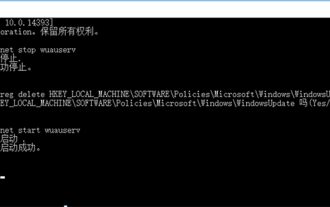 Solution to Windows Update prompt Error 0x8024401c error
Jun 08, 2024 pm 12:18 PM
Solution to Windows Update prompt Error 0x8024401c error
Jun 08, 2024 pm 12:18 PM
Table of Contents Solution 1 Solution 21. Delete the temporary files of Windows update 2. Repair damaged system files 3. View and modify registry entries 4. Turn off the network card IPv6 5. Run the WindowsUpdateTroubleshooter tool to repair 6. Turn off the firewall and other related anti-virus software. 7. Close the WidowsUpdate service. Solution 3 Solution 4 "0x8024401c" error occurs during Windows update on Huawei computers Symptom Problem Cause Solution Still not solved? Recently, the web server needs to be updated due to system vulnerabilities. After logging in to the server, the update prompts error code 0x8024401c. Solution 1
 How to configure domain name in tomcat
Apr 21, 2024 am 09:52 AM
How to configure domain name in tomcat
Apr 21, 2024 am 09:52 AM
To configure Tomcat to use a domain name, follow these steps: Create a server.xml backup. Open server.xml and add the Host element, replacing example.com with your domain name. Create an SSL certificate for the domain name (if required). Add an SSL connector in server.xml, change the port, keystore file, and password. Save server.xml. Restart Tomcat.
 Where is the tomcat startup error log?
Apr 21, 2024 am 10:11 AM
Where is the tomcat startup error log?
Apr 21, 2024 am 10:11 AM
The Tomcat startup error log is usually located in the catalina.out file. This file contains error information that occurs during the startup process. Common errors include deployment application exceptions, configuration errors, and connection problems. Regularly checking the catalina.out file can help find potential problems.
 Reasons for garbled characters in tomcat
Apr 21, 2024 am 10:18 AM
Reasons for garbled characters in tomcat
Apr 21, 2024 am 10:18 AM
Reasons for Tomcat garbled characters: 1. Character set mismatch; 2. HTTP response header is not set correctly; 3. Filter or encoder configuration error; 4. Web page encoding is incorrect; 5. Other reasons (including server-side language, database encoding and proxy server issues).
 How to add a server in eclipse
May 05, 2024 pm 07:27 PM
How to add a server in eclipse
May 05, 2024 pm 07:27 PM
To add a server to Eclipse, follow these steps: Create a server runtime environment Configure the server Create a server instance Select the server runtime environment Configure the server instance Start the server deployment project
 Where to read tomcat error logs
Apr 21, 2024 am 10:04 AM
Where to read tomcat error logs
Apr 21, 2024 am 10:04 AM
Tomcat error logs are generally stored in: Linux/Unix/macOS: $CATALINA_HOME/logs/catalina.out Windows: %CATALINA_HOME%\logs\catalina.out You can find the Tomcat installation directory by running the echo $CATALINA_HOME or echo %CATALINA_HOME% command. If the catalina.out file is not found, check the stderr file or the localhost.yyyy-mm-dd.log file, or pass -Dloggi
 How to access the page after tomcat is started
Apr 21, 2024 am 10:30 AM
How to access the page after tomcat is started
Apr 21, 2024 am 10:30 AM
To access the page after Tomcat is started, you need to: start the Tomcat server; determine the port number (default 8080); splice the URL, including IP address, port number and page path; use a web browser to access the spliced URL; identify the Tomcat welcome page; Use the same format to access other pages.
 How to deploy war package in tomcat
Apr 21, 2024 am 10:23 AM
How to deploy war package in tomcat
Apr 21, 2024 am 10:23 AM
The steps to deploy the WAR package to Tomcat are as follows: Copy the WAR package to the webapps directory of Tomcat. Start the Tomcat server and it will automatically deploy the WAR package. Access the application by entering the application's context path into the browser.
