


When connecting to xbox, the xbox store will be unable to connect to the Internet. What is going on? So let’s take a look at the solution to the problem that the Xbox store cannot connect to the Internet!
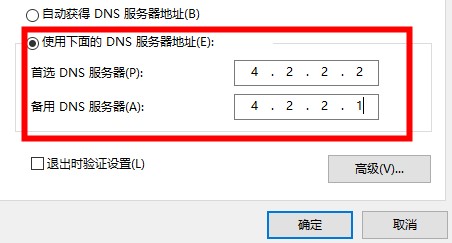
1. Open the Network and Sharing Center - Manually modify DNS - you can set it to 4.2.2.2 or 4.2.2.1.
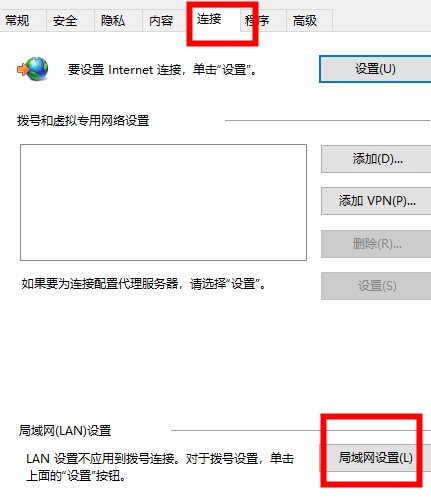
2. Open Internet Options - Select Connection - Click LAN Settings.
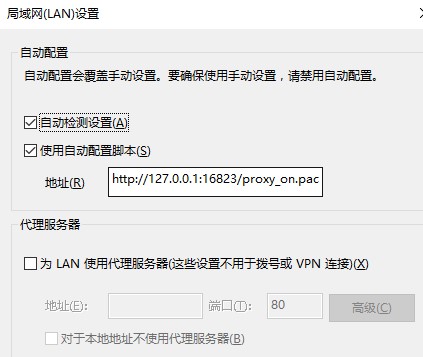
3. Check whether the automatic detection setting is checked - if not, just check it.
The above is the detailed content of How to fix the issue of not being able to connect to the Xbox Store. For more information, please follow other related articles on the PHP Chinese website!
 The difference between xls and xlsx
 Ripple latest price
 What software do you use to open dat files?
 How to solve garbled characters in PHP
 How to solve the problem that Apple cannot download more than 200 files
 The difference between master and host
 What are the java workflow engines?
 How to bind data in dropdownlist




















![[Web front-end] Node.js quick start](https://img.php.cn/upload/course/000/000/067/662b5d34ba7c0227.png)



