


 Backend Development
PHP Tutorial
How to combine ECharts and php interface to realize dynamic data display of statistical charts
Backend Development
PHP Tutorial
How to combine ECharts and php interface to realize dynamic data display of statistical charts
How to combine ECharts and php interface to realize dynamic data display of statistical charts


How to combine ECharts and PHP interfaces to realize dynamic data display of statistical charts
Introduction:
With the development of Internet technology, data visualization has emerged in various fields played an important role. ECharts is a powerful data visualization library that can help us quickly create various types of charts. PHP is a popular server-side scripting language that can be used to handle data requests and build interfaces. Combining ECharts and PHP interfaces, we can realize dynamic data display of statistical charts, and easily update and interact with charts.
This article will introduce how to combine ECharts and PHP interfaces to realize dynamic data display of statistical charts, and provide specific code examples.
Step 1: Preparation
First, we need to install ECharts and PHP environment. ECharts can be downloaded from the official website (https://echarts.apache.org/zh/index.html), and the PHP environment can be obtained by installing an integrated development environment (such as XAMPP).
Step 2: Build the PHP interface
We need to create a PHP file to handle the request and return of chart data. The following is a simple example:
<?php
    // 链接数据库并查询数据
    $conn = mysqli_connect("localhost", "root", "", "database");
    $sql = "SELECT * FROM statistics";
    $result = mysqli_query($conn, $sql);

    // 将查询到的数据转化为JSON格式
    $data = array();
    while($row = mysqli_fetch_assoc($result)){
        $data[] = $row;
    }
    $json = json_encode($data);

    // 设置响应头,指定返回的数据类型为JSON
    header('Content-Type: application/json');
    // 返回JSON数据
    echo $json;
?>Please modify the database connection information and query statements according to your actual situation.
Step 3: Build HTML file
Create an HTML file and introduce ECharts and jQuery libraries. Here is a simple example:
<!DOCTYPE html>
<html>
<head>
    <title>统计图示例</title>
    <!-- 引入ECharts库 -->
    <script src="echarts.min.js"></script>
    <script src="jquery.min.js"></script>
</head>
<body>
    <!-- 定义一个容器,用于显示图表 -->
    <div id="chart-container" style="width: 600px; height: 400px;"></div>

    <script>
        // 使用ajax请求PHP接口获取数据
        $.ajax({
            url: "data.php",
            type: "GET",
            success: function(data) {
                // 将返回的JSON数据解析为JavaScript对象
                var jsonData = JSON.parse(data);

                // 创建一个ECharts实例
                var chart = echarts.init(document.getElementById('chart-container'));

                // 配置图表的参数和数据
                var option = {
                    title: {
                        text: '统计图示例'
                    },
                    xAxis: {
                        type: 'category',
                        data: jsonData.map(function(item){
                            return item.label;
                        })
                    },
                    yAxis: {
                        type: 'value'
                    },
                    series: [{
                        data: jsonData.map(function(item){
                            return item.value;
                        }),
                        type: 'bar'
                    }]
                };

                // 使用刚指定的配置项和数据显示图表
                chart.setOption(option);
            }
        });
    </script>
</body>
</html>Please note that the URL of the data.php file needs to be modified to the actual path.
Step 4: Run and test
Place the PHP file and HTML file in the root directory of the server, and then enter the URL to access the HTML file in the browser. If everything goes well, you will see a statistical chart displayed using ECharts, and the data in the chart will come from the PHP interface.
Summary:
By combining ECharts and PHP interfaces, we can realize dynamic data display of statistical charts. By writing database query statements in PHP files, converting query results into JSON format, and obtaining data in HTML files through ajax requests and displaying them using ECharts, you can easily update and interact with charts. I hope this article can be helpful to you, please leave a message for discussion and communication.
The above is the detailed content of How to combine ECharts and php interface to realize dynamic data display of statistical charts. For more information, please follow other related articles on the PHP Chinese website!

Hot AI Tools

Undresser.AI Undress
AI-powered app for creating realistic nude photos

AI Clothes Remover
Online AI tool for removing clothes from photos.

Undress AI Tool
Undress images for free

Clothoff.io
AI clothes remover

AI Hentai Generator
Generate AI Hentai for free.

Hot Article
Hot Tools

Notepad++7.3.1
Easy-to-use and free code editor

SublimeText3 Chinese version
Chinese version, very easy to use

Zend Studio 13.0.1
Powerful PHP integrated development environment

Dreamweaver CS6
Visual web development tools

SublimeText3 Mac version
God-level code editing software (SublimeText3)
Hot Topics
 1377
1377
 52
52

 PHP 8.4 Installation and Upgrade guide for Ubuntu and Debian
Dec 24, 2024 pm 04:42 PM
PHP 8.4 Installation and Upgrade guide for Ubuntu and Debian
Dec 24, 2024 pm 04:42 PM
PHP 8.4 brings several new features, security improvements, and performance improvements with healthy amounts of feature deprecations and removals. This guide explains how to install PHP 8.4 or upgrade to PHP 8.4 on Ubuntu, Debian, or their derivati
 Discuss CakePHP
Sep 10, 2024 pm 05:28 PM
Discuss CakePHP
Sep 10, 2024 pm 05:28 PM
CakePHP is an open-source framework for PHP. It is intended to make developing, deploying and maintaining applications much easier. CakePHP is based on a MVC-like architecture that is both powerful and easy to grasp. Models, Views, and Controllers gu
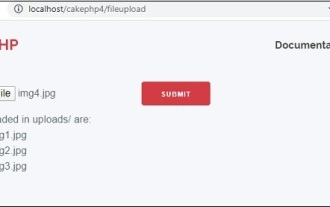 CakePHP File upload
Sep 10, 2024 pm 05:27 PM
CakePHP File upload
Sep 10, 2024 pm 05:27 PM
To work on file upload we are going to use the form helper. Here, is an example for file upload.
 How To Set Up Visual Studio Code (VS Code) for PHP Development
Dec 20, 2024 am 11:31 AM
How To Set Up Visual Studio Code (VS Code) for PHP Development
Dec 20, 2024 am 11:31 AM
Visual Studio Code, also known as VS Code, is a free source code editor — or integrated development environment (IDE) — available for all major operating systems. With a large collection of extensions for many programming languages, VS Code can be c
 How do you parse and process HTML/XML in PHP?
Feb 07, 2025 am 11:57 AM
How do you parse and process HTML/XML in PHP?
Feb 07, 2025 am 11:57 AM
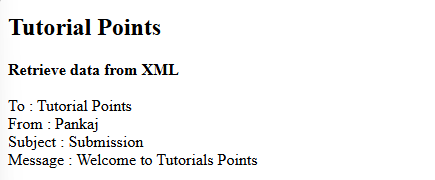
This tutorial demonstrates how to efficiently process XML documents using PHP. XML (eXtensible Markup Language) is a versatile text-based markup language designed for both human readability and machine parsing. It's commonly used for data storage an
 CakePHP Quick Guide
Sep 10, 2024 pm 05:27 PM
CakePHP Quick Guide
Sep 10, 2024 pm 05:27 PM
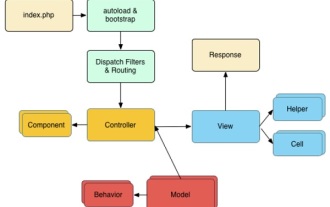
CakePHP is an open source MVC framework. It makes developing, deploying and maintaining applications much easier. CakePHP has a number of libraries to reduce the overload of most common tasks.
 PHP Program to Count Vowels in a String
Feb 07, 2025 pm 12:12 PM
PHP Program to Count Vowels in a String
Feb 07, 2025 pm 12:12 PM
A string is a sequence of characters, including letters, numbers, and symbols. This tutorial will learn how to calculate the number of vowels in a given string in PHP using different methods. The vowels in English are a, e, i, o, u, and they can be uppercase or lowercase. What is a vowel? Vowels are alphabetic characters that represent a specific pronunciation. There are five vowels in English, including uppercase and lowercase: a, e, i, o, u Example 1 Input: String = "Tutorialspoint" Output: 6 explain The vowels in the string "Tutorialspoint" are u, o, i, a, o, i. There are 6 yuan in total
 Explain JSON Web Tokens (JWT) and their use case in PHP APIs.
Apr 05, 2025 am 12:04 AM
Explain JSON Web Tokens (JWT) and their use case in PHP APIs.
Apr 05, 2025 am 12:04 AM
JWT is an open standard based on JSON, used to securely transmit information between parties, mainly for identity authentication and information exchange. 1. JWT consists of three parts: Header, Payload and Signature. 2. The working principle of JWT includes three steps: generating JWT, verifying JWT and parsing Payload. 3. When using JWT for authentication in PHP, JWT can be generated and verified, and user role and permission information can be included in advanced usage. 4. Common errors include signature verification failure, token expiration, and payload oversized. Debugging skills include using debugging tools and logging. 5. Performance optimization and best practices include using appropriate signature algorithms, setting validity periods reasonably,
