


Pycharm environment variable configuration tutorial

pycharm environment variable configuration tutorial: 1. Copy the pycharm installation directory; 2. Open the environment variable setting page; 3. Add the pycharm installation path address to the path of the system variable and save it.
#The operating system of this tutorial: Windows 10 system, PyCharm 2023.3 version, Dell G3 computer.
The tutorial for configuring pycharm environment variables is as follows:
1. Copy the pycharm installation directory
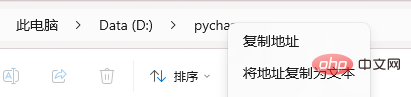
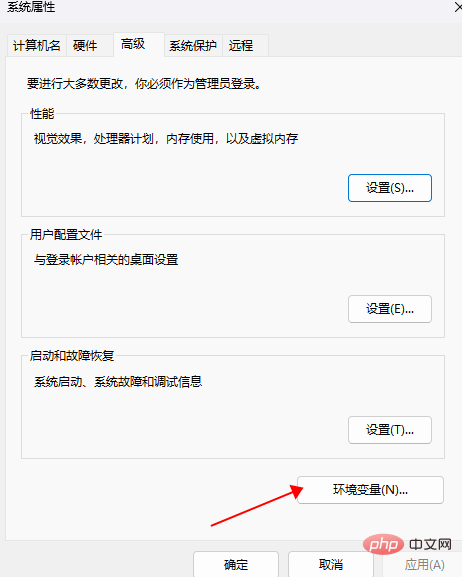
2. Enter the system environment variable setting page
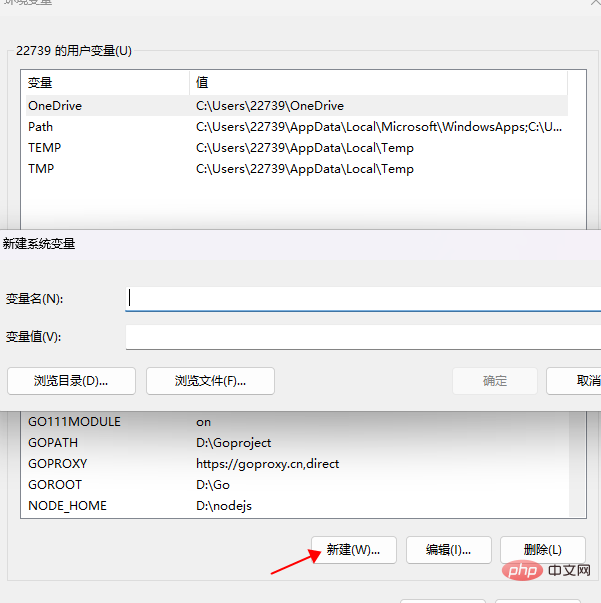
3. Add the installation path address of pycharm to the path of the system variable and save it
The above is the detailed content of Pycharm environment variable configuration tutorial. For more information, please follow other related articles on the PHP Chinese website!

Hot AI Tools

Undresser.AI Undress
AI-powered app for creating realistic nude photos

AI Clothes Remover
Online AI tool for removing clothes from photos.

Undress AI Tool
Undress images for free

Clothoff.io
AI clothes remover

AI Hentai Generator
Generate AI Hentai for free.

Hot Article
Hot Tools

Notepad++7.3.1
Easy-to-use and free code editor

SublimeText3 Chinese version
Chinese version, very easy to use

Zend Studio 13.0.1
Powerful PHP integrated development environment

Dreamweaver CS6
Visual web development tools

SublimeText3 Mac version
God-level code editing software (SublimeText3)
Hot Topics
 1385
1385
 52
52

 How to run ipynb file in pycharm
Apr 25, 2024 am 04:03 AM
How to run ipynb file in pycharm
Apr 25, 2024 am 04:03 AM
To run an ipynb file in PyCharm: open the ipynb file, create a Python environment (optional), run the code cell, use an interactive environment.
 The reason why pycharm runs very slowly
Apr 25, 2024 am 05:42 AM
The reason why pycharm runs very slowly
Apr 25, 2024 am 05:42 AM
Reasons for PyCharm to run slowly include: Hardware limitations: low CPU performance, insufficient memory, and insufficient storage space. Software related issues: Too many plugins, indexing issues, and large project sizes. Project configuration: Improper configuration of the Python interpreter, excessive file monitoring, and excessive resource consumption by the code analysis function.
 How to solve pycharm crash
Apr 25, 2024 am 05:09 AM
How to solve pycharm crash
Apr 25, 2024 am 05:09 AM
Solutions to PyCharm crashes include: check memory usage and increase PyCharm's memory limit; update PyCharm to the latest version; check plug-ins and disable or uninstall unnecessary plug-ins; reset PyCharm settings; disable hardware acceleration; reinstall PyCharm; contact Support staff asked for help.
 How to delete the pycharm interpreter
Apr 25, 2024 am 05:54 AM
How to delete the pycharm interpreter
Apr 25, 2024 am 05:54 AM
To remove the PyCharm interpreter: Open the Settings window and navigate to Interpreters. Select the interpreter you want to delete and click the minus button. Confirm the deletion and reload the project if necessary.
 How to export py files with pycharm
Apr 25, 2024 am 06:24 AM
How to export py files with pycharm
Apr 25, 2024 am 06:24 AM
How to export Py files in PyCharm: Open the file to be exported, click the "File" menu, select "Export File", select the export location and file name, and click the "Export" button
 How to change python to Chinese
May 05, 2024 pm 07:48 PM
How to change python to Chinese
May 05, 2024 pm 07:48 PM
Method to modify the Python interface to Chinese: Set the Python language environment variable: set PYTHONIOENCODING=UTF-8 Modify the IDE settings: PyCharm: Settings>Appearance and Behavior>Appearance>Language (Chinese); Visual Studio Code: File>Preferences>Search "locale" > Enter "zh-CN" to modify the system locale: Windows: Control Panel > Region > Format (Chinese (China)); macOS: Language and Region > Preferred Language (Chinese (Simplified) drag to the top of the list)
 How to install pandas module in pycharm
Apr 25, 2024 am 10:03 AM
How to install pandas module in pycharm
Apr 25, 2024 am 10:03 AM
How to install the Pandas module using PyCharm: Open PyCharm, create a new project, and configure the Python interpreter. Enter the command pip install pandas in the terminal to install Pandas. Verify installation: Import pandas in PyCharm's Python script. If there are no errors, the installation is successful.
 How to adjust pycharm running configuration
Apr 25, 2024 am 09:48 AM
How to adjust pycharm running configuration
Apr 25, 2024 am 09:48 AM
Configure a run configuration in PyCharm: Create a run configuration: In the "Run/Debug Configurations" dialog box, select the "Python" template. Specify script and parameters: Specify the script path and command line parameters to be run. Set the running environment: select the Python interpreter and modify the environment variables. Debug Settings: Enable/disable debugging features and specify the debugger port. Deployment options: Set remote deployment options, such as deploying scripts to the server. Name and save the configuration: Enter a name for the configuration and save it.
