


Pert diagram drawing steps: 1. Open the software and click New; 2. Select Management Consulting, then select Project Management of the subcategory, and then select the PERT diagram; 3. Click on the PERT diagram shape in the diagram, and then click on the left Side symbol library, change the shape of the PERT diagram; 4. Click the table in the picture, double-click the text box to modify the text, or click the property panel on the right to adjust the table; 5. After drawing the PERT diagram, click Save or in the upper left corner Just export it as a picture.

Drawing a PERT diagram is actually not difficult. You only need to follow the following steps to easily draw a PERT diagram. Let’s follow the editor and take a look today.
The first step is to open the "Yitu Icon" software and click "New" to start drawing; or open the web page, search "Yitu Online" and click "Start Drawing". There is no need to download the online drawing. picture.
The second step is to select the category "Management Consulting", then select the subcategory "Project Management", then select "PERT Diagram", and select a favorite template in the material library; or search Just search for "PERT diagram" in the box.

The third step is to click on the PERT diagram shape in the picture, and then click on the symbol library on the left to change the shape of the PERT diagram.
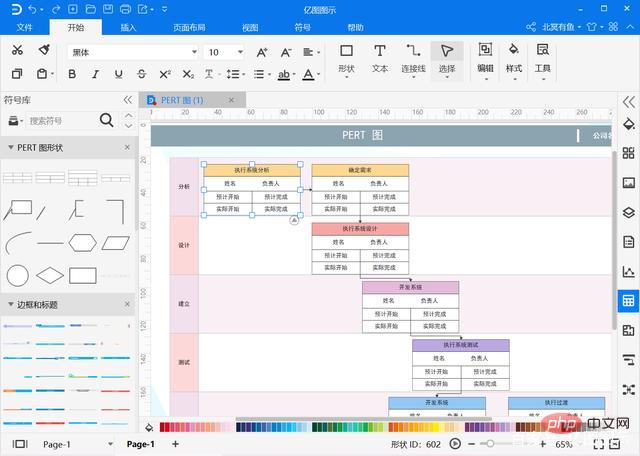
The fourth step is to click on the table in the picture and double-click the text box to modify the text. You can also click on the properties panel on the right to adjust the table.

Step 5: After drawing the PERT diagram, click on the upper left corner to save or export as picture, Html, PDF, SVG, Microsoft Word, PowerPoint, Excel and other formats can also be shared to WeChat and Moments with one click.

The above is the detailed content of How to draw pert diagram. For more information, please follow other related articles on the PHP Chinese website!
 How to draw pert diagram
 How to delete a directory in LINUX
 Comparative analysis of win10 home version and professional version
 How to solve errors encountered in geforce experience
 Solution to the problem that the input is not supported when the computer starts up
 How to solve the problem that scanf return value is ignored
 What is function
 What should I do if the web video cannot be opened?









![[Web front-end] Node.js quick start](https://img.php.cn/upload/course/000/000/067/662b5d34ba7c0227.png)



