


PGM is a portable grayscale map. If we want to store a 2D array in C as an image in PNG, JPEG or any other image format, we have to do a lot of work to encode the data in some specified format before writing to the file.
The Netpbm format provides a simple and portable solution. Netpbm is an open source graphics package, basically used on Linux or Unix platforms. It also runs under Microsoft Windows systems.
Every file starts with a two-byte magic number. This magic number is used to identify the type of file. Types include PBM, PGM, PPM, etc. It also identifies the encoding (ASCII or binary). A magic number is a capital P followed by a number.
ASCII encoding allows for human readability and easy transfer to other platforms; the binary format is more efficient in terms of file size, but may have native byte order issues.
How to write PGM files?
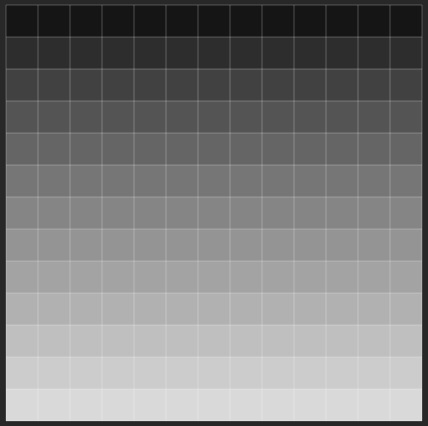
#includemain() { int i, j; int w = 13, h = 13; // This 2D array will be converted into an image The size is 13 x 13 int image[13][13] = { { 15, 15, 15, 15, 15, 15, 15, 15, 15, 15, 15, 15, 15 }, { 31, 31, 31, 31, 31, 31, 31, 31, 31, 31, 31, 31, 31}, { 47, 47, 47, 47, 47, 47, 47, 47, 47, 47, 47, 47, 47}, { 63, 63, 63, 63, 63, 63, 63, 63, 63, 63, 63, 63, 63}, { 79, 79, 79, 79, 79, 79, 79, 79, 79, 79, 79, 79, 79}, { 95, 95, 95, 95, 95, 95, 95, 95, 95, 95, 95, 95, 95 }, { 111, 111, 111, 111, 111, 111, 111, 111, 111, 111, 111, 111, 111}, { 127, 127, 127, 127, 127, 127, 127, 127, 127, 127, 127, 127, 127}, { 143, 143, 143, 143, 143, 143, 143, 143, 143, 143, 143, 143, 143}, { 159, 159, 159, 159, 159, 159, 159, 159, 159, 159, 159, 159, 159}, { 175, 175, 175, 175, 175, 175, 175, 175, 175, 175, 175, 175, 175}, { 191, 191, 191, 191, 191, 191, 191, 191, 191, 191, 191, 191, 191}, { 207, 207, 207, 207, 207, 207, 207, 207, 207, 207, 207, 207, 207} }; FILE* pgmimg; pgmimg = fopen("my_pgmimg.pgm", "wb"); //write the file in binary mode fprintf(pgmimg, "P2 "); // Writing Magic Number to the File fprintf(pgmimg, "%d %d
", w, h); // Writing Width and Height into the file fprintf(pgmimg, "255
"); // Writing the maximum gray value int count = 0; for (i = 0; i < h; i++) { for (j = 0; j < w; j++) { fprintf(pgmimg, "%d ", image[i][j]); //Copy gray value from array to file } fprintf(pgmimg, "
"); } fclose(pgmimg); }
PGM image is shown below
The above is the detailed content of C program to write image in PGM format. For more information, please follow other related articles on the PHP Chinese website!
 Configure java environment variables
 What is the core of a database system?
 What are the data storage methods?
 What does python do?
 The function of net user command
 The difference between lightweight application servers and cloud servers
 What are the data analysis methods?
 How to write api interface




















![[Web front-end] Node.js quick start](https://img.php.cn/upload/course/000/000/067/662b5d34ba7c0227.png)



