


 Backend Development
PHP Tutorial
Use PHP and coreseek to create accurate medical information search function
Backend Development
PHP Tutorial
Use PHP and coreseek to create accurate medical information search function
Use PHP and coreseek to create accurate medical information search function

Use PHP and coreseek to create an accurate medical information search function
With the popularization of information technology, people's demand for medical information is getting higher and higher. However, it is difficult for traditional search engines to meet users' needs for accurate medical information search, so it is very important to develop a function that can provide accurate search for medical information. In this article, we will introduce how to use PHP and coreseek, a full-text indexing engine, to achieve this goal.
coreseek is a full-text search engine developed based on Sphinx. It is characterized by fast speed, powerful functions, support for Chinese word segmentation and multiple search modes. PHP is a popular server-side programming language with good database support and rich network programming interfaces.
First of all, we need to prepare the PHP and coreseek environments. We can download the latest coreseek installation package from the official website and install it according to the official documentation. After the installation is complete, we need to configure coreseek's indexing and search settings. In the coreseek configuration file (such as sphinx.conf), we need to specify parameters such as index fields, word segmentation configuration, and search mode. These parameters can be set according to actual needs.
Next, we need to interact with coreseek in PHP. PHP provides the sphinx extension to easily connect and operate coreseek. In the PHP code, we first need to connect to the coreseek search engine, which is implemented through the sphinx_connect function:
$sphinx = new SphinxClient();
$sphinx->setServer('localhost', 9312);Here, we specify the coreseek connection address and port.
Next, we can set search conditions and search. We can use sphinx Query Language (SphinxQL) to build search statements. The following is a simple example. We search for information whose title and content contain the keyword "medical":
$sphinx->setMatchMode(SPH_MATCH_EXTENDED2); // 设置匹配模式
$sphinx->setFilter('category', [1]); // 设置过滤条件
$sphinx->setSortMode(SPH_SORT_RELEVANCE); // 设置排序方式
$sphinx->setLimits(0, 20); // 设置结果限制
$res = $sphinx->query('医疗'); // 执行查询

if ($res === false) {
    echo '查询失败';
} else {
    // 处理搜索结果
    foreach ($res['matches'] as $match) {
        $docId = $match['id'];
        // 根据docId从数据库中获取详细信息
        $info = $db->getInfo($docId);
        // 显示资讯信息
        echo $info['title'] . '<br>';
        echo $info['content'] . '<br><br>';
    }
}In the code, we specify the matching mode as SPH_MATCH_EXTENDED2 through the sphinx->setMatchMode() function, which Indicates that we are using extended matching mode. The sphinx->setFilter() function is used to set filter conditions. Here we filter out non-medical category information. The sphinx->setSortMode() function is used to set the sorting method. Here we sort based on relevance. The sphinx->setLimits() function is used to limit the number of search results. Finally, we execute the query through the sphinx->query() function, and process and display relevant information based on the search results.
In addition to the basic search function, we can also further improve the accuracy and efficiency of search by setting different indexes and search parameters. For example, we can segment medical categories more granularly and personalize search results based on a user's search history and behavior. These need to be configured and implemented according to specific needs.
To sum up, by using PHP and coreseek, we can implement an accurate medical information search function. By setting appropriate indexing and search parameters, and using sphinx extensions for search operations, we can achieve fast, accurate and sophisticated medical information search. This will provide users with a more convenient and satisfactory medical information search experience.
I hope this article can help readers understand how to use PHP and coreseek to build accurate medical information search functions, and can expand and optimize them according to actual needs. Wish everyone good luck with development!
The above is the detailed content of Use PHP and coreseek to create accurate medical information search function. For more information, please follow other related articles on the PHP Chinese website!

Hot AI Tools

Undresser.AI Undress
AI-powered app for creating realistic nude photos

AI Clothes Remover
Online AI tool for removing clothes from photos.

Undress AI Tool
Undress images for free

Clothoff.io
AI clothes remover

AI Hentai Generator
Generate AI Hentai for free.

Hot Article
Hot Tools

Notepad++7.3.1
Easy-to-use and free code editor

SublimeText3 Chinese version
Chinese version, very easy to use

Zend Studio 13.0.1
Powerful PHP integrated development environment

Dreamweaver CS6
Visual web development tools

SublimeText3 Mac version
God-level code editing software (SublimeText3)
Hot Topics
 1377
1377
 52
52

 PHP 8.4 Installation and Upgrade guide for Ubuntu and Debian
Dec 24, 2024 pm 04:42 PM
PHP 8.4 Installation and Upgrade guide for Ubuntu and Debian
Dec 24, 2024 pm 04:42 PM
PHP 8.4 brings several new features, security improvements, and performance improvements with healthy amounts of feature deprecations and removals. This guide explains how to install PHP 8.4 or upgrade to PHP 8.4 on Ubuntu, Debian, or their derivati
 Discuss CakePHP
Sep 10, 2024 pm 05:28 PM
Discuss CakePHP
Sep 10, 2024 pm 05:28 PM
CakePHP is an open-source framework for PHP. It is intended to make developing, deploying and maintaining applications much easier. CakePHP is based on a MVC-like architecture that is both powerful and easy to grasp. Models, Views, and Controllers gu
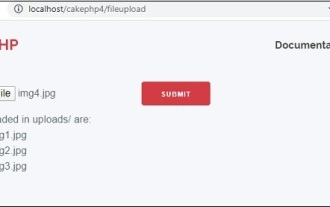 CakePHP File upload
Sep 10, 2024 pm 05:27 PM
CakePHP File upload
Sep 10, 2024 pm 05:27 PM
To work on file upload we are going to use the form helper. Here, is an example for file upload.
 How To Set Up Visual Studio Code (VS Code) for PHP Development
Dec 20, 2024 am 11:31 AM
How To Set Up Visual Studio Code (VS Code) for PHP Development
Dec 20, 2024 am 11:31 AM
Visual Studio Code, also known as VS Code, is a free source code editor — or integrated development environment (IDE) — available for all major operating systems. With a large collection of extensions for many programming languages, VS Code can be c
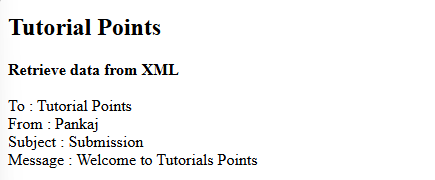 How do you parse and process HTML/XML in PHP?
Feb 07, 2025 am 11:57 AM
How do you parse and process HTML/XML in PHP?
Feb 07, 2025 am 11:57 AM
This tutorial demonstrates how to efficiently process XML documents using PHP. XML (eXtensible Markup Language) is a versatile text-based markup language designed for both human readability and machine parsing. It's commonly used for data storage an
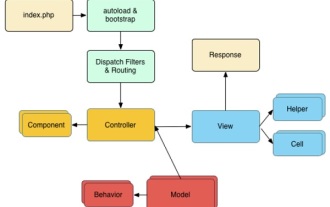 CakePHP Quick Guide
Sep 10, 2024 pm 05:27 PM
CakePHP Quick Guide
Sep 10, 2024 pm 05:27 PM
CakePHP is an open source MVC framework. It makes developing, deploying and maintaining applications much easier. CakePHP has a number of libraries to reduce the overload of most common tasks.
 PHP Program to Count Vowels in a String
Feb 07, 2025 pm 12:12 PM
PHP Program to Count Vowels in a String
Feb 07, 2025 pm 12:12 PM
A string is a sequence of characters, including letters, numbers, and symbols. This tutorial will learn how to calculate the number of vowels in a given string in PHP using different methods. The vowels in English are a, e, i, o, u, and they can be uppercase or lowercase. What is a vowel? Vowels are alphabetic characters that represent a specific pronunciation. There are five vowels in English, including uppercase and lowercase: a, e, i, o, u Example 1 Input: String = "Tutorialspoint" Output: 6 explain The vowels in the string "Tutorialspoint" are u, o, i, a, o, i. There are 6 yuan in total
 Explain JSON Web Tokens (JWT) and their use case in PHP APIs.
Apr 05, 2025 am 12:04 AM
Explain JSON Web Tokens (JWT) and their use case in PHP APIs.
Apr 05, 2025 am 12:04 AM
JWT is an open standard based on JSON, used to securely transmit information between parties, mainly for identity authentication and information exchange. 1. JWT consists of three parts: Header, Payload and Signature. 2. The working principle of JWT includes three steps: generating JWT, verifying JWT and parsing Payload. 3. When using JWT for authentication in PHP, JWT can be generated and verified, and user role and permission information can be included in advanced usage. 4. Common errors include signature verification failure, token expiration, and payload oversized. Debugging skills include using debugging tools and logging. 5. Performance optimization and best practices include using appropriate signature algorithms, setting validity periods reasonably,
