


 Web Front-end
Vue.js
How to solve the problem 'Error: 'xxx' is not a registered route.' when using vue-router in a Vue application?
Web Front-end
Vue.js
How to solve the problem 'Error: 'xxx' is not a registered route.' when using vue-router in a Vue application?
How to solve the problem 'Error: 'xxx' is not a registered route.' when using vue-router in a Vue application?

Vue.js is a lightweight JavaScript framework that provides a complete set of development tools for building interactive and efficient user interfaces. Vue Router is the official routing management plug-in of Vue.js, which can be used to build single-page applications (SPA) and implement client-side routing control. However, when using Vue Router, the error message "Error: xxx is not a registered route" sometimes appears. So how to solve it?
1. Check the routing configuration
When using Vue Router, you must first configure the routing. In the application's entry file, the Vue.use() method is generally used to install the Vue Router plug-in and define routing configuration items. For example:
import Vue from 'vue'
import VueRouter from 'vue-router'
import Home from './views/Home.vue'

Vue.use(VueRouter)

const routes = [
  {
    path: '/',
    name: 'home',
    component: Home
  }
]

const router = new VueRouter({
  mode: 'history',
  base: process.env.BASE_URL,
  routes
})

export default routerIf the error message "Error: xxx is not a registered route" appears, first check whether the route exists in the routing configuration item. For example, if the error message "Error: about is not a registered route" appears, you need to check whether the route named "about" is defined in the routing configuration item.
2. Check navigation links
In Vue applications, the
<router-link to="/about">关于我们</router-link>
If the error message "Error: xxx is not a registered route" appears when using a navigation link, you need to check whether the to attribute in the navigation link is correct and whether it is consistent with the one defined in the routing configuration item. Path matching.
3. Check route jump logic
In Vue Router, you can jump routes through programmatic navigation. For example: $router.push('/about'). If the error message "Error: xxx is not a registered route" appears when performing route jump, you need to check whether the jump path exists in the routing configuration item.
4. Check named routing
Vue Router supports named routing. You can set a name for the route in the routing configuration item for easy use when making route jumps. For example:
{
  path: '/about',
  name: 'about',
  component: About
}If the error message "Error: xxx is not a registered route" appears when using a named route to jump, you need to check whether the named route is correct and whether it matches the defined route name.
Summary
The error message "Error: xxx is not a registered route" is usually caused by incorrect routing configuration or incorrect jump path. When using Vue Router, you need to carefully check the routing configuration, navigation links, and routing jump logic to ensure that the routing is functioning properly.
The above is the detailed content of How to solve the problem 'Error: 'xxx' is not a registered route.' when using vue-router in a Vue application?. For more information, please follow other related articles on the PHP Chinese website!

Hot AI Tools

Undresser.AI Undress
AI-powered app for creating realistic nude photos

AI Clothes Remover
Online AI tool for removing clothes from photos.

Undress AI Tool
Undress images for free

Clothoff.io
AI clothes remover

AI Hentai Generator
Generate AI Hentai for free.

Hot Article
Hot Tools

Notepad++7.3.1
Easy-to-use and free code editor

SublimeText3 Chinese version
Chinese version, very easy to use

Zend Studio 13.0.1
Powerful PHP integrated development environment

Dreamweaver CS6
Visual web development tools

SublimeText3 Mac version
God-level code editing software (SublimeText3)
Hot Topics
 1378
1378
 52
52

 How to register multiple accounts on Xiaohongshu? Will I be discovered if I register multiple accounts?
Mar 25, 2024 am 09:41 AM
How to register multiple accounts on Xiaohongshu? Will I be discovered if I register multiple accounts?
Mar 25, 2024 am 09:41 AM
As a platform integrating social networking and e-commerce, Xiaohongshu has attracted more and more users to join. Some users hope to register multiple accounts to better experience interacting with Xiaohongshu. So, how to register multiple accounts on Xiaohongshu? 1. How to register multiple accounts on Xiaohongshu? 1. Use different mobile phone numbers to register. Currently, Xiaohongshu mainly uses mobile phone numbers to register accounts. Users sometimes try to purchase multiple mobile phone number cards and use them to register multiple Xiaohongshu accounts. However, this approach has some limitations, because purchasing multiple mobile phone number cards is cumbersome and costly. 2. Use email to register. In addition to your mobile phone number, your email can also be used to register a Xiaohongshu account. Users can prepare multiple email addresses and then use these email addresses to register accounts. but
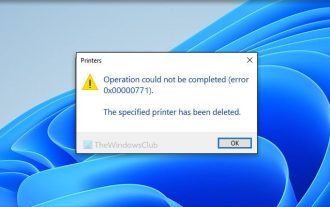 Unable to complete operation (Error 0x0000771) Printer error
Mar 16, 2024 pm 03:50 PM
Unable to complete operation (Error 0x0000771) Printer error
Mar 16, 2024 pm 03:50 PM
If you encounter an error message when using your printer, such as the operation could not be completed (error 0x00000771), it may be because the printer has been disconnected. In this case, you can solve the problem through the following methods. In this article, we will discuss how to fix this issue on Windows 11/10 PC. The entire error message says: The operation could not be completed (error 0x0000771). The specified printer has been deleted. Fix 0x00000771 Printer Error on Windows PC To fix Printer Error the operation could not be completed (Error 0x0000771), the specified printer has been deleted on Windows 11/10 PC, follow this solution: Restart Print Spool
 How to register a Manwa Comics account
Feb 28, 2024 am 08:00 AM
How to register a Manwa Comics account
Feb 28, 2024 am 08:00 AM
On the Manwa Comics platform, there are rich comic resources waiting for everyone to explore. As long as you easily enter the official platform of Manwa Comics, you can enjoy all kinds of wonderful comic works. Everyone can easily find their favorite comics to read according to their own preferences. So how to register the official account of Manwa Comics? The editor of this website will bring you this detailed tutorial guide, hoping to help everyone in need. Manwa Comics-Official entrance: https://fuw11.cc/mw666 Manwa Comics app download address: https://www.siemens-home.cn/soft/74440.html Manwa Comics non-mainland area entrance: https: /
 How to register a Xiaohongshu account? What is required to register a Xiaohongshu account?
Mar 22, 2024 am 10:16 AM
How to register a Xiaohongshu account? What is required to register a Xiaohongshu account?
Mar 22, 2024 am 10:16 AM
Xiaohongshu, a social platform integrating life, entertainment, shopping and sharing, has become an indispensable part of the daily life of many young people. So, how to register a Xiaohongshu account? 1. How to register a Xiaohongshu account? 1. Open the Xiaohongshu official website or download the Xiaohongshu APP. Click the "Register" button below and you can choose different registration methods. Currently, Xiaohongshu supports registration with mobile phone numbers, email addresses, and third-party accounts (such as WeChat, QQ, Weibo, etc.). 3. Fill in the relevant information. According to the selected registration method, fill in the corresponding mobile phone number, email address or third-party account information. 4. Set a password. Set a strong password to keep your account secure. 5. Complete the verification. Follow the prompts to complete mobile phone verification or email verification. 6. Perfect the individual
 Solution to Windows Update prompt Error 0x8024401c error
Jun 08, 2024 pm 12:18 PM
Solution to Windows Update prompt Error 0x8024401c error
Jun 08, 2024 pm 12:18 PM
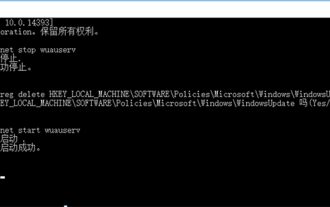
Table of Contents Solution 1 Solution 21. Delete the temporary files of Windows update 2. Repair damaged system files 3. View and modify registry entries 4. Turn off the network card IPv6 5. Run the WindowsUpdateTroubleshooter tool to repair 6. Turn off the firewall and other related anti-virus software. 7. Close the WidowsUpdate service. Solution 3 Solution 4 "0x8024401c" error occurs during Windows update on Huawei computers Symptom Problem Cause Solution Still not solved? Recently, the web server needs to be updated due to system vulnerabilities. After logging in to the server, the update prompts error code 0x8024401c. Solution 1
 How to register a Xiaohongshu account? How to recover if its account is abnormal?
Mar 21, 2024 pm 04:57 PM
How to register a Xiaohongshu account? How to recover if its account is abnormal?
Mar 21, 2024 pm 04:57 PM
As one of the most popular lifestyle sharing platforms in the world, Xiaohongshu has attracted a large number of users. So, how to register a Xiaohongshu account? This article will introduce you to the Xiaohongshu account registration process in detail, and answer the question of how to recover Xiaohongshu account abnormalities. 1. How to register a Xiaohongshu account? 1. Download the Xiaohongshu APP: Search and download the Xiaohongshu APP in the mobile app store, and open it after the installation is complete. 2. Register an account: After opening the Xiaohongshu APP, click the "Me" button in the lower right corner of the homepage, and then select "Register". 3. Fill in the registration information: Fill in the mobile phone number, set password, verification code and other registration information according to the prompts. 4. Complete personal information: After successful registration, follow the prompts to complete personal information, such as name, gender, birthday, etc. 5. Settings
 How to register a qooapp account
Mar 19, 2024 pm 08:58 PM
How to register a qooapp account
Mar 19, 2024 pm 08:58 PM
qooapp is a software that can download many games, so how to register an account? Users need to click the "Register" button if they don't have a pass yet, and then choose a registration method. This account registration method introduction is enough to tell you how to operate it. The following is a detailed introduction, so take a look. How to register a qooapp account? Answer: Click to register, and then choose a registration method. Specific methods: 1. After entering the login interface, click below. Don’t have a pass yet? Apply now. 2. Then choose the login method you need. 3. You can use it directly after that. Official website registration: 1. Open the website https://apps.ppaooq.com/ and click on the upper right corner to register. 2. Select registration
 Interpreting Oracle error 3114: causes and solutions
Mar 08, 2024 pm 03:42 PM
Interpreting Oracle error 3114: causes and solutions
Mar 08, 2024 pm 03:42 PM
Title: Analysis of Oracle Error 3114: Causes and Solutions When using Oracle database, you often encounter various error codes, among which error 3114 is a relatively common one. This error generally involves database link problems, which may cause exceptions when accessing the database. This article will interpret Oracle error 3114, discuss its causes, and give specific methods to solve the error and related code examples. 1. Definition of error 3114 Oracle error 3114 pass
