


What format is jpg?

JPG is a JPEG format file. JPEG format is the most commonly used image file format, with the suffix ".jpg" or ".jpeg". JPG format standards are divided into three types: JPEG, progressive JPEG, and JPEG2000. It is a standard generally used for continuous-tone static image compression. It is lossy compression, which compresses data images in a small storage space while causing loss of image data. Damage, if the user has higher requirements for image quality, it is recommended to abandon this image file format, especially for some high-definition pictures.
# Operating system for this tutorial: Windows 10 system, Dell G3 computer.
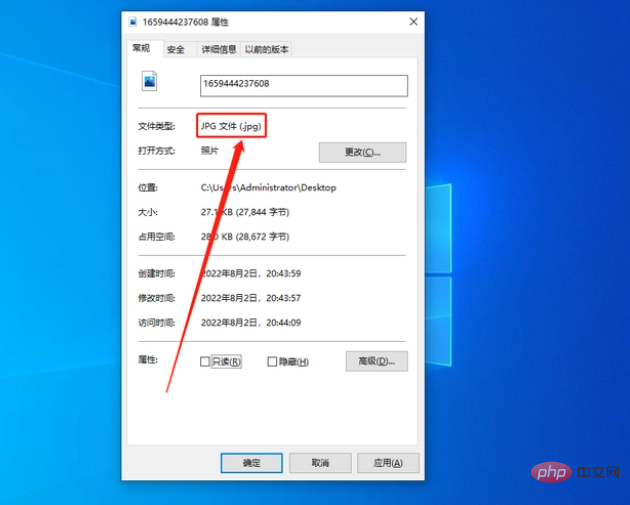
JPG generally refers to JPEG (Joint Photographic Experts Group), which is an image file format, and the extension is generally .jpg/.jpeg. Common image file formats include PNG, BMP, GIF, TIF, EPS, SVG, etc.
The format standards of JPG are divided into three types: JPEG, progressive JPEG, and JPEG2000. A standard commonly used for continuous-tone static image compression is lossy compression, which compresses data images into a small storage space while causing damage to the image data. If the user has higher requirements for image quality, it is recommended to abandon this image file format, especially for some high-definition pictures.
The advantages and disadvantages of JPG are briefly listed below:
Advantages
1. High compression rate and fast download speed ;
2. Small file size and fast transmission speed;
3. Strong format versatility and good device compatibility.
Disadvantages
1. Lossy compression reduces image quality;
2. JPG photos have been processed, making post-processing difficult;
3. Not all web pages support inserting photos in JPG format.

Supplement
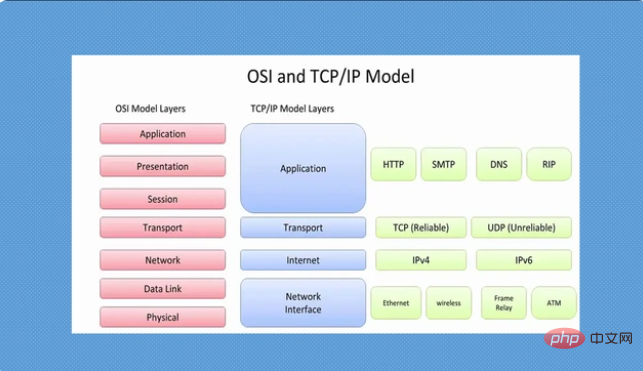
According to the Open System Interconnect Reference Model (Open System Interconnect, OSI) jointly developed by the International Organization for Standardization (ISO) and CCITT, it can be seen from It is divided into 7 layers from bottom to top: physical layer, data link layer, network layer, transport layer, session layer, presentation layer and application layer. JPG is located in the presentation layer, which acts as the "translator" between applications and the network. In the presentation layer, data is formatted in a way that the network can understand, data conversion, text compression, decryption and encryption, etc. Common protocols at this layer include: JPEG, ASCII, GIF, DES, MPEG, etc.
The above is the detailed content of What format is jpg?. For more information, please follow other related articles on the PHP Chinese website!

Hot AI Tools

Undresser.AI Undress
AI-powered app for creating realistic nude photos

AI Clothes Remover
Online AI tool for removing clothes from photos.

Undress AI Tool
Undress images for free

Clothoff.io
AI clothes remover

AI Hentai Generator
Generate AI Hentai for free.

Hot Article
Hot Tools

Notepad++7.3.1
Easy-to-use and free code editor

SublimeText3 Chinese version
Chinese version, very easy to use

Zend Studio 13.0.1
Powerful PHP integrated development environment

Dreamweaver CS6
Visual web development tools

SublimeText3 Mac version
God-level code editing software (SublimeText3)
Hot Topics
 1378
1378
 52
52

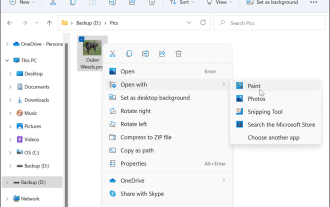 How to convert PNG to JPG on Windows 11
May 12, 2023 pm 03:55 PM
How to convert PNG to JPG on Windows 11
May 12, 2023 pm 03:55 PM
How to Convert PNG to JPG on Windows 11 On Windows 10 and 11, you can use Microsoft's built-in Paint app to quickly convert image files. To convert a PNG image to JPG on Windows 11, use the following steps: Open File Explorer and navigate to the PNG image you want to convert. Right-click the image and select Open With > Draw from the menu. Your photo or image opens in the Paint app. Note the file size at the bottom of the screen. To convert a file from PNG to JPG, click File and select Save As > JPEG Image from the menu. When the file resource
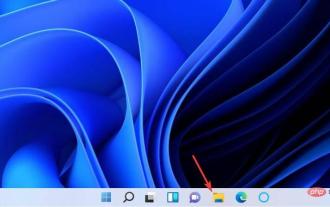 Fix: Can't open JPG files in Windows 11
Apr 17, 2023 pm 12:37 PM
Fix: Can't open JPG files in Windows 11
Apr 17, 2023 pm 12:37 PM
JPG is one of the most popular image file formats along with PNG. This is a lossy compressed image format ideal for websites. Therefore, many users save or convert images to JPG format. However, some users have stated that they are having issues opening JPG files in Windows 11 using the platform’s default Photos app. Therefore, these users cannot open, view and edit JPG format images in Windows 11. This is what one user said in a Microsoft forum post: When double-clicking a JPG file to open in Microsoft Photo, I receive the error The specified program cannot be found. This was purchased new about a month ago
 Let's talk about how to use php to easily convert WebP to JPG.
Mar 24, 2023 pm 02:57 PM
Let's talk about how to use php to easily convert WebP to JPG.
Mar 24, 2023 pm 02:57 PM
In recent years, with the continuous development of Web technology, WebP, a new image format, has gradually entered the field of vision of programmers and Web developers. The advantages of WebP cannot be ignored: small file size, high quality, high browser support, etc. But in some cases, we may need to convert WebP images into some other formats, such as JPG. So, how to use PHP to convert WebP to JPG?
 What format is jpg?
Jun 21, 2023 am 11:36 AM
What format is jpg?
Jun 21, 2023 am 11:36 AM
JPG is a JPEG format file. The JPEG format is the most commonly used image file format, with the suffix ".jpg" or ".jpeg". JPG format standards are divided into three types: JPEG, progressive JPEG, and JPEG2000. It is a standard generally used for continuous-tone static image compression. It is lossy compression, which compresses data images in a small storage space while causing loss of image data. Damage, if the user has higher requirements for image quality, it is recommended to abandon this image file format, especially for some high-definition pictures.
 What does jpg mean?
Nov 28, 2022 am 09:46 AM
What does jpg mean?
Nov 28, 2022 am 09:46 AM
JPG generally refers to the JPEG format, which is an image format saved using a lossy compression method. It is a standard for continuous tone static image compression. Its file suffix is ".jpg" or ".jpeg". JPG files mainly use a joint coding method of predictive coding (DPCM), discrete cosine transform (DCT) and entropy coding to remove redundant images and color data; it can compress images in a small storage space, but to a certain extent will cause damage to the image data.
 How to convert svg to jpg format
Nov 24, 2023 am 09:50 AM
How to convert svg to jpg format
Nov 24, 2023 am 09:50 AM
svg can be converted to jpg format by using image processing software, using online conversion tools, and using the Python image processing library. Detailed introduction: 1. Image processing software includes Adobe Illustrator, Inkscape and GIMP; 2. Online conversion tools include CloudConvert, Zamzar, Online Convert, etc.; 3. Python image processing library, etc.
 How to convert PSD files to JPG format
Feb 23, 2024 pm 09:15 PM
How to convert PSD files to JPG format
Feb 23, 2024 pm 09:15 PM
How to Convert PSD Files to JPG The PSD file is the native file format of Adobe Photoshop software. It is usually used to store multiple layers of images, text, vector shapes and other editing features. In contrast, JPG is a common image file format commonly used for sharing and displaying images on the web. If you have a PSD file and want to convert it to JPG format for easier use, then you can follow the steps below to convert it. Method 1: Use Adobe Photoshop software
 How to rename the extension of all files within a folder, including subfolders
Apr 14, 2023 pm 12:22 PM
How to rename the extension of all files within a folder, including subfolders
Apr 14, 2023 pm 12:22 PM
Suppose you need to rename the extension of a file from one extension to another, say jpg to png. It's easy, of course! But what if you have multiple files whose extensions need to be changed? Or worse, what if these multiple files are also located in multiple folders and subfolders, within a single folder? Well, for a normal person, this can be a nightmare. But for a geek, absolutely not. The question now is, are you a geek? Well, with the help of Geek Page, you definitely are! In this article, we explain how to easily rename the extension of all files within a folder, including subfolders of your choice, from one extension to another through a batch script method. Notice: