


 Web Front-end
Vue.js
How to solve the problem that after the vue3 project is packaged and published to the server, the access page displays blank
Web Front-end
Vue.js
How to solve the problem that after the vue3 project is packaged and published to the server, the access page displays blank
How to solve the problem that after the vue3 project is packaged and published to the server, the access page displays blank

After the vue3 project is packaged and published to the server, the access page displays blank
1. Process the publicPath in the vue.config.js file
The processing is as follows:
const { defineConfig } = require('@vue/cli-service')
module.exports = defineConfig({
    publicPath: process.env.NODE_ENV === 'production' ? './' : '/',
    outputDir: 'dist',
    indexPath: 'index.html',
    lintOnSave: false,
    transpileDependencies: true,
})2. Process the index.js file in the router folder
The processing is as follows: Use the modified part
import { createRouter, createWebHistory, createWebHashHistory  } from 'vue-router';
import routes from "./routes";

const router = createRouter({
    //history: createWebHistory(process.env.BASE_URL),//默认时
    history: createWebHashHistory(process.env.BASE_URL),//修改后
    routes
})
export default router;to solve the above two steps. Solve the problem that the access page displays a blank page after the vue3 project is packaged and released to the server
The problem of a blank page being displayed when packaging the project and some solution ideas
We will package it after the project development is completed
npm run build
The files generated by packaging will be in the dist folder
But sometimes a blank page will appear when opening index.html
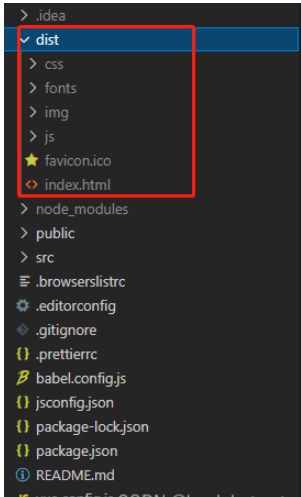
Next we start from Analyze from several aspects:
1. The overall resource path when packaging
According to the actual situation, it is necessary to judge whether it is / or ./

Configure in vue-ui:

module.exports = {
//基本路径 文件打包后放的位置
publicPath:‘./',

//默认输出文件夹为dist,填入的名字为打包后的文件名
outputDir:‘name',

// 放置生成的静态资源 (js、css、img、fonts) 的 (相对于 outputDir 的) 目录。资源放的目录
assetsDir: “./static”,

// 指定生成的 index.html 的输出路径 (相对于 outputDir)。也可以是一个绝对路径 index的路劲和名字
indexPath: ‘./index.html',

//打包后是否生成map文件,map文件能看到错误代码位置,设置为false不生成map文件,打包体积缩小
productionSourceMap: false,
}const router = new VueRouter({
routes,
mode:'hash',
})We can simply deploy the local server and let dist run
Create the folder
- Initialize npm in the folder terminal npm init -y
- Install express npm i express -S
- Copy dist to a new folder
- Create app.js and write code
Enable gzip to reduce the file size and make the transfer faster
- Installation corresponding Package npm install compression -p
- Import package const compression = require('compression')
- Enable middleware app.use(compression( ))
Use PM2 management application
- Install npm i pm2 -g
- Start the project: pm2 start .\app.js --Custom name
- View running project pm2 ls
- Restart project pm2 restart custom name (ID)
- Stop project pm2 stop custom name (ID)
- Delete project pm2 delete custom name (ID )

const express = require('express')
const app = express()

const compression = require('compression')

app.use(compression()) // 一定要把这一行写在 静态资源托管之前
app.use(express.static('./dist'))

app.listen(80,()=> {
  console.log('server running at http://127.0.0.1')
})4. Some optimizations can be made before executing the build Set local services and built entry files in vue.confjg.js respectively
module.exports = {
  chainWebpack:config=>{
    //发布模式
    config.when(process.env.NODE_ENV === 'production',config=>{
      //entry找到默认的打包入口,调用clear则是删除默认的打包入口
      //add添加新的打包入口
      config.entry('app').clear().add('./src/main-prod.js')

      //使用externals设置排除项
      config.set('externals',{
        vue:'Vue',
        axios:'axios',
        lodash:'_',
        echarts:'echarts',
        nprogress:'NProgress',
      })

// 在项目的根目录创建一个vue.config.vue文件,添加上 chainWebpack,修改args里的参数配置,重新返回就可以  这里是 判断是开发版本 还是 发布版本
      config.plugin('html').tap(args => {
        args[0].isProd = true
        return args
      })

    })
    //开发模式
    config.when(process.env.NODE_ENV === 'development',config=>{
      config.entry('app').clear().add('./src/main-dev.js')

      config.plugin('html').tap(args => {
        args[0].isProd = false
        return args
      })
    })

  }
}main-dev.js
The main entrance to the development versionmain-prod.js
The main entrance to the release version is here to improve and delete unnecessary dependencies based on the development version. Item is changed to use cdn introduction, configuration routing lazy loading plug-in...
The above is the detailed content of How to solve the problem that after the vue3 project is packaged and published to the server, the access page displays blank. For more information, please follow other related articles on the PHP Chinese website!

Hot AI Tools

Undresser.AI Undress
AI-powered app for creating realistic nude photos

AI Clothes Remover
Online AI tool for removing clothes from photos.

Undress AI Tool
Undress images for free

Clothoff.io
AI clothes remover

Video Face Swap
Swap faces in any video effortlessly with our completely free AI face swap tool!

Hot Article
Hot Tools

Notepad++7.3.1
Easy-to-use and free code editor

SublimeText3 Chinese version
Chinese version, very easy to use

Zend Studio 13.0.1
Powerful PHP integrated development environment

Dreamweaver CS6
Visual web development tools

SublimeText3 Mac version
God-level code editing software (SublimeText3)
Hot Topics
 1386
1386
 52
52

 How to solve the problem that eMule search cannot connect to the server
Jan 25, 2024 pm 02:45 PM
How to solve the problem that eMule search cannot connect to the server
Jan 25, 2024 pm 02:45 PM
Solution: 1. Check the eMule settings to make sure you have entered the correct server address and port number; 2. Check the network connection, make sure the computer is connected to the Internet, and reset the router; 3. Check whether the server is online. If your settings are If there is no problem with the network connection, you need to check whether the server is online; 4. Update the eMule version, visit the eMule official website, and download the latest version of the eMule software; 5. Seek help.
 Solution to the inability to connect to the RPC server and the inability to enter the desktop
Feb 18, 2024 am 10:34 AM
Solution to the inability to connect to the RPC server and the inability to enter the desktop
Feb 18, 2024 am 10:34 AM
What should I do if the RPC server is unavailable and cannot be accessed on the desktop? In recent years, computers and the Internet have penetrated into every corner of our lives. As a technology for centralized computing and resource sharing, Remote Procedure Call (RPC) plays a vital role in network communication. However, sometimes we may encounter a situation where the RPC server is unavailable, resulting in the inability to enter the desktop. This article will describe some of the possible causes of this problem and provide solutions. First, we need to understand why the RPC server is unavailable. RPC server is a
 Detailed explanation of CentOS installation fuse and CentOS installation server
Feb 13, 2024 pm 08:40 PM
Detailed explanation of CentOS installation fuse and CentOS installation server
Feb 13, 2024 pm 08:40 PM
As a LINUX user, we often need to install various software and servers on CentOS. This article will introduce in detail how to install fuse and set up a server on CentOS to help you complete the related operations smoothly. CentOS installation fuseFuse is a user space file system framework that allows unprivileged users to access and operate the file system through a customized file system. Installing fuse on CentOS is very simple, just follow the following steps: 1. Open the terminal and Log in as root user. 2. Use the following command to install the fuse package: ```yuminstallfuse3. Confirm the prompts during the installation process and enter `y` to continue. 4. Installation completed
 How to configure Dnsmasq as a DHCP relay server
Mar 21, 2024 am 08:50 AM
How to configure Dnsmasq as a DHCP relay server
Mar 21, 2024 am 08:50 AM
The role of a DHCP relay is to forward received DHCP packets to another DHCP server on the network, even if the two servers are on different subnets. By using a DHCP relay, you can deploy a centralized DHCP server in the network center and use it to dynamically assign IP addresses to all network subnets/VLANs. Dnsmasq is a commonly used DNS and DHCP protocol server that can be configured as a DHCP relay server to help manage dynamic host configurations in the network. In this article, we will show you how to configure dnsmasq as a DHCP relay server. Content Topics: Network Topology Configuring Static IP Addresses on a DHCP Relay D on a Centralized DHCP Server
 Best Practice Guide for Building IP Proxy Servers with PHP
Mar 11, 2024 am 08:36 AM
Best Practice Guide for Building IP Proxy Servers with PHP
Mar 11, 2024 am 08:36 AM
In network data transmission, IP proxy servers play an important role, helping users hide their real IP addresses, protect privacy, and improve access speeds. In this article, we will introduce the best practice guide on how to build an IP proxy server with PHP and provide specific code examples. What is an IP proxy server? An IP proxy server is an intermediate server located between the user and the target server. It acts as a transfer station between the user and the target server, forwarding the user's requests and responses. By using an IP proxy server
 How to check server status
Oct 09, 2023 am 10:10 AM
How to check server status
Oct 09, 2023 am 10:10 AM
Methods to view server status include command line tools, graphical interface tools, monitoring tools, log files, and remote management tools. Detailed introduction: 1. Use command line tools. On Linux or Unix servers, you can use command line tools to view the status of the server; 2. Use graphical interface tools. For server operating systems with graphical interfaces, you can use the graphics provided by the system. Use interface tools to view server status; 3. Use monitoring tools. You can use special monitoring tools to monitor server status in real time, etc.
 How to enable TFTP server
Oct 18, 2023 am 10:18 AM
How to enable TFTP server
Oct 18, 2023 am 10:18 AM
The steps to start the TFTP server include selecting the TFTP server software, downloading and installing the software, configuring the TFTP server, and starting and testing the server. Detailed introduction: 1. When choosing TFTP server software, you first need to choose the TFTP server software that suits your needs. Currently, there are many TFTP server software to choose from, such as Tftpd32, PumpKIN, tftp-hpa, etc., which all provide simple and easy-to-use functions. interface and configuration options; 2. Download and install TFTP server software, etc.
 What should I do if I can't enter the game when the epic server is offline? Solution to why Epic cannot enter the game offline
Mar 13, 2024 pm 04:40 PM
What should I do if I can't enter the game when the epic server is offline? Solution to why Epic cannot enter the game offline
Mar 13, 2024 pm 04:40 PM
What should I do if I can’t enter the game when the epic server is offline? This problem must have been encountered by many friends. When this prompt appears, the genuine game cannot be started. This problem is usually caused by interference from the network and security software. So how should it be solved? The editor of this issue will explain I would like to share the solution with you, I hope today’s software tutorial can help you solve the problem. What to do if the epic server cannot enter the game when it is offline: 1. It may be interfered by security software. Close the game platform and security software and then restart. 2. The second is that the network fluctuates too much. Try restarting the router to see if it works. If the conditions are OK, you can try to use the 5g mobile network to operate. 3. Then there may be more
