


How to implement nginx multi-domain forwarding

Basic concepts
DNS
DNS is the abbreviation of Domain Name System, which is the domain name system. DNS is a service on the Internet, generally called domain name service or domain name resolution service. It mainly provides services for converting website domain names and IP addresses.
Correspondence between domain names and IP
There is a one-to-one correspondence between domain names and IP addresses, but multiple domain names can correspond to the same IP address. Just like the relationship between a person's name and their ID number, it is obviously much easier to remember a person's name than their ID number. An IP address is a numerical address that identifies a user's site on the Internet. To make it easier to remember, domain names are used instead of IP addresses to represent site addresses. DNS resolves domain names into IP addresses so that they correspond one to one.
How DNS works
On the Internet, a domain name must be provided by two domain name servers to provide "authoritative" domain name resolution. If it is an international domain name, the domain name registration authority is Interinc. If it is a domestic domain name, the domain name registration authority is CNNIC. All domain names must be registered with two registration agencies in order to be used properly.
For example, if you want to visit a website now, such as www.baidu.com, your computer needs to know the IP address of this site before it can access it. So it will automatically send a query to the "master DNS" server in your area, that is, what is the IP of "www.baidu.com"? If there is no record of the domain name on the server, it will go to the upper level DNS to search and repeat until it is found. If it is still not found at the last level. At this time, it will search on the authoritative DNS, and then return the corresponding IP information to your computer. Your computer can communicate with the server corresponding to www.baidu.com. Such level-by-level queries are called "recursive" queries.
hosts file
The hosts file is a local system file without a suffix and requires administrator rights to modify its content. As can be seen from the above DNS resolution process, each DNS resolution may be forwarded by many DNS servers before the real IP address is finally obtained, which is very inefficient. So there is also a DNS resolution file locally on the computer, that is, the hosts file. When you point www.baidu.com in hosts to the correct Baidu server address, the computer will interact with the correct server. If the local hosts do not have a mapping relationship configured, then it will go to the DNS server on the LAN to find the corresponding mapping relationship. If it still doesn't exist, it will look for it in the DNS of the local corresponding node and repeat the steps mentioned above.
nginx reverse proxy
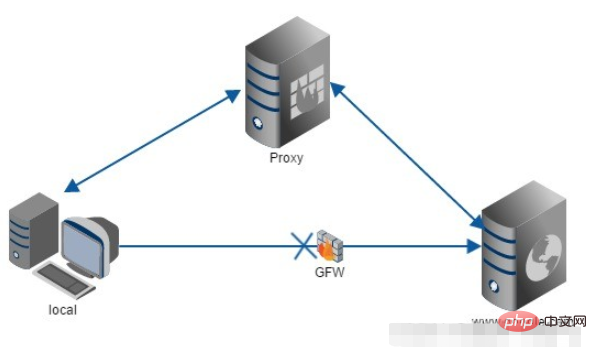
Proxy: In fact, it is an intermediary. A and B could have been directly connected, but C was added between A and B. Forward proxy
is the dns above. It acts as a proxy for the client, sends and receives requests for the client, and is transparent to the server. When I use a browser to access http://www.google.com, it is brutally blocked. So you can set up a proxy server abroad and ask the proxy to help me request google.com. The proxy will return the corresponding structure returned by the request. Give me.
Reverse proxy
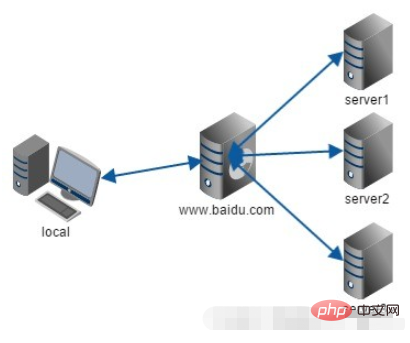
is a function of nginx. It acts as a proxy for the server. It forwards requests for the server and is transparent to the client. When we request www.baidu.com, it's like dialing 10086. There may be thousands of servers serving us behind the scenes, but you don't know which one it is, and you don't need to know. You just need to know. It just matters who the reverse proxy server is. www.baidu.com is our reverse proxy server. The reverse proxy server will help us forward the request to the real server. Nginx is a reverse proxy server with very good performance, used for load balancing.
nginx adds hosts to do multiple domain name mapping
For example, the domain names of your two applications are a.test.com and b .test.com.
Find the hosts file in the C:WindowsSystem32driversetc directory and open it with super administrator privileges. Add
a.test.com 127.0.0.1
b.test.com 127.0.0.1
at the end of the file and modify the nginx.conf file (since nginx.conf has many configurations, here is just the simplest example) and add server inside {} of http. Add the following content:
server {
  listen 80;
  server_name a.test.com;   //填入自己项目对应的域名
  charset utf-8;
  error_log logs/error.log;
  location / {
    proxy_set_header X-Real-IP $remote_addr;
    proxy_set_header X-Forwarded-For $proxy_add_x_forwarded_for;
    proxy_set_header Host $http_host;
    proxy_set_header X-NginX-Proxy true;
    proxy_pass http://127.0.0.1:8888; //填入自己项目的ip加端口号(此处的项目没有工程上下文,只有端口号)
  }
}

server {
  listen 80;
  server_name b.test.com;   //填入自己项目对应的域名
  charset utf-8;
  error_log logs/error.log;
  location / {
    proxy_set_header X-Real-IP $remote_addr;
    proxy_set_header X-Forwarded-For $proxy_add_x_forwarded_for;
    proxy_set_header Host $http_host;
    proxy_set_header X-NginX-Proxy true;
    proxy_pass http://127.0.0.1:8889; //填入自己项目的ip加端口号(此处的项目没有工程上下文,只有端口号)
  }
}
After modification, reload the nginx configuration file
nginx.exe -s reload
The above is the detailed content of How to implement nginx multi-domain forwarding. For more information, please follow other related articles on the PHP Chinese website!

Hot AI Tools

Undress AI Tool
Undress images for free

Undresser.AI Undress
AI-powered app for creating realistic nude photos

AI Clothes Remover
Online AI tool for removing clothes from photos.

Clothoff.io
AI clothes remover

Video Face Swap
Swap faces in any video effortlessly with our completely free AI face swap tool!

Hot Article
Hot Tools

Notepad++7.3.1
Easy-to-use and free code editor

SublimeText3 Chinese version
Chinese version, very easy to use

Zend Studio 13.0.1
Powerful PHP integrated development environment

Dreamweaver CS6
Visual web development tools

SublimeText3 Mac version
God-level code editing software (SublimeText3)


 How to execute php code after writing php code? Several common ways to execute php code
May 23, 2025 pm 08:33 PM
How to execute php code after writing php code? Several common ways to execute php code
May 23, 2025 pm 08:33 PM
PHP code can be executed in many ways: 1. Use the command line to directly enter the "php file name" to execute the script; 2. Put the file into the document root directory and access it through the browser through the web server; 3. Run it in the IDE and use the built-in debugging tool; 4. Use the online PHP sandbox or code execution platform for testing.
 After installing Nginx, the configuration file path and initial settings
May 16, 2025 pm 10:54 PM
After installing Nginx, the configuration file path and initial settings
May 16, 2025 pm 10:54 PM
Understanding Nginx's configuration file path and initial settings is very important because it is the first step in optimizing and managing a web server. 1) The configuration file path is usually /etc/nginx/nginx.conf. The syntax can be found and tested using the nginx-t command. 2) The initial settings include global settings (such as user, worker_processes) and HTTP settings (such as include, log_format). These settings allow customization and extension according to requirements. Incorrect configuration may lead to performance issues and security vulnerabilities.
 How to limit user resources in Linux? How to configure ulimit?
May 29, 2025 pm 11:09 PM
How to limit user resources in Linux? How to configure ulimit?
May 29, 2025 pm 11:09 PM
Linux system restricts user resources through the ulimit command to prevent excessive use of resources. 1.ulimit is a built-in shell command that can limit the number of file descriptors (-n), memory size (-v), thread count (-u), etc., which are divided into soft limit (current effective value) and hard limit (maximum upper limit). 2. Use the ulimit command directly for temporary modification, such as ulimit-n2048, but it is only valid for the current session. 3. For permanent effect, you need to modify /etc/security/limits.conf and PAM configuration files, and add sessionrequiredpam_limits.so. 4. The systemd service needs to set Lim in the unit file
 Specific steps to configure the self-start of Nginx service
May 16, 2025 pm 10:39 PM
Specific steps to configure the self-start of Nginx service
May 16, 2025 pm 10:39 PM
The steps for starting Nginx configuration are as follows: 1. Create a systemd service file: sudonano/etc/systemd/system/nginx.service, and add relevant configurations. 2. Reload the systemd configuration: sudosystemctldaemon-reload. 3. Enable Nginx to boot up automatically: sudosystemctlenablenginx. Through these steps, Nginx will automatically run when the system is started, ensuring the reliability and user experience of the website or application.
 What are the Debian Nginx configuration skills?
May 29, 2025 pm 11:06 PM
What are the Debian Nginx configuration skills?
May 29, 2025 pm 11:06 PM
When configuring Nginx on Debian system, the following are some practical tips: The basic structure of the configuration file global settings: Define behavioral parameters that affect the entire Nginx service, such as the number of worker threads and the permissions of running users. Event handling part: Deciding how Nginx deals with network connections is a key configuration for improving performance. HTTP service part: contains a large number of settings related to HTTP service, and can embed multiple servers and location blocks. Core configuration options worker_connections: Define the maximum number of connections that each worker thread can handle, usually set to 1024. multi_accept: Activate the multi-connection reception mode and enhance the ability of concurrent processing. s
 Configure PhpStorm and Docker containerized development environment
May 20, 2025 pm 07:54 PM
Configure PhpStorm and Docker containerized development environment
May 20, 2025 pm 07:54 PM
Through Docker containerization technology, PHP developers can use PhpStorm to improve development efficiency and environmental consistency. The specific steps include: 1. Create a Dockerfile to define the PHP environment; 2. Configure the Docker connection in PhpStorm; 3. Create a DockerCompose file to define the service; 4. Configure the remote PHP interpreter. The advantages are strong environmental consistency, and the disadvantages include long startup time and complex debugging.
 What are the SEO optimization techniques for Debian Apache2?
May 28, 2025 pm 05:03 PM
What are the SEO optimization techniques for Debian Apache2?
May 28, 2025 pm 05:03 PM
DebianApache2's SEO optimization skills cover multiple levels. Here are some key methods: Keyword research: Use tools (such as keyword magic tools) to mine the core and auxiliary keywords of the page. High-quality content creation: produce valuable and original content, and the content needs to be conducted in-depth research to ensure smooth language and clear format. Content layout and structure optimization: Use titles and subtitles to guide reading. Write concise and clear paragraphs and sentences. Use the list to display key information. Combining multimedia such as pictures and videos to enhance expression. The blank design improves the readability of text. Technical level SEO improvement: robots.txt file: Specifies the access rights of search engine crawlers. Accelerate web page loading: optimized with the help of caching mechanism and Apache configuration
 How to implement automated deployment of Docker on Debian
May 28, 2025 pm 04:33 PM
How to implement automated deployment of Docker on Debian
May 28, 2025 pm 04:33 PM
Implementing Docker's automated deployment on Debian system can be done in a variety of ways. Here are the detailed steps guide: 1. Install Docker First, make sure your Debian system remains up to date: sudoaptupdatesudoaptupgrade-y Next, install the necessary software packages to support APT access to the repository via HTTPS: sudoaptinstallapt-transport-httpsca-certificatecurlsoftware-properties-common-y Import the official GPG key of Docker: curl-
